
Introduction
In modern software development and enterprise architecture, documentation often becomes the first casualty of speed. Teams model complex systems in specialized tools, only to export static screenshots that are manually uploaded to wikis like Confluence or Notion. As designs evolve through sprints, these images quickly become obsolete, leading to “documentation drift”—a state where written records no longer reflect reality. This disconnect forces engineers and product managers to waste time hunting for the latest files or rebuilding pages from scratch.
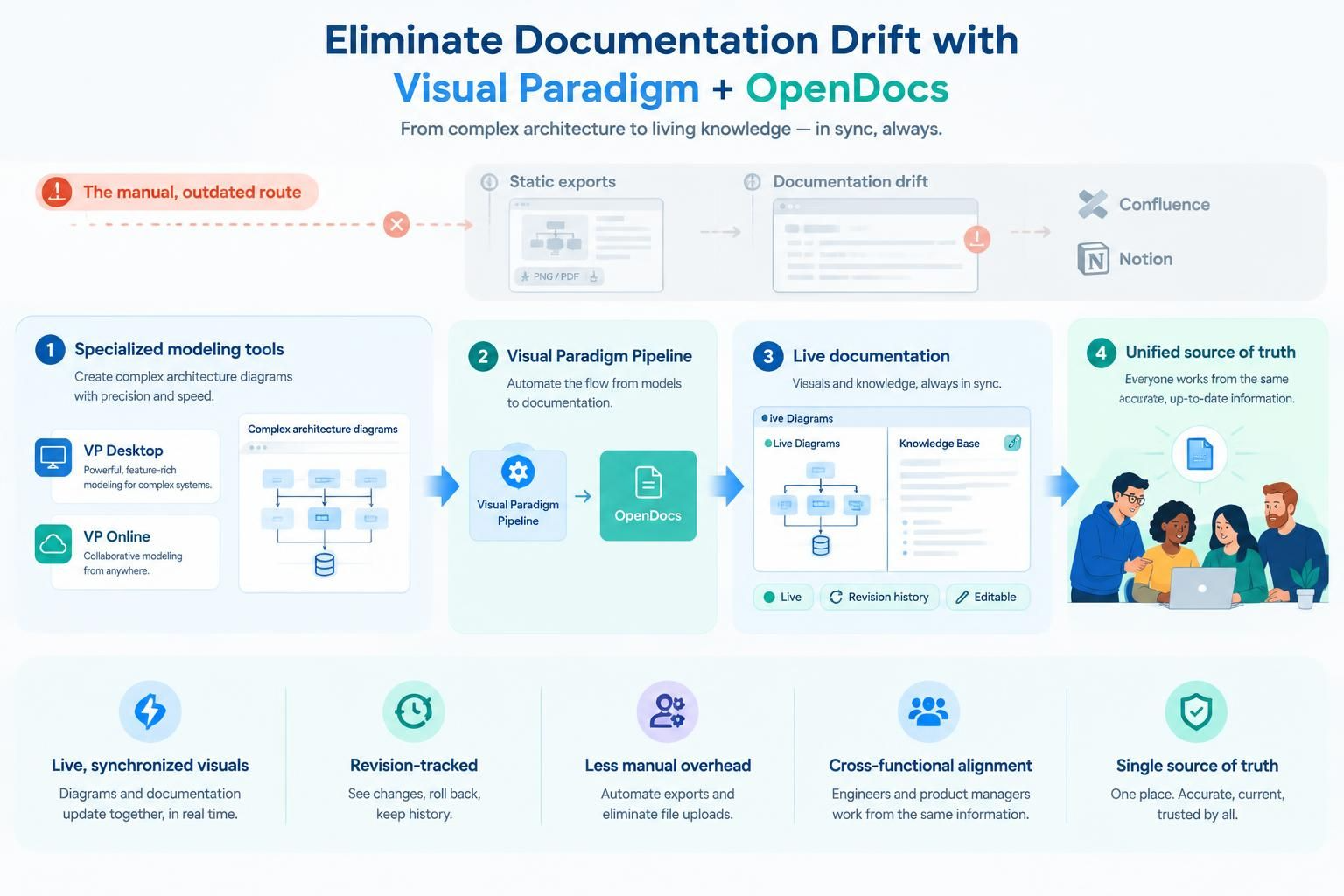
The combination of Visual Paradigm (VP) and OpenDocs offers a transformative solution to this problem. By integrating the robust modeling capabilities of the Visual Paradigm ecosystem with the AI-powered knowledge management of OpenDocs, teams can create living, synchronized documentation. Instead of managing disconnected files, organizations can stream live, revision-tracked visuals directly into their knowledge base. This guide explores how to leverage this pipeline to eliminate manual overhead, align cross-functional teams, and maintain a single source of truth for all project artifacts.
The Core Concept: The Visual Paradigm Pipeline
At the heart of this integration is the Visual Paradigm Pipeline, a cloud-based asset and revision bridge. Rather than treating diagrams as static images, the Pipeline treats them as dynamic assets linked to their source models. When a diagram is sent to the Pipeline, it retains its connection to the original tool—whether that is VP Desktop, VP Online, or VPasCode.
OpenDocs acts as the presentation layer for these assets. It is “diagram-aware,” meaning it can embed visuals that stay linked to their source. When an architect updates a system design in VP Desktop, they commit the change to the Pipeline. OpenDocs detects the new revision and allows users to swap in the updated visual with a single click, preserving the surrounding context and text. This workflow ensures that documentation evolves in lockstep with the actual product or architecture.
High-Value Ecosystem Workflows
1. Living Software Architecture & C4/UML Specs
Software architects often struggle to keep high-level architecture diagrams aligned with low-level implementation details. Using VP Desktop, architects can model complex system components, sequence flows, or database ERDs using standard notations like UML, SysML, or C4. These models are pushed to the Pipeline and embedded in OpenDocs technical specs.
As the architecture evolves across sprints, architects simply commit updates in Desktop. In OpenDocs, the documentation team sees a flag indicating a newer revision is available. They can swap in the new diagram without rebuilding the page, ensuring that stakeholders always view the current state of the system. This is particularly valuable for maintaining accurate API specifications and runbooks alongside visual representations.
2. Rapid AI-to-Knowledge-Base Ideation
The integration of AI accelerates the initial stages of documentation. Product managers or business analysts can use the AI Visual Modeling Chatbot to generate initial use case diagrams, flowcharts, or C4 context diagrams from plain-English prompts. For example, a prompt like “Create a C4 context diagram for a payment processing system” can yield a foundational visual in seconds.
Once refined, these visuals are sent directly to the Pipeline. Inside OpenDocs, AI writing tools can then draft surrounding requirements, user stories, and acceptance criteria based on the diagram’s content. This end-to-end AI acceleration reduces the friction between ideation and formal documentation, allowing teams to capture insights before they fade.
3. Diagram-as-Code (DaC) Engineering Wikis
Developers who prefer text-based workflows can leverage VPasCode to write PlantUML or Mermaid syntax. This approach keeps engineering diagrams version-controlled in code repositories while still making them accessible to non-technical stakeholders. Diagrams generated from code are pushed to the Pipeline and embedded in OpenDocs pages alongside API specs.
This hybrid approach satisfies both camps: developers enjoy the speed and precision of text-based modeling, while product managers and clients view clean, rendered diagrams in a browser-based workspace. It eliminates the need for developers to switch contexts to use heavy GUI tools for simple structural diagrams.
4. Cross-Functional Business Process & SOP Hubs
Business analysts can map operational workflows in VP Online or VP Desktop using BPMN, while operations teams write Standard Operating Procedures (SOPs) in OpenDocs. The Pipeline bridges these two worlds, allowing stakeholders to view the latest process maps and step-by-step instructions in one unified interface.
This is crucial for compliance and training. When a business process changes, the analyst updates the BPMN model and sends it to the Pipeline. The operations team then updates the corresponding SOP text in OpenDocs and swaps in the new diagram. The result is a centralized hub where process logic and procedural text are always synchronized.
5. Interactive Client & Stakeholder Portals
Consultants and product teams can combine technical architecture notes in OpenDocs with interactive publications such as Flipbooks and Bookshelves. These assets, which might include converted PDF proposals, manuals, or catalogs, are routed through the Pipeline into OpenDocs pages.
Teams can share secure, read-only links with external clients for project reviews and sign-offs. Because the content is hosted in OpenDocs, clients access the latest versions without needing to download large files or install desktop software. This enhances professionalism and ensures that feedback is based on the most current data.
Why This Combination Is Powerful
Eliminates Documentation Drift
Traditional wikis rely on static image exports that quickly go out of date. Because OpenDocs is linked to the Pipeline, embedded visuals stay connected to their source models with tracked revision notes. This ensures that what you see is always what was last modeled.
Matches the Right Tool to Each Role
The ecosystem respects the preferences of different roles. Power users get deep, standards-compliant engineering features in VP Desktop. Developers get text-based speed in VPasCode. Non-technical writers get a clean Markdown and visual editor in OpenDocs. All these inputs feed into one central source of truth, reducing friction and tool fatigue.
End-to-End AI Acceleration
AI assists across the entire lifecycle, not just in text generation. You can generate a diagram from a prompt, refine its structure in a modeling tool, and then use AI inside OpenDocs to summarize the model or draft technical explanations. This holistic support speeds up both creation and maintenance.
No Context-Switching or File Clutter
Teams stop hunting through local folders for files named architecture_v3_final.png. Everything moves cleanly from creation to publication inside the Visual Paradigm Unified Platform. This reduces maintenance overhead and significantly speeds up new-hire onboarding, as newcomers can trust that the documentation reflects the current state of the project.
Implementation Workflow
To set up this workflow, teams should follow these steps:
-
Send to Pipeline: Export a diagram or visual asset from a source tool (such as VP Desktop or VP Online) to the OpenDocs Pipeline. This is typically done via the “Export > Send to OpenDocs Pipeline” option or the diagram side drawer. Add a revision note to track changes.
-
Insert into OpenDocs: In the OpenDocs editor, open the “Insert > Pipeline” menu and choose the artifact or a specific revision to place it in your document.
-
Update & Swap Revisions: When the source diagram changes, send or commit the update again. The Pipeline panel in OpenDocs will flag that a newer revision is available. Click to swap it in, ensuring the document remains current.
Note: Pipeline sync features generally require a supported paid tier, such as Visual Paradigm Professional Edition or higher for Desktop sync, or Combo edition and above for VP Online export.
Conclusion
The integration of Visual Paradigm and OpenDocs represents a shift from static, fragmented documentation to dynamic, living knowledge bases. By leveraging the Visual Paradigm Pipeline, teams can ensure that their diagrams, models, and text remain synchronized throughout the project lifecycle. This approach not only saves time but also improves accuracy, collaboration, and stakeholder confidence. Whether you are an architect managing complex UML specs, a developer writing Diagram-as-Code, or a product manager drafting user stories, this ecosystem provides the tools to keep your documentation alive and relevant.
Recommended Resources
-
Visual Paradigm OpenDocs Comprehensive Guide: A detailed overview of OpenDocs features, AI integration, and best practices for knowledge management.
-
From Concept to Documentation: How Visual Paradigm OpenDocs Unifies AI-Powered Modeling: Explores the synergy between AI diagramming and automated documentation workflows.
-
Mastering the Visual Paradigm Pipeline: From Static Screenshots to Living Knowledge: A third-party review focusing on eliminating documentation debt through pipeline synchronization.
-
Visual Paradigm Pipeline: A Comprehensive Guide: Technical deep-dive into how the Pipeline connects VP Desktop, Online, and OpenDocs.
-
Architecture as Code: Building Self-Updating Documentation: Guide for developers using VPasCode and Mermaid/PlantUML with OpenDocs.
-
Visual Paradigm Unified Platform: A Practical Guide: Overview of the central hub that connects all Visual Paradigm tools and services.
-
Case Study: Streamlining Knowledge Management with Visual Paradigm OpenDocs Pipeline: Real-world examples of teams reducing manual effort and improving documentation accuracy.