
1. Introduction: Gantt Chat for Project Management and Planning
Project planning has traditionally been a time-consuming process involving complex software, manual data entry, and frequent revisions. With the advent of AI-powered tools, this landscape is rapidly changing. Gantt Chat represents a new paradigm in project management where natural language conversations drive the creation and refinement of visual project schedules.
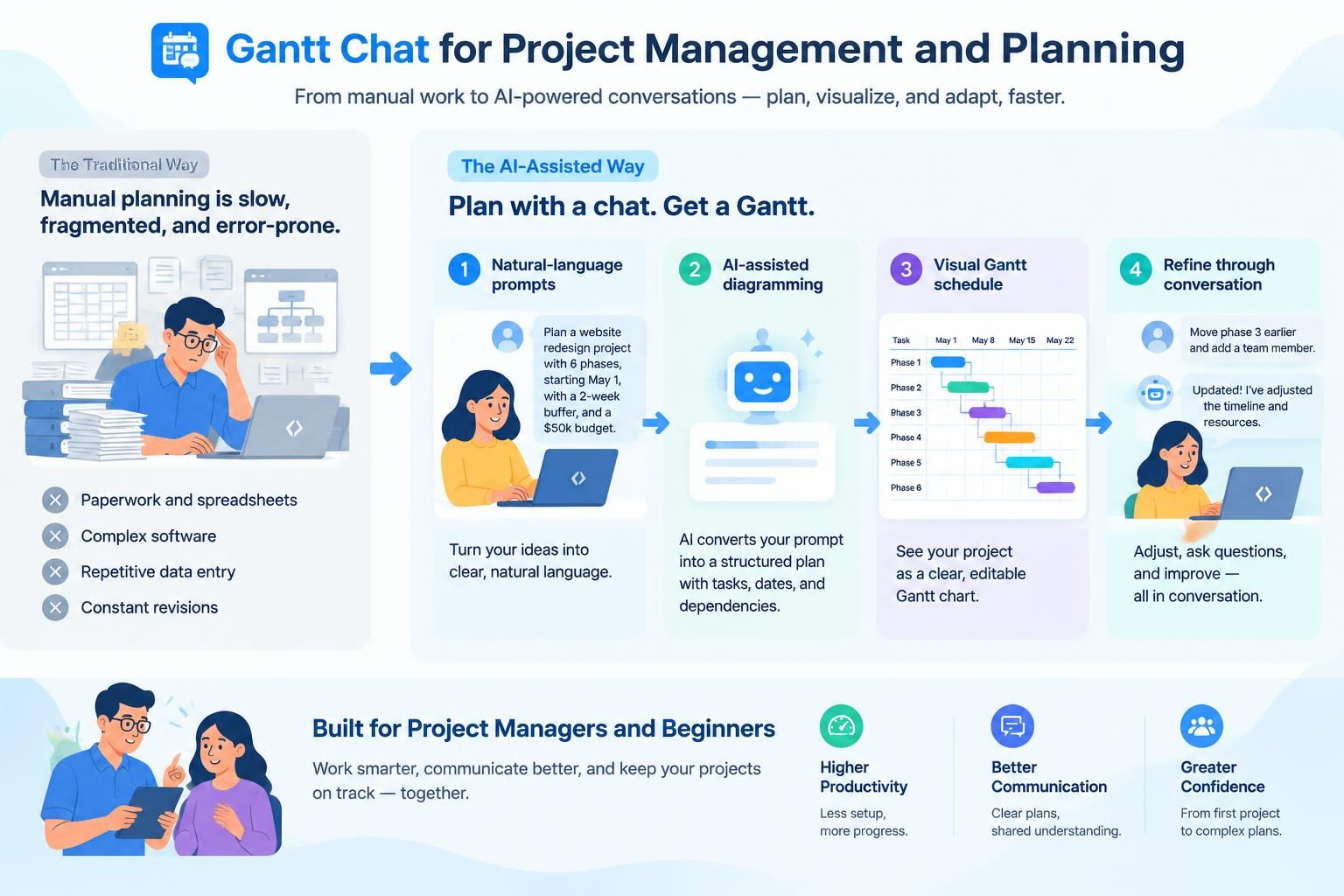
This guide explores how conversational AI transforms project planning, focusing on Visual Paradigm’s innovative approach to turning simple text prompts into comprehensive Gantt charts. Whether you’re a seasoned project manager or just starting out, understanding how to leverage AI-assisted diagramming can dramatically improve your productivity and communication.
2. What Is Gantt Chat?
How Conversational Project Planning Works
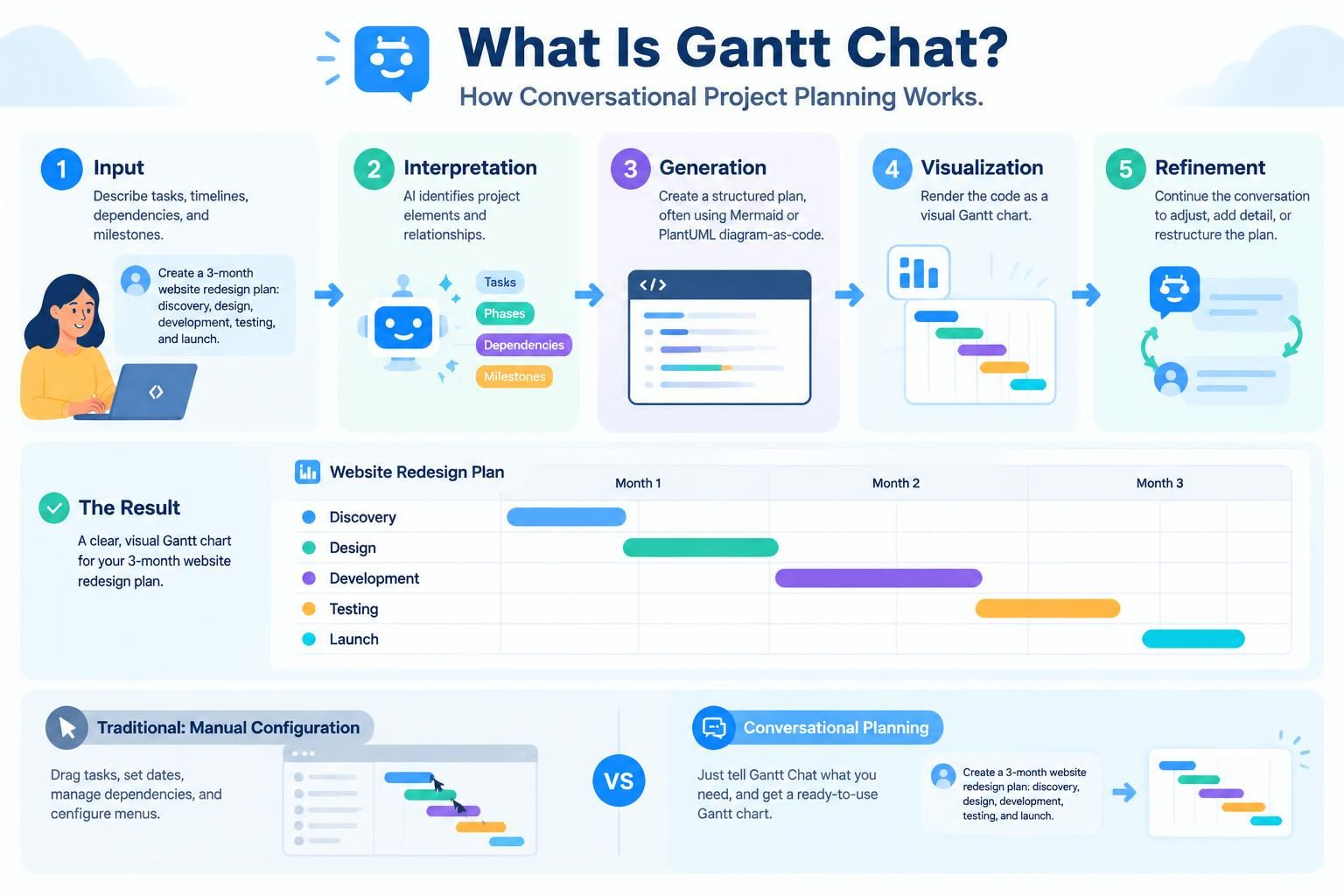
Gantt Chat is an AI-powered feature that allows users to create, modify, and refine Gantt charts through natural language conversations. Instead of manually dragging bars, setting dates, and configuring dependencies in traditional project management software, you simply describe your project requirements in plain English (or other supported languages).
The AI interprets your instructions, understands project structure, and automatically generates a visual Gantt chart that reflects your specifications. You can then continue the conversation to make adjustments, add details, or restructure the entire plan.
From Natural-Language Prompts to Gantt Charts
The process works through several key steps:
-
Input: You provide a description of your project, including tasks, timelines, dependencies, and milestones
-
Interpretation: The AI analyzes your text, identifies project elements, and understands relationships between tasks
-
Generation: The system creates a structured representation (typically using diagram-as-code formats like Mermaid or PlantUML)
-
Visualization: The code is rendered into a visual Gantt chart
-
Refinement: Through continued conversation, you can modify any aspect of the plan
For example, instead of clicking through menus to create a task, you might say: “Create a project plan for a website redesign with phases for discovery, design, development, testing, and launch over 3 months.” The AI will generate a complete timeline with appropriate task breakdowns and dependencies.
3. Why Use Visual Paradigm for Gantt Chat?
Visual Paradigm’s Approach to AI-Assisted Diagramming
Visual Paradigm has long been recognized as a powerful tool for creating professional diagrams, from UML models to business process flows. Their approach to AI-assisted diagramming combines decades of diagramming expertise with cutting-edge natural language processing capabilities.
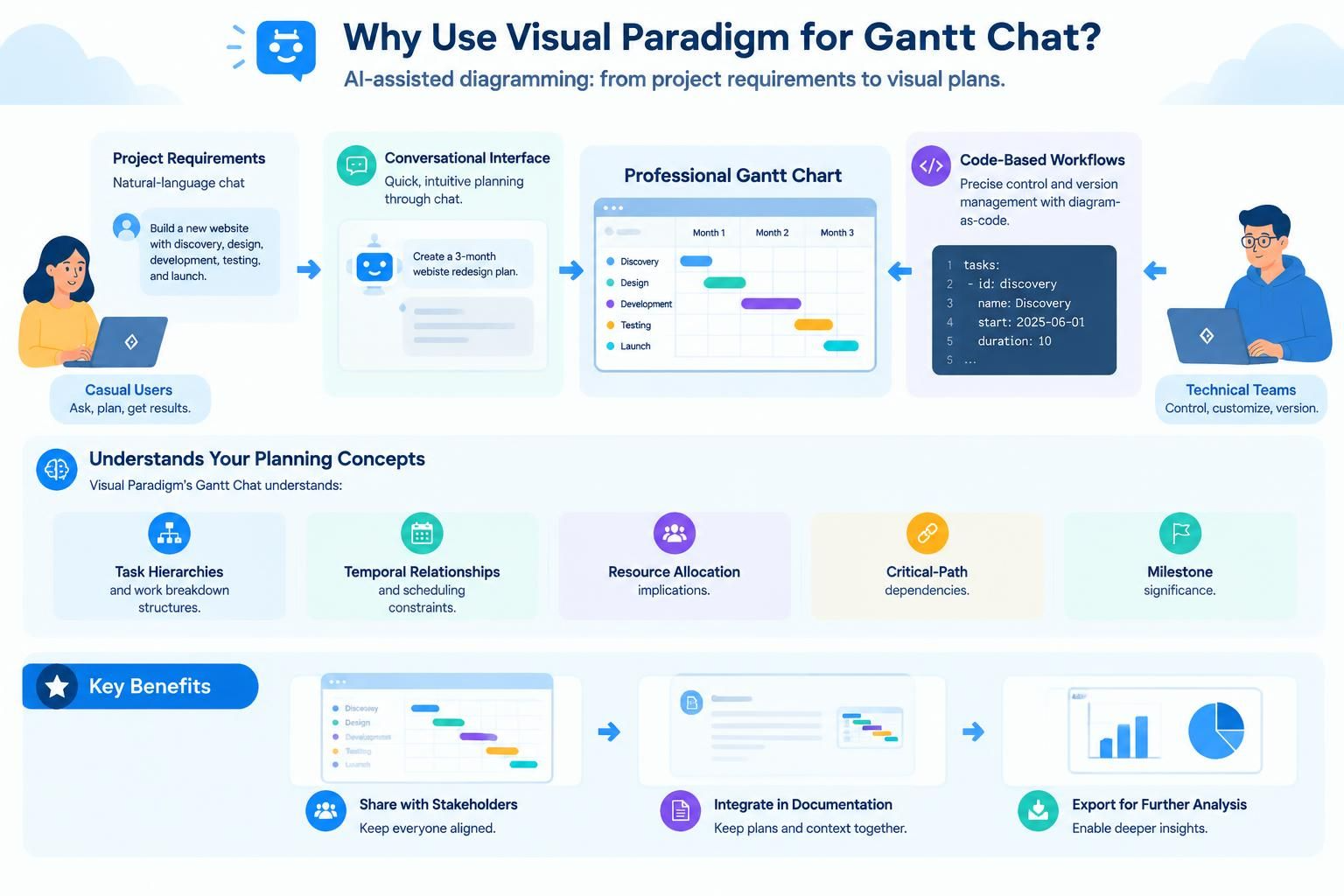
What sets Visual Paradigm apart is its dual-pathway approach:
-
Conversational Interface: For quick, intuitive planning through chat
-
Code-Based Workflows: For precise control and version management through diagram-as-code
This hybrid approach ensures that both casual users and technical teams can benefit from AI assistance while maintaining the flexibility needed for complex projects.
Turning Project Requirements into Visual Plans
Visual Paradigm excels at translating abstract project requirements into concrete visual representations. The system understands:
-
Task hierarchies and work breakdown structures
-
Temporal relationships and scheduling constraints
-
Resource allocation implications
-
Critical path dependencies
-
Milestone significance
By leveraging Visual Paradigm’s extensive diagramming engine, Gantt Chat produces publication-quality charts that can be easily shared with stakeholders, integrated into documentation, or exported for further analysis.
4. Key Benefits of Visual Paradigm Gantt Chat
Faster Project-Plan Creation
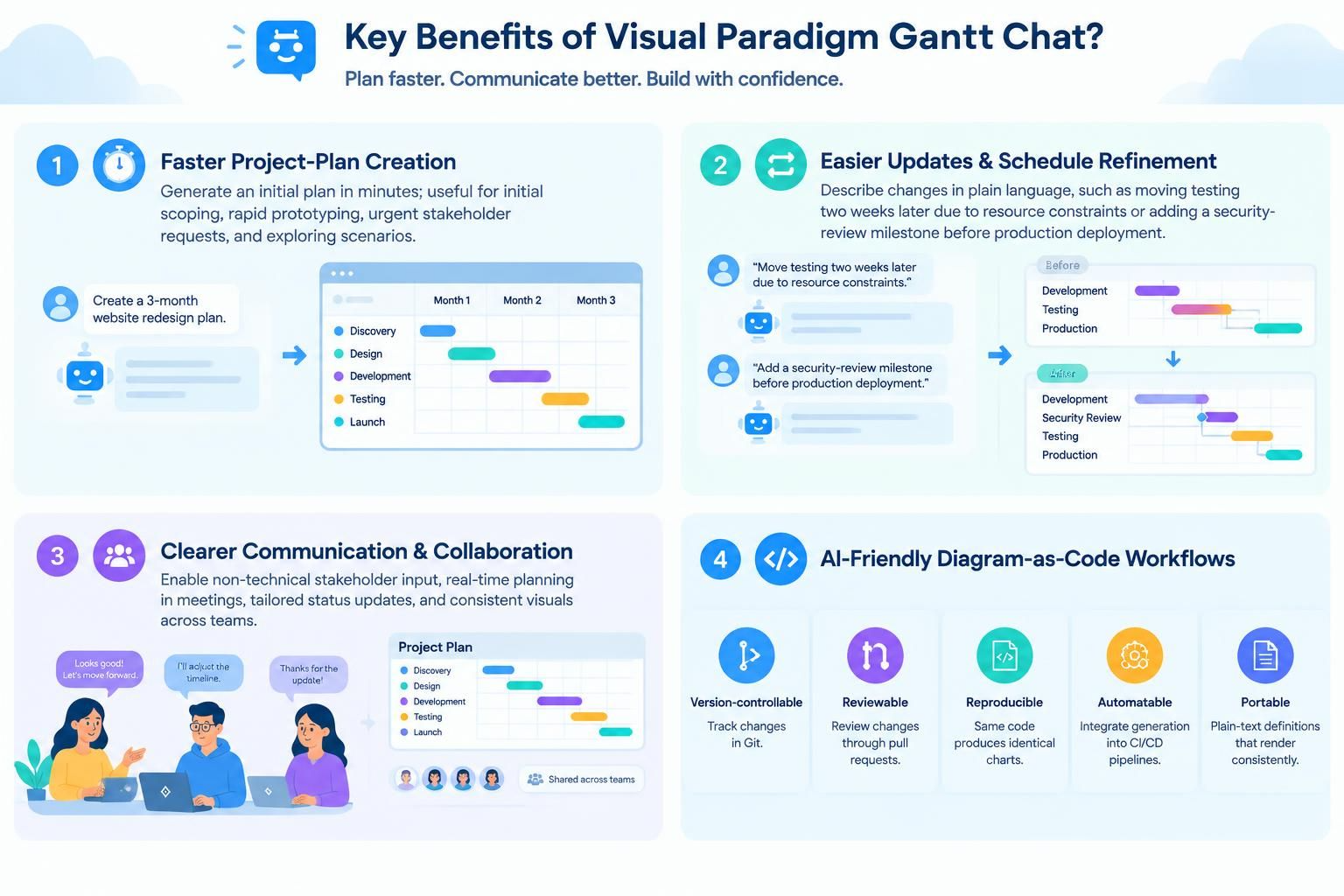
Traditional Gantt chart creation can take hours or even days for complex projects. With Gantt Chat, you can generate a comprehensive initial plan in minutes. This speed advantage is particularly valuable during:
-
Initial project scoping sessions
-
Rapid prototyping of project approaches
-
Responding to urgent stakeholder requests
-
Exploring multiple planning scenarios
Easier Updates and Schedule Refinement
Projects rarely follow their initial plans exactly. Changes are constant—tasks get delayed, resources shift, priorities change. With Gantt Chat, updating your plan is as simple as describing the changes:
“Move the testing phase two weeks later due to resource constraints” or “Add a security review milestone before the production deployment.”
The AI handles all the cascading adjustments automatically, recalculating dependencies and updating the visualization instantly.
Clearer Communication and Collaboration
Visual Gantt charts are universally understood across organizations. By making chart creation accessible through conversation, Gantt Chat enables:
-
Non-technical stakeholders to contribute to planning
-
Real-time collaboration during meetings
-
Quick generation of status updates for different audiences
-
Consistent visualization across teams and departments
Support for AI-Friendly, Diagram-as-Code Workflows
Visual Paradigm’s integration with diagram-as-code formats means your project plans are:
-
Version-controllable: Track changes in Git alongside your code
-
Reviewable: Team members can review plan changes through pull requests
-
Reproducible: Generate identical charts from the same code
-
Automatable: Integrate chart generation into CI/CD pipelines
-
Portable: Share plain-text definitions that render consistently anywhere
5. Standout Features and Tooling
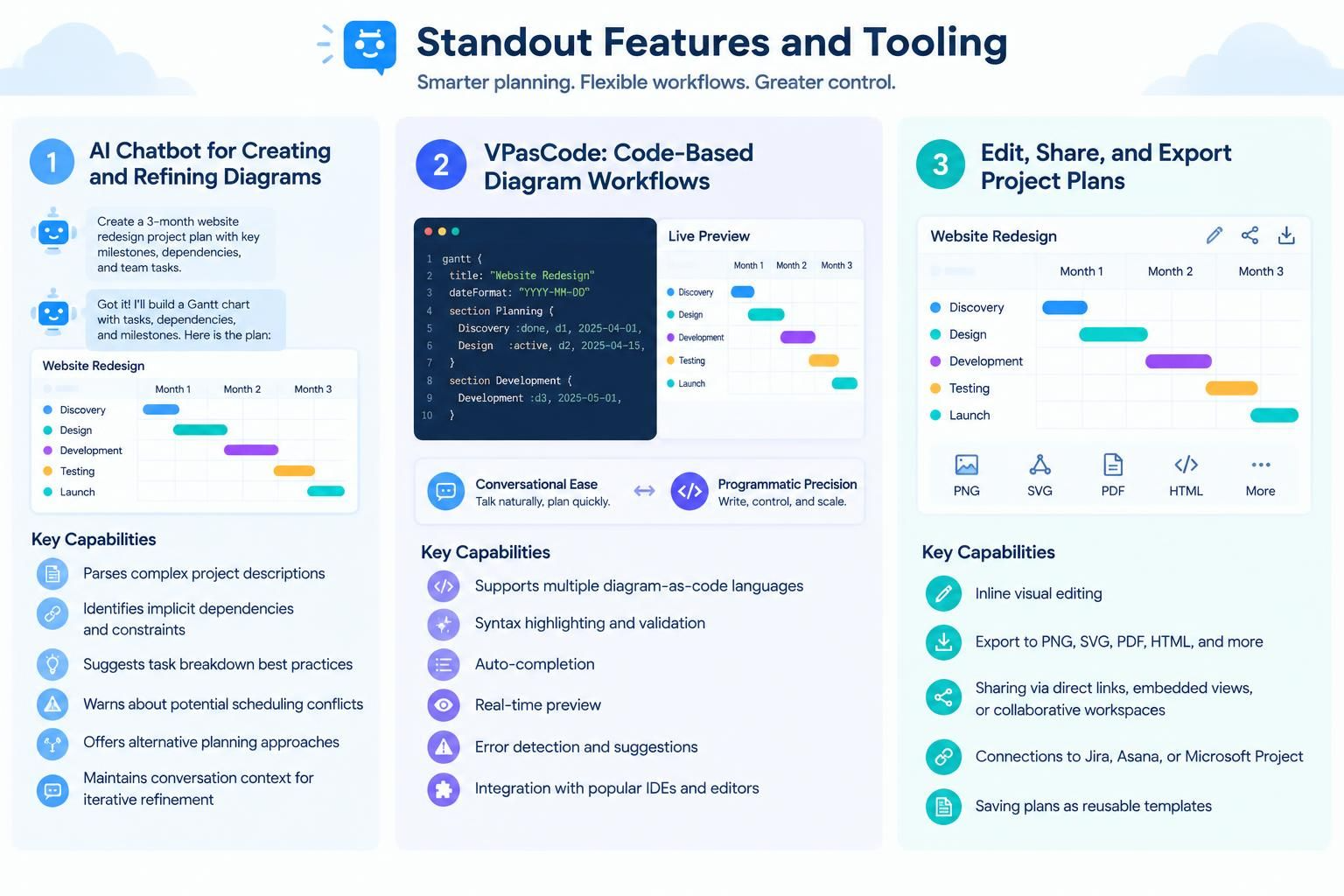
AI Chatbot for Creating and Refining Diagrams
The core of Gantt Chat is an intelligent conversational agent that understands project management terminology and can:
-
Parse complex project descriptions
-
Identify implicit dependencies and constraints
-
Suggest best practices for task breakdown
-
Warn about potential scheduling conflicts
-
Provide alternative planning approaches
The chatbot maintains context throughout your conversation, allowing for iterative refinement without losing earlier decisions.
VPasCode for Code-Based Diagram Workflows
VPasCode is Visual Paradigm’s framework for working with diagrams as code. It supports multiple diagram-as-code languages and provides:
-
Syntax highlighting and validation
-
Auto-completion for diagram elements
-
Real-time preview as you type
-
Error detection and suggestions
-
Integration with popular IDEs and editors
This feature bridges the gap between conversational ease and programmatic precision, giving you the best of both worlds.
Editing, Sharing, and Exporting Project Plans
Once your Gantt chart is generated, Visual Paradigm provides comprehensive options for working with it:
-
Inline Editing: Make fine-tuned adjustments directly in the visual editor
-
Multiple Export Formats: PNG, SVG, PDF, HTML, and more
-
Sharing Options: Direct links, embedded views, or collaborative workspaces
-
Integration: Connect with project management tools like Jira, Asana, or Microsoft Project
-
Templates: Save successful plans as templates for future projects
6. Gantt Diagrams as Code: Key Concepts
Understanding the underlying structure of diagram-as-code is essential for getting the most out of Gantt Chat, even if you primarily use the conversational interface.
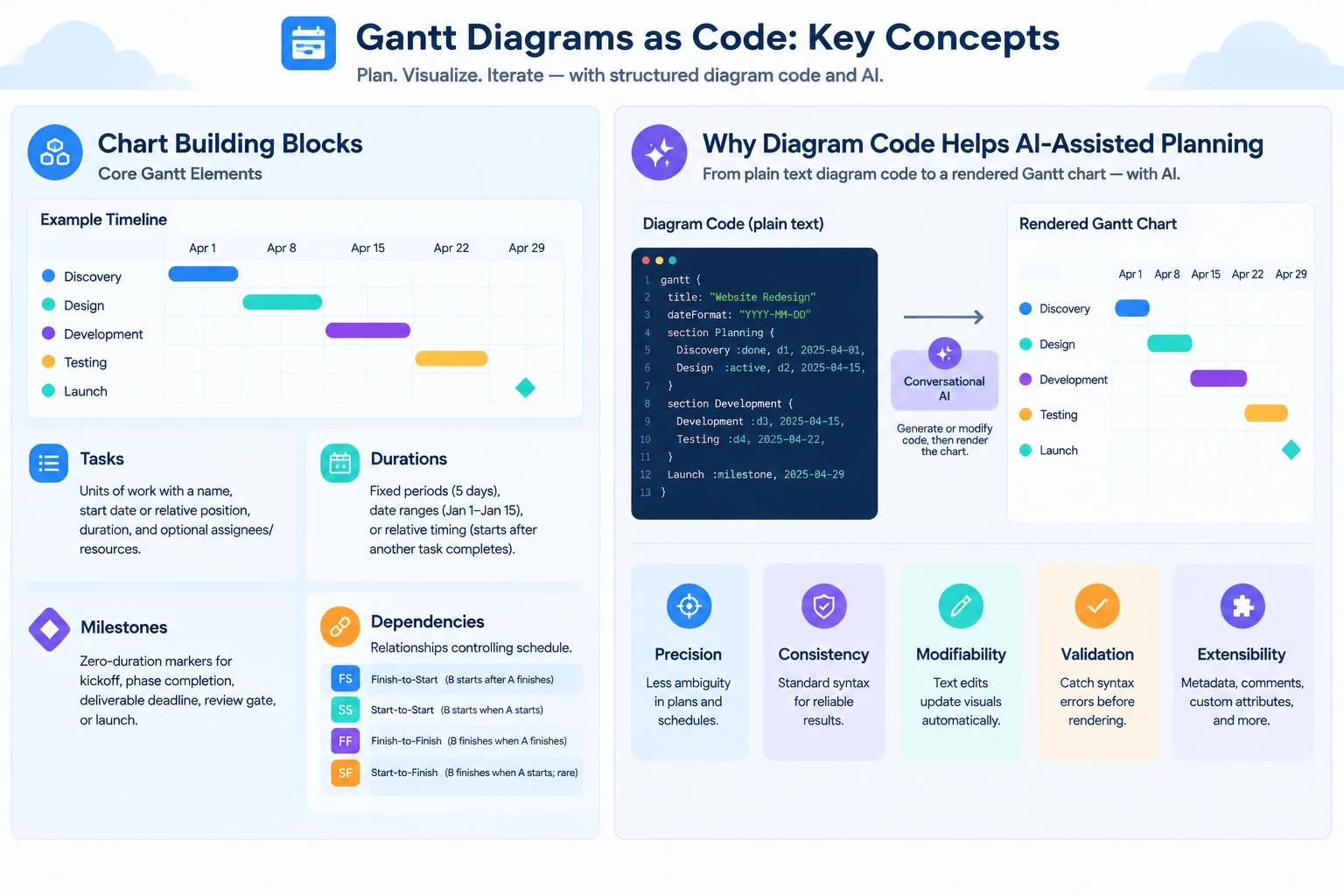
Tasks, Durations, Milestones, and Dependencies
Every Gantt chart consists of these fundamental elements:
Tasks: The basic units of work in your project. Each task has:
-
A name or description
-
A start date or relative position
-
A duration (in days, weeks, etc.)
-
Optional assignees or resources
Durations: How long each task takes. These can be:
-
Fixed durations (e.g., “5 days”)
-
Date ranges (e.g., “Jan 1 to Jan 15”)
-
Relative to other tasks (e.g., “starts after Task A completes”)
Milestones: Zero-duration markers representing significant events:
-
Project kickoffs
-
Phase completions
-
Deliverable deadlines
-
Review gates
-
Launch dates
Dependencies: Relationships between tasks that determine scheduling:
-
Finish-to-Start (FS): Task B starts after Task A finishes
-
Start-to-Start (SS): Task B starts when Task A starts
-
Finish-to-Finish (FF): Task B finishes when Task A finishes
-
Start-to-Finish (SF): Task B finishes when Task A starts (rare)
How Diagram Code Supports AI-Assisted Planning
Diagram-as-code formats provide a structured, machine-readable representation of your Gantt chart. This structure is crucial for AI assistance because:
-
Precision: Code eliminates ambiguity in task definitions
-
Consistency: Standardized syntax ensures reliable parsing
-
Modifiability: Small text changes can produce significant visual updates
-
Validation: Syntax checking catches errors before rendering
-
Extensibility: Code can include metadata, comments, and custom attributes
When you converse with Gantt Chat, the AI is essentially generating and modifying this code behind the scenes, then rendering it visually for you.
7. Gantt Chart Examples in Mermaid
Mermaid is a popular JavaScript-based diagramming and charting tool that uses a Markdown-inspired text definition format. It’s widely supported in documentation platforms, wikis, and development tools.
A Simple Project Schedule
Here’s a basic Mermaid Gantt chart for a small project:
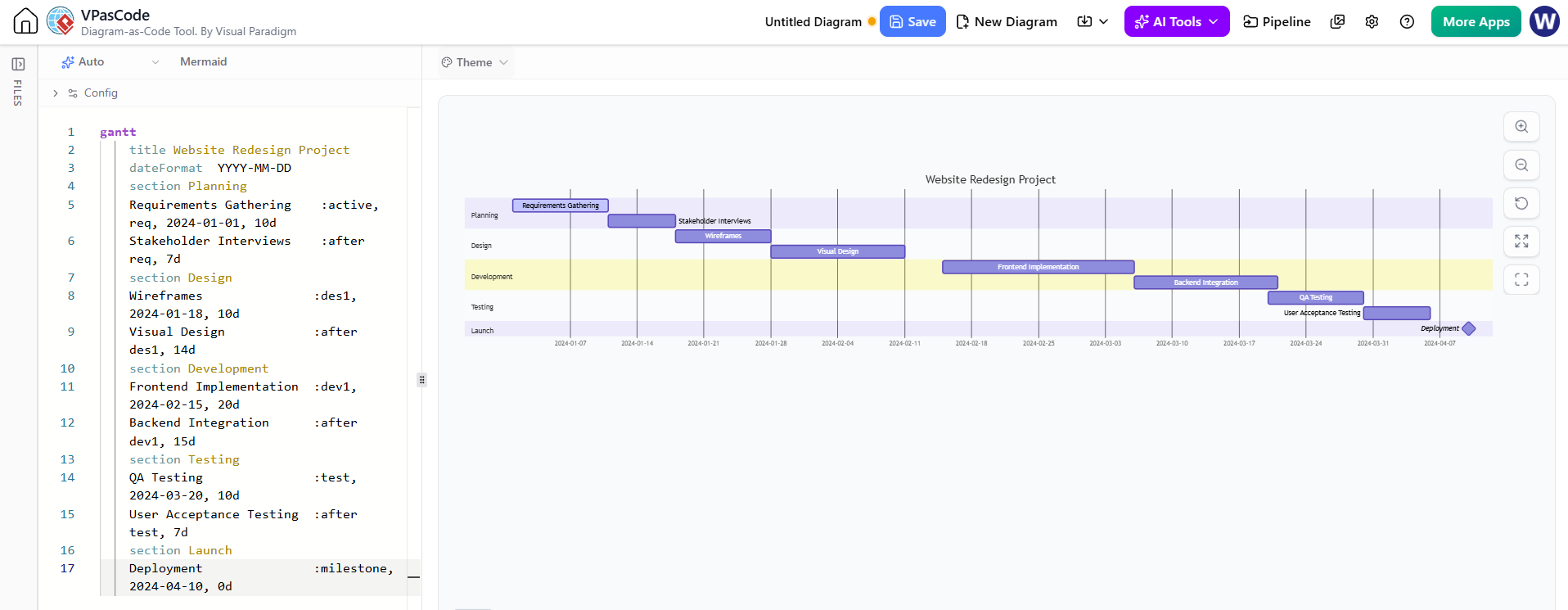
gantt
    title Website Redesign Project
    dateFormat  YYYY-MM-DD
    section Planning
    Requirements Gathering    :active, req, 2024-01-01, 10d
    Stakeholder Interviews    :after req, 7d
    section Design
    Wireframes               :des1, 2024-01-18, 10d
    Visual Design            :after des1, 14d
    section Development
    Frontend Implementation  :dev1, 2024-02-15, 20d
    Backend Integration      :after dev1, 15d
    section Testing
    QA Testing               :test, 2024-03-20, 10d
    User Acceptance Testing  :after test, 7d
    section Launch
    Deployment               :milestone, 2024-04-10, 0d

This example demonstrates:
-
Sections for organizing related tasks
-
Active highlighting for current tasks
-
Sequential dependencies using
afterkeyword -
A milestone marker for the launch date
A Schedule with Dependencies and Milestones
A more complex example showing explicit dependencies:
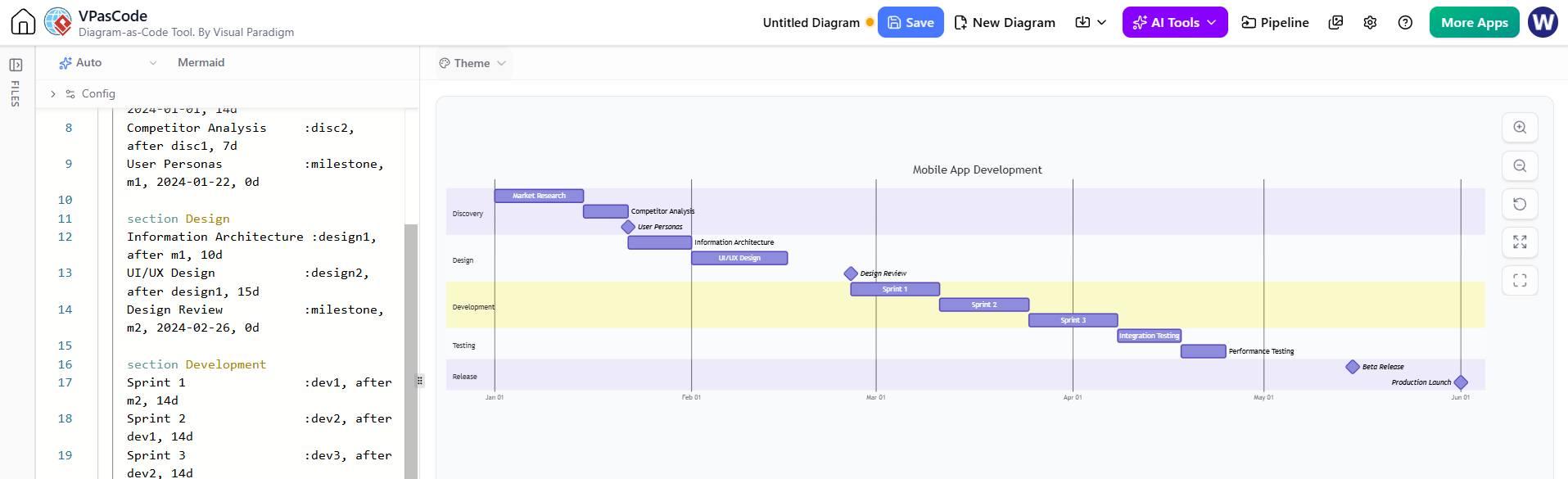
gantt
    title Mobile App Development
    dateFormat  YYYY-MM-DD
    axisFormat  %b %d

    section Discovery
    Market Research         :disc1, 2024-01-01, 14d
    Competitor Analysis     :disc2, after disc1, 7d
    User Personas           :milestone, m1, 2024-01-22, 0d

    section Design
    Information Architecture :design1, after m1, 10d
    UI/UX Design            :design2, after design1, 15d
    Design Review           :milestone, m2, 2024-02-26, 0d

    section Development
    Sprint 1                :dev1, after m2, 14d
    Sprint 2                :dev2, after dev1, 14d
    Sprint 3                :dev3, after dev2, 14d

    section Testing
    Integration Testing     :test1, after dev3, 10d
    Performance Testing     :test2, after test1, 7d

    section Release
    Beta Release            :milestone, m3, 2024-05-15, 0d
    Production Launch       :milestone, m4, 2024-06-01, 0d
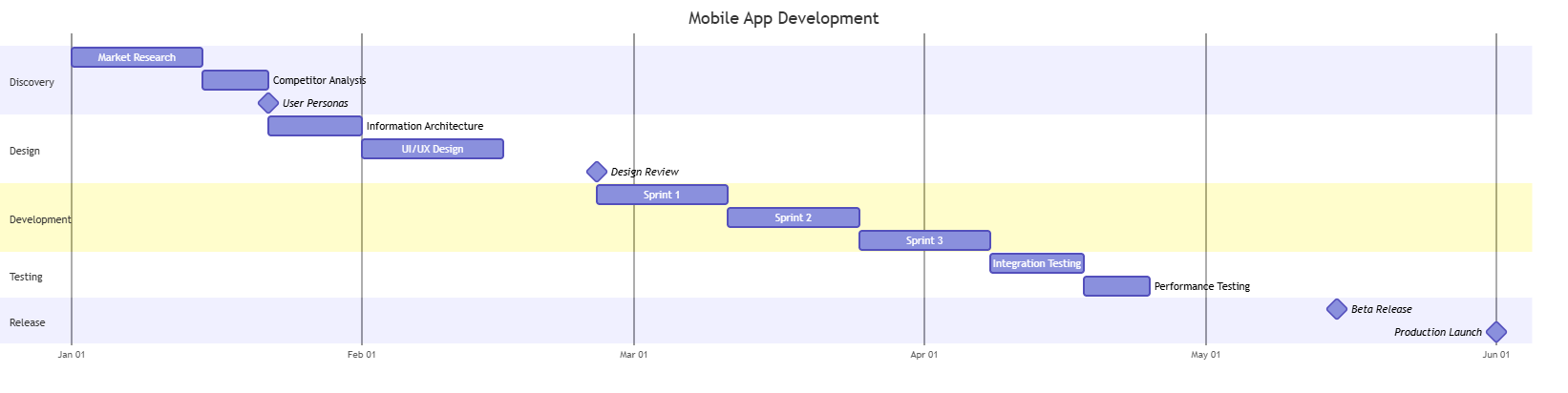
Generating and Refining Mermaid Code with AI
With Gantt Chat, you don’t need to write this code manually. You could simply say:
“Create a mobile app development schedule starting January 1st with discovery, design, three development sprints, testing, and release phases. Include milestones for persona completion, design review, beta release, and production launch.”
The AI would generate the Mermaid code above, which you can then refine through conversation:
-
“Make Sprint 2 overlap with the end of Sprint 1 by 3 days”
-
“Change the beta release to May 20th”
-
“Add a security audit task before production launch”
Each request updates the code and regenerates the visualization instantly.
8. Gantt Chart Examples in PlantUML
PlantUML is another popular diagram-as-code tool with strong support for Gantt charts. It offers slightly different syntax and additional features compared to Mermaid.
A Basic Project Timeline
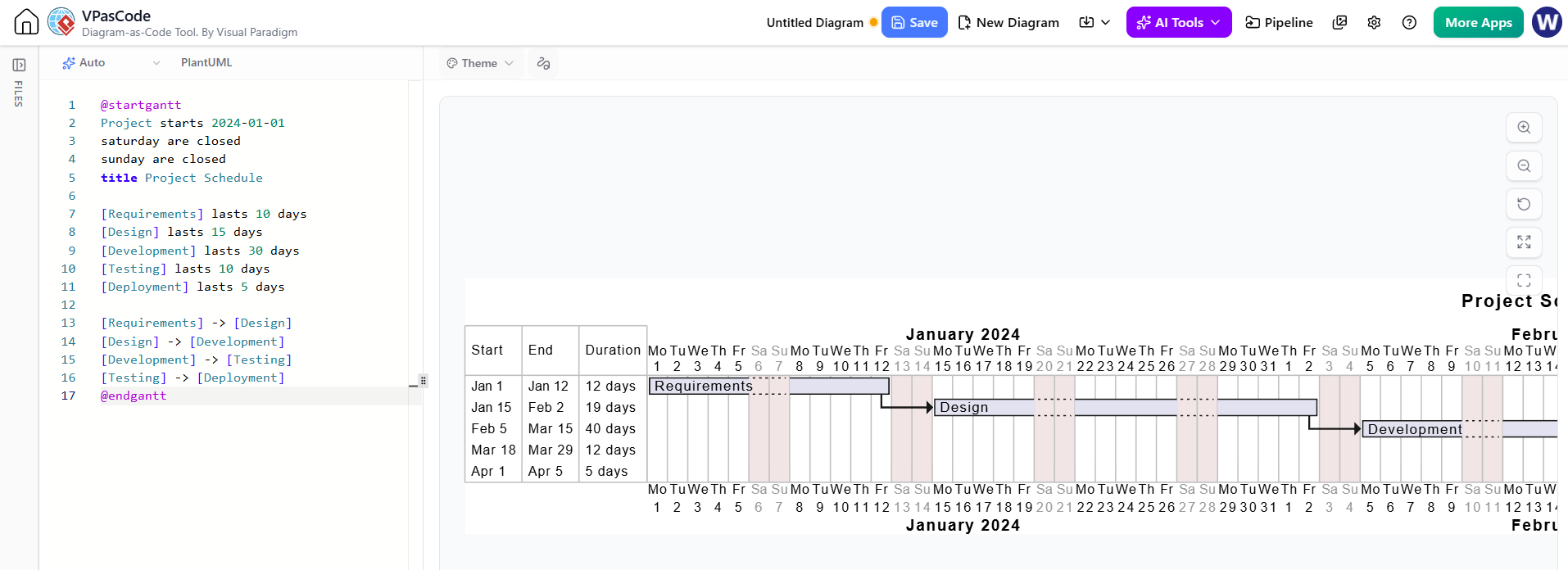
@startgantt
Project starts 2024-01-01
Prints date format YYYY-MM-DD

[Requirements] lasts 10 days
[Design] lasts 15 days
[Development] lasts 30 days
[Testing] lasts 10 days
[Deployment] lasts 5 days

[Requirements] -> [Design]
[Design] -> [Development]
[Development] -> [Testing]
[Testing] -> [Deployment]
@endgantt

This minimal example shows PlantUML’s clean, straightforward syntax with explicit dependency arrows.
Tasks, Dates, and Dependencies
A more detailed PlantUML example:
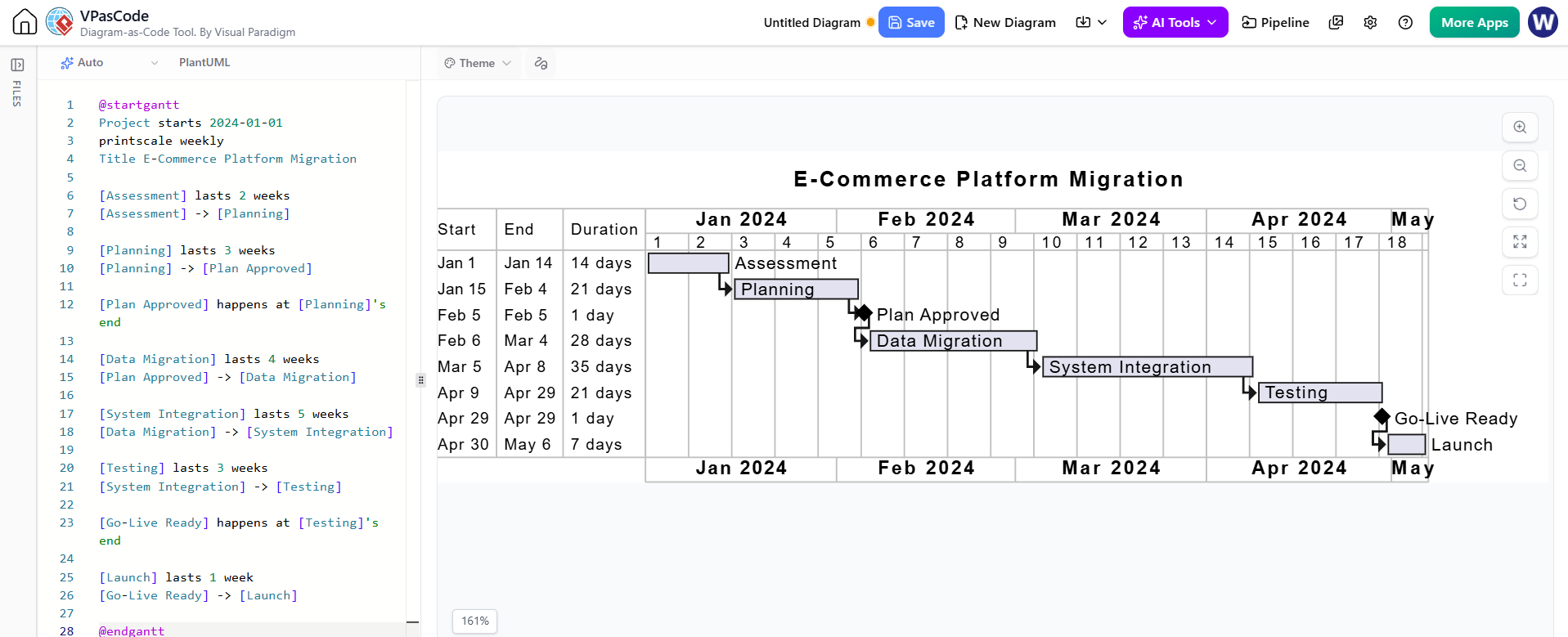
@startgantt
Project starts 2024-01-01
printscale weekly
Title E-Commerce Platform Migration

[Assessment] lasts 2 weeks
[Assessment] -> [Planning]

[Planning] lasts 3 weeks
[Planning] -> [Plan Approved]

[Plan Approved] happens at [Planning]'s end

[Data Migration] lasts 4 weeks
[Plan Approved] -> [Data Migration]

[System Integration] lasts 5 weeks
[Data Migration] -> [System Integration]

[Testing] lasts 3 weeks
[System Integration] -> [Testing]

[Go-Live Ready] happens at [Testing]'s end

[Launch] lasts 1 week
[Go-Live Ready] -> [Launch]

@endganttThis example demonstrates:
-
Notes attached to tasks for additional context
-
Explicit milestone definitions
-
Custom highlighting for important events
-
Scale and print scale settings
Generating and Refining PlantUML with AI
Similar to Mermaid, you can generate PlantUML code through conversation:
“Create a PlantUML Gantt chart for an e-commerce migration project with six phases: assessment, planning, data migration, integration, testing, and launch. Add milestones for plan approval and go-live readiness.”
Then refine with:
-
“Add notes explaining what happens in each phase”
-
“Highlight the milestones in gold”
-
“Change the scale to show weekly view”
9. Mermaid or PlantUML: Which Should You Use?
Both Mermaid and PlantUML are excellent choices for diagram-as-code workflows, but they have different strengths:
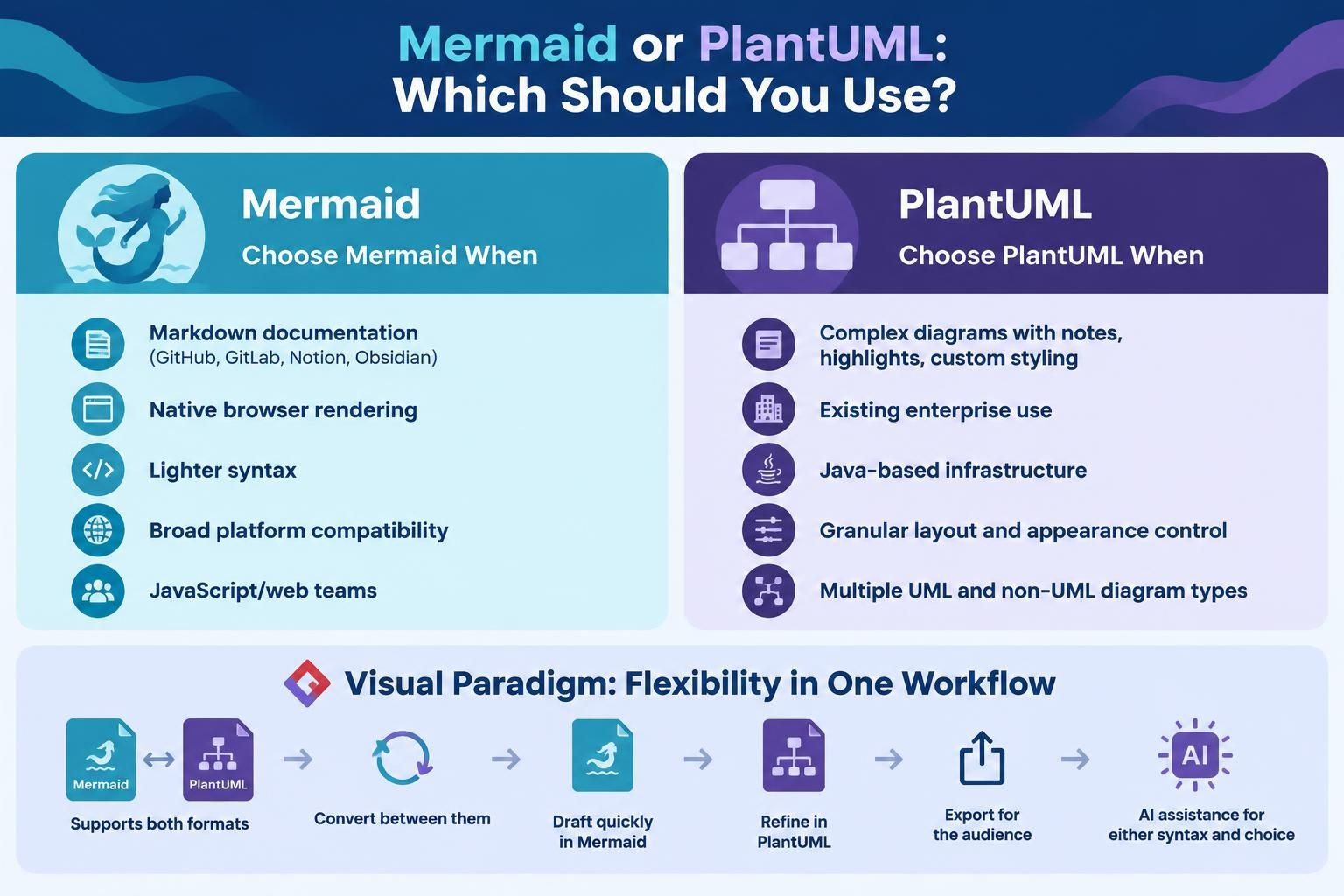
Choose Mermaid When:
-
Documentation Integration: You’re writing docs in Markdown (GitHub, GitLab, Notion, Obsidian)
-
Web Rendering: You need charts that render natively in browsers
-
Simplicity: You prefer a lighter-weight syntax
-
Community Support: You want the widest platform compatibility
-
JavaScript Ecosystem: Your team works primarily with web technologies
Choose PlantUML When:
-
Complex Diagrams: You need advanced features like notes, highlights, and custom styling
-
Enterprise Tools: Your organization already uses PlantUML for other diagram types
-
Java Environment: Your infrastructure is Java-based
-
Detailed Control: You want more granular control over appearance and layout
-
Multiple Diagram Types: You’re creating various UML and non-UML diagrams in one tool
Visual Paradigm’s Advantage
Visual Paradigm supports both formats and can convert between them, giving you flexibility. You can:
-
Start with Mermaid for quick drafts
-
Convert to PlantUML for detailed refinement
-
Export to either format based on your audience
-
Use whichever syntax feels more natural for each project
The AI assistant understands both formats and can suggest the best choice based on your specific needs.
10. A Practical Workflow: From Chat Prompt to Project Plan
Let’s walk through a complete example of using Gantt Chat to create a real project plan.
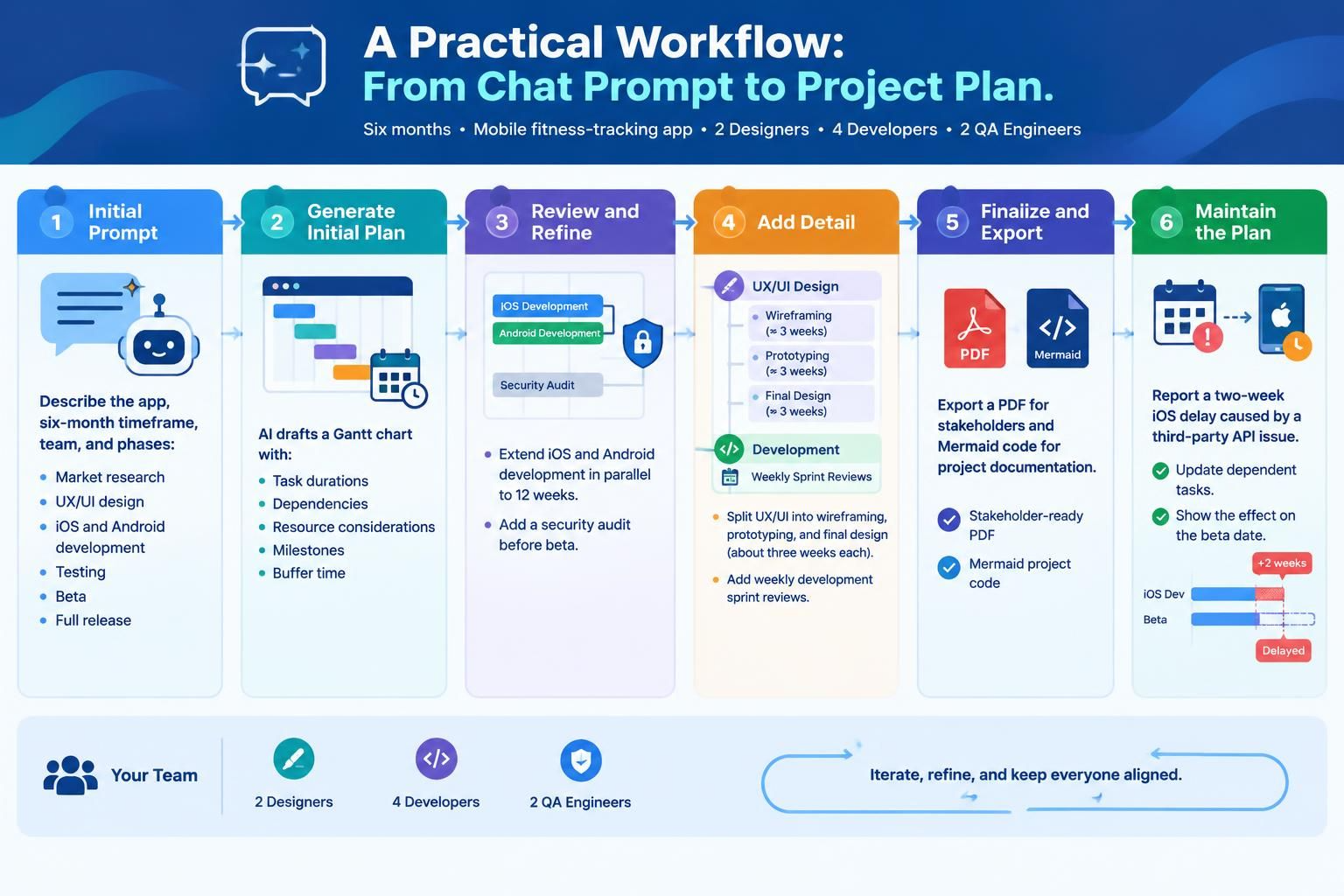
Step 1: Initial Prompt
You start with a high-level description:
“I need a project plan for launching a new mobile fitness tracking app. We have 6 months from now. The main phases should include market research, UX/UI design, development (iOS and Android), testing, beta launch, and full release. We have a team of 2 designers, 4 developers, and 2 QA engineers.”
Step 2: AI Generates Initial Plan
The AI creates a comprehensive Gantt chart with:
-
Realistic task durations based on industry standards
-
Logical dependencies between phases
-
Appropriate resource considerations
-
Milestones for key deliverables
-
Buffer time for unexpected delays
Step 3: Review and Refine
You examine the generated chart and notice some issues:
“The development phase seems too short. Can you extend iOS and Android development to run in parallel for 12 weeks? Also, add a security audit before the beta launch.”
The AI adjusts the timeline accordingly, extending the development phase and inserting the security audit task with appropriate dependencies.
Step 4: Add Detail
Now you want more granularity:
“Break down the UX/UI design phase into wireframing, prototyping, and final design. Each should take about 3 weeks. Also, add weekly sprint reviews during development.”
The AI expands the design phase and adds recurring sprint review tasks throughout development.
Step 5: Finalize and Export
Once satisfied:
“This looks good. Export it as a PDF for our stakeholder meeting next week, and also give me the Mermaid code so I can include it in our project documentation.”
Visual Paradigm generates both outputs, ready for distribution.
Step 6: Ongoing Maintenance
As the project progresses, you update the plan through conversation:
“We’re two weeks behind on iOS development due to a third-party API issue. Adjust the schedule accordingly and show the impact on the beta launch date.”
The AI recalculates all dependent tasks and shows you the revised timeline with the delayed beta launch.
11. Tips for Getting Better Results from Gantt Chat
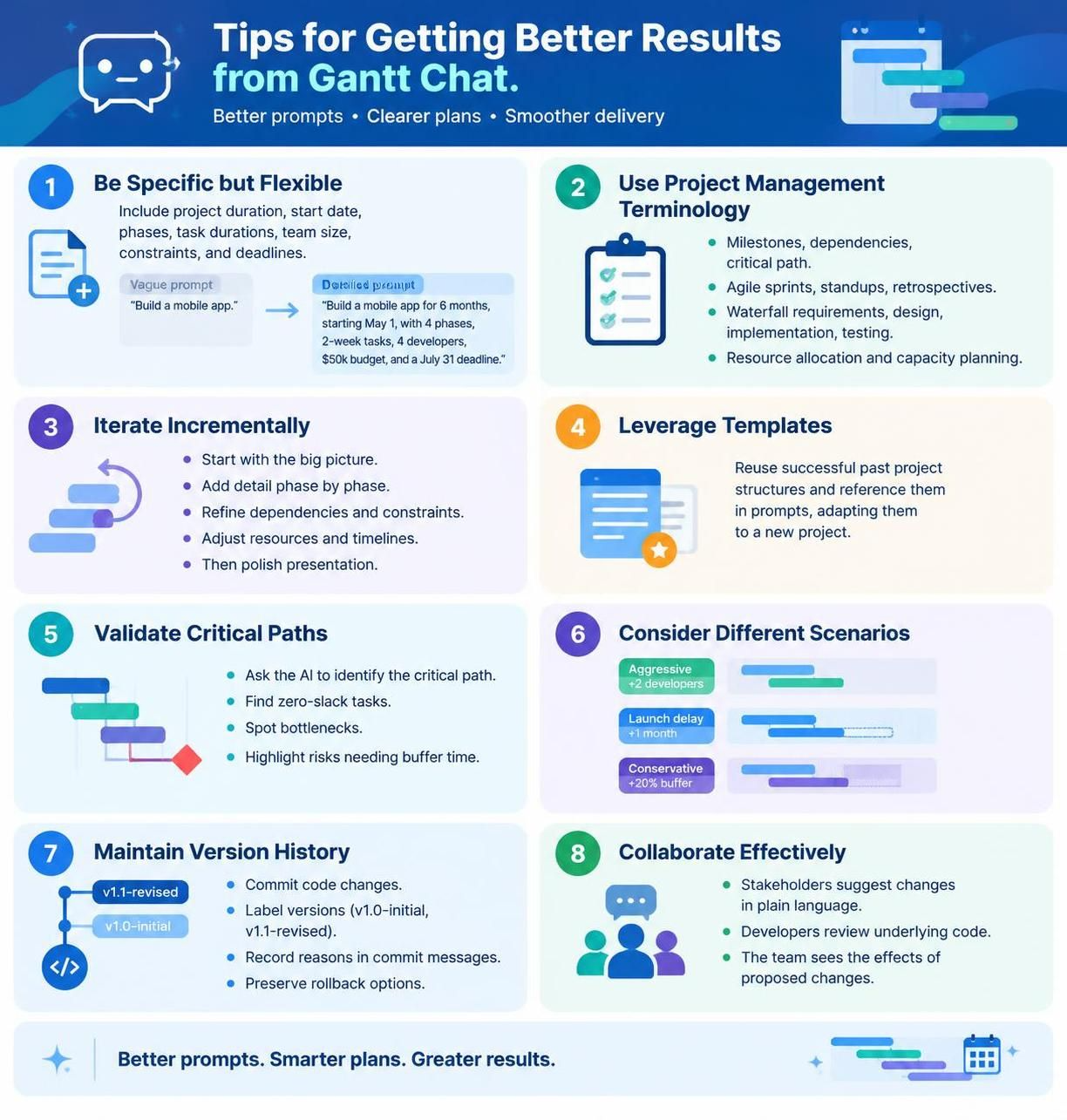
To maximize the effectiveness of Gantt Chat, follow these best practices:
-
Good: “Create a 3-month project plan for a website redesign with 5 main phases”
-
Better: “Create a 3-month website redesign project starting March 1st with phases for discovery (2 weeks), design (4 weeks), development (6 weeks), testing (3 weeks), and launch (1 week)”
-
Best: Include known constraints, team size, and critical deadlines
Use Project Management Terminology
The AI understands standard PM terms:
-
Milestones, dependencies, critical path
-
Agile concepts: sprints, standups, retrospectives
-
Waterfall phases: requirements, design, implementation, testing
-
Resource allocation and capacity planning
Iterate Incrementally
Don’t try to perfect everything in one prompt:
-
Start with the big picture
-
Add detail phase by phase
-
Refine dependencies and constraints
-
Adjust resources and timelines
-
Polish formatting and presentation
Leverage Templates
If you have successful past projects:
-
Save them as templates
-
Reference them in prompts: “Similar to our Q3 mobile app project, but for a web application”
-
The AI will apply similar structures and durations
Validate Critical Paths
Always ask the AI to identify:
-
The critical path through your project
-
Tasks with zero slack
-
Potential bottlenecks
-
Risk areas that need buffer time
Consider Different Scenarios
Use Gantt Chat to explore alternatives:
-
“Show me an aggressive timeline if we add 2 more developers”
-
“What if we delay the launch by one month?”
-
“Create a conservative estimate with 20% buffer on all tasks”
Maintain Version History
Since you’re working with code:
-
Commit changes to version control
-
Label versions (v1.0-initial, v1.1-revised, etc.)
-
Track why changes were made in commit messages
-
Enable easy rollback if needed
Collaborate Effectively
Share your Gantt Chat workflow with your team:
-
Non-technical stakeholders can suggest changes in plain language
-
Developers can review the underlying code for accuracy
-
Everyone can see the impact of proposed changes immediately
12. Conclusion: Planning Projects with Visual Paradigm
Gantt Chat represents a significant evolution in project planning, combining the accessibility of natural language with the precision of diagram-as-code. Visual Paradigm’s implementation offers several key advantages:
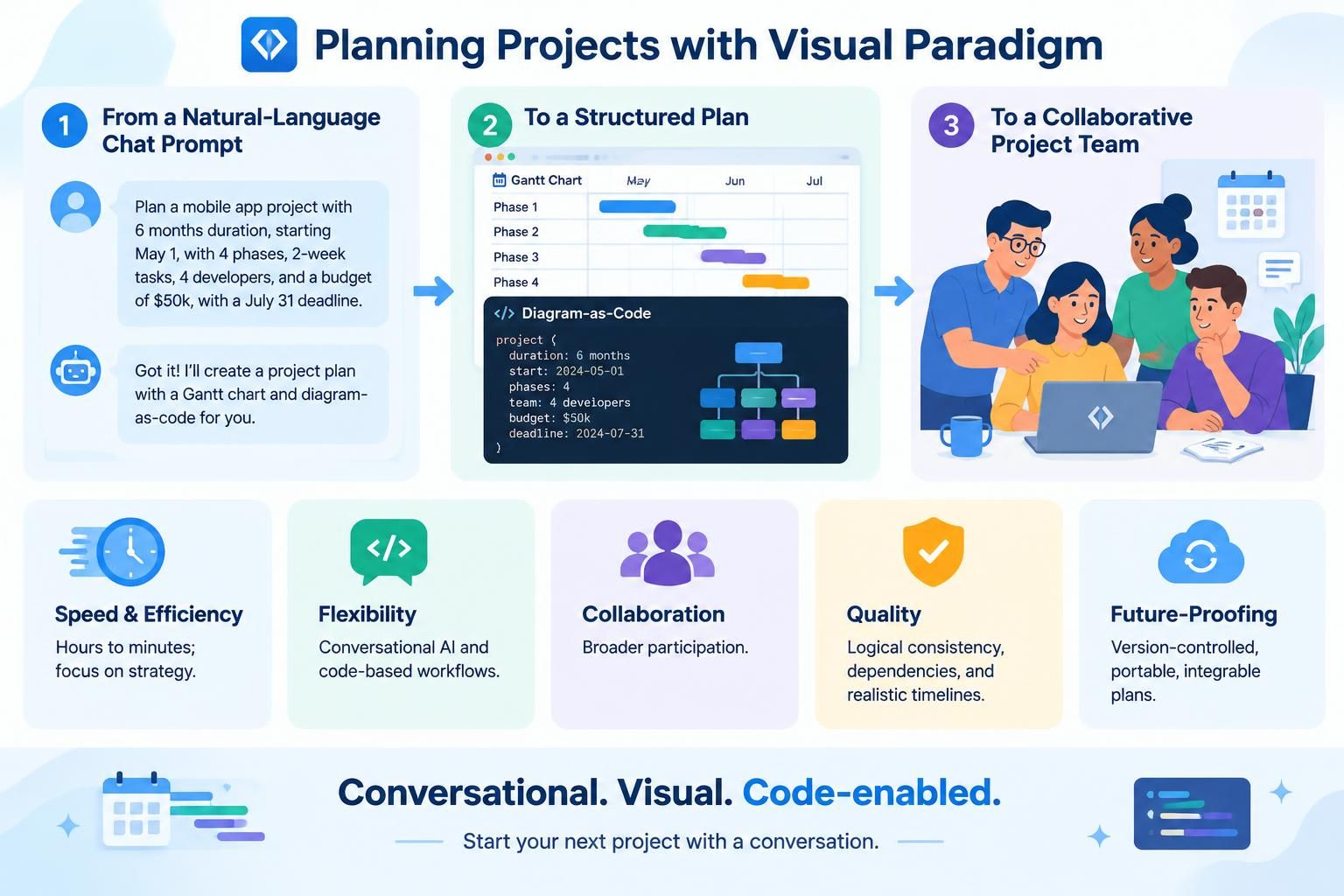
Speed and Efficiency: What once took hours now takes minutes, allowing you to focus on strategic thinking rather than mechanical chart construction.
Flexibility: The dual pathway of conversational AI and code-based workflows accommodates different working styles and project complexities.
Collaboration: By lowering the barrier to creating professional Gantt charts, you enable broader participation in project planning across your organization.
Quality: AI-assisted planning helps ensure logical consistency, proper dependencies, and realistic timelines based on industry best practices.
Future-Proofing: Diagram-as-code ensures your project plans are version-controlled, portable, and integrable with modern development workflows.
Whether you’re managing a small team project or coordinating a complex enterprise initiative, Gantt Chat through Visual Paradigm provides the tools you need to plan effectively, communicate clearly, and adapt quickly to changing circumstances.
The future of project management is conversational, visual, and code-enabled. By embracing tools like Gantt Chat today, you position yourself and your team to work smarter, not harder, in an increasingly fast-paced business environment.
Start your next project with a conversation, and watch your plans come to life.