
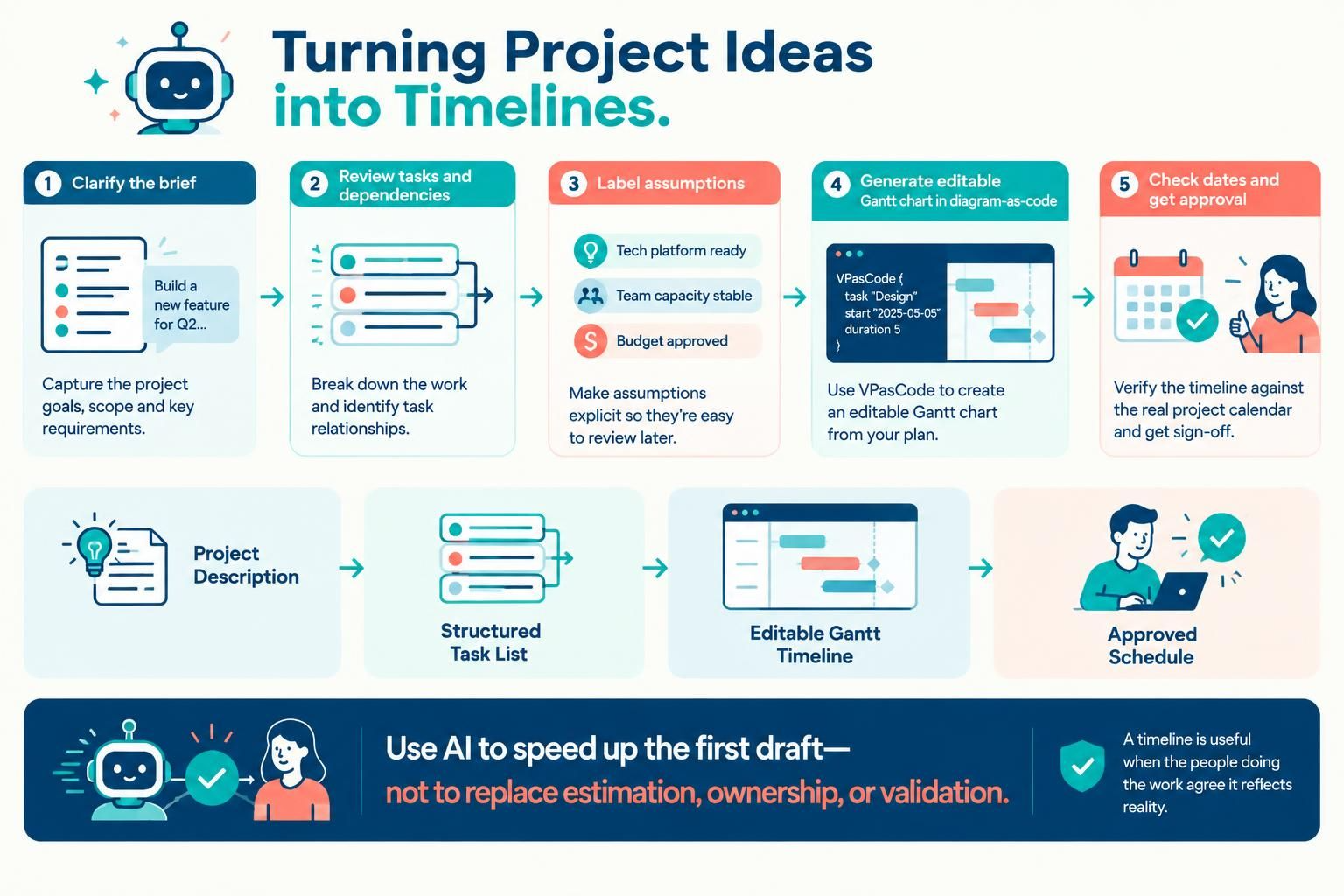
In the modern landscape of project management, the gap between a raw idea and a structured execution plan is often bridged by Artificial Intelligence. However, AI is best used as a force multiplier for the initial draft, not a replacement for human validation. This tutorial explores the technical workflow of transforming project descriptions into editable, reliable Gantt charts using the VPasCode diagram-as-code methodology within Visual Paradigm.
By treating project planning as a coding problem, you gain version control, reproducibility, and precision. Below, we break down the system architecture of this workflow, the specific PlantUML syntax required, and the tools needed to bring your timeline to life.
The 5-Step AI Workflow for Project Scheduling
Before generating a single line of code, it is essential to establish a reliable process. The transition from a vague concept to an approved schedule follows a logical five-step pipeline designed to minimize ambiguity.
1. Clarify the Brief
The process begins with the AI interpreting a high-level project description. Instead of guessing, you provide the AI with clear goals, scope, and key requirements. For example, a prompt might ask: “Create a project plan for building a new feature for Q2.”
2. Review Tasks and Dependencies
Once the AI generates a draft, the human element becomes critical. You must review the breakdown of work to identify task relationships. Are dependencies linear or parallel? This step ensures the logical flow of the project is sound before committing to a schedule.
3. Label Assumptions
Projects often fail due to unverified assumptions. This step requires making those assumptions explicit. By documenting factors such as tech platform readiness, team capacity stability, or budget approval, you create a safety net for your schedule. If a dependency fails, you know exactly which assumption was violated.
4. Generate Editable Gantt Chart
Here is where the magic happens. Using VPasCode, the structured task list is converted into a diagram. This is not a static image; it is code that renders into an editable Gantt chart. You can tweak dates and durations directly in the text file and re-render instantly.
5. Check Dates and Get Approval
The final step is validation. You must verify the rendered timeline against the real project calendar. A timeline is only useful when the people responsible for the work agree that it reflects reality. Once the dates align with business reality, you get the sign-off.
Technical Implementation: VPasCode and PlantUML
To implement this workflow, you will utilize the VPasCode tool, which is built on the PlantUML syntax engine. This allows for a “diagram-as-code” approach where the Gantt chart is defined by text rather than mouse clicks.
Why Visual Paradigm UML?
Visual Paradigm stands out in the industry by combining the flexibility of open-source syntax with a robust enterprise-grade interface. Its standout benefits include:
- Integrated AI Assistant: The platform includes an AI Chatbot that can help generate the initial text code based on natural language prompts.
- Editable Diagrams: Unlike static images, the generated code allows for programmatic manipulation of dates, dependencies, and resources.
- Seamless Export: The diagrams can be easily exported to various formats or integrated into project management reports.
Diagram Example in VPasCode
Below is a concrete example of how a project structure is translated into VPasCode syntax. Notice how the code explicitly defines the task, start date, duration, and dependencies.
@startgantt
title Project Timeline Draft
project start "2025-05-05"
project duration "10d"

section Design
  task "Design" start "2025-05-05" duration "5d"
  task "Review" start "2025-05-10" duration "2d" depends "Design"

section Development
  task "Coding" start "2025-05-12" duration "4d" depends "Review"
  task "Testing" start "2025-05-16" duration "3d" depends "Coding"

@endganttConclusion: Speed Meets Accuracy
The ultimate goal of using AI and VPasCode is to speed up the first draft while maintaining high standards of accuracy. By treating the project timeline as a structured data model, you empower your team to focus on execution rather than manual data entry. Remember: AI helps you build the skeleton, but human validation gives it life.