
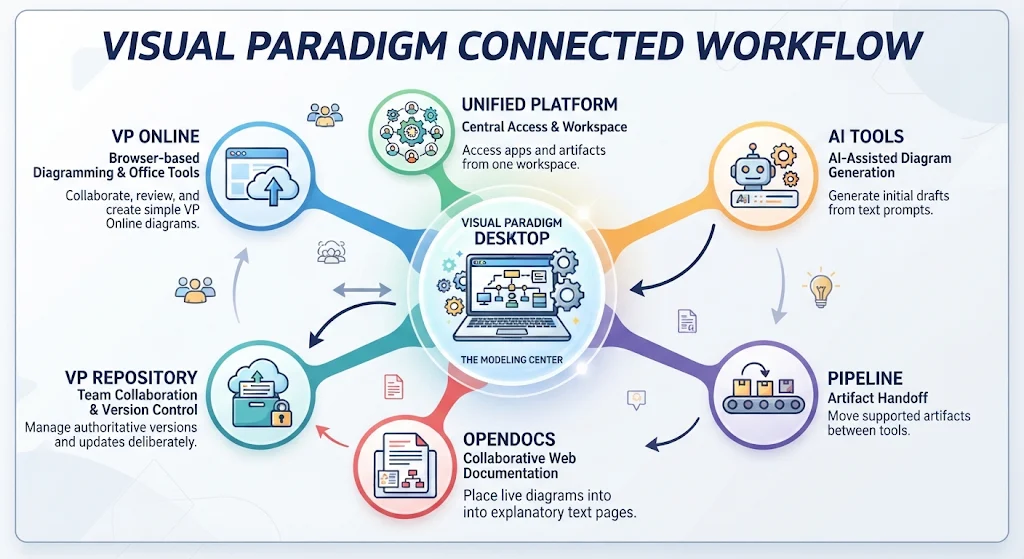
In modern enterprise architecture and software engineering, the gap between design and documentation is often where projects stall. Visual Paradigm has addressed this by creating a Connected Workflow ecosystem. This system is not merely a collection of separate applications but a cohesive environment where a central modeling engine interacts with collaborative tools, AI assistants, and documentation platforms.
This tutorial explores the architecture of the Visual Paradigm ecosystem, focusing on how Visual Paradigm Desktop acts as the “Modeling Center” to orchestrate the flow of information from initial ideas to final, reviewed documentation.
The Architecture of the Ecosystem
To understand the workflow, we must first define the distinct roles of the components. The architecture is designed to separate creation (Modeling) from collaboration (Online/Unified) and consumption (OpenDocs).
1. The Modeling Center: Visual Paradigm Desktop
At the heart of the ecosystem lies Visual Paradigm Desktop. This is a robust, workbench-style application designed for detailed modeling. It is the source of truth for complex project structures.
- Function: Building and refining structured project diagrams and models.
- Best Use Case: Complex engineering-oriented capabilities, detailed UML, and ongoing project maintenance.
- Role: It is the engine room where the heavy lifting of system design occurs.
2. The Collaborative Layer: VP Online & Unified Platform
While Desktop is for creation, the ecosystem requires accessibility.
- VP Online: A browser-based environment that allows teams to create and review diagrams without installing software. It is ideal for lightweight tasks or when web access is the primary constraint.
- Unified Platform: This acts as the “Control Center” or central workspace. It does not replace the individual tools but organizes access to them. It allows users to discover apps, launch Desktop or Online sessions, and locate artifacts across the entire ecosystem from a single dashboard.
3. The Innovation Layer: AI Tools
Visual Paradigm integrates AI to accelerate the initial phases of modeling. Rather than starting with a blank canvas, users can utilize AI tools to draft diagrams or explore ideas from text prompts. This serves as a powerful “starter pack” for ideas, which are then refined.
4. The Handoff Layer: Pipeline
The Pipeline is the technical mechanism that connects the Desktop environment to the cloud-based documentation tools. It is the transfer route for supported artifacts. Crucially, it acts as a bridge, moving the binary or structured data of a diagram from the local Desktop application to the cloud ecosystem.
5. The Consumption Layer: OpenDocs
OpenDocs is where the final value is delivered to the team. It is a platform for collaborative web documentation. It takes the diagrammatic artifacts and places them alongside explanatory text, ensuring that the “why” (context) is never separated from the “what” (diagram).
Step-by-Step: The End-to-End Workflow
A practical workflow in Visual Paradigm follows a logical progression from abstract requirements to concrete, documented architecture. Here is how you orchestrate this process.
Phase 1: Ideation and Initial Drafting
Every project begins with a requirement or a technical question. In the Visual Paradigm workflow, you have three starting points:
- AI-Assisted: Use an AI tool to generate a draft based on a text prompt. This is excellent for overcoming the “blank page” syndrome.
- Desktop Native: Begin directly in Visual Paradigm Desktop for a structured approach.
- VP Online: Start in the browser if the team is remote or the diagram is simple.
Crucial Step: Regardless of the entry point, keep relevant requirements, decisions, or notes attached to the project immediately. This context is vital for reviewers later.
Phase 2: Review and Refinement (The “Source of Truth”)
Once the initial draft is created, it must be treated as a work-in-progress, not an approved design. You must verify that the diagram reflects the actual requirements and uses consistent terminology.
At this stage, the workflow often converges on Visual Paradigm Desktop. This is the preferred environment for detailed modeling, ensuring that the “Authoritative Version” of the artifact is maintained in a robust, version-controlled project file.
Phase 3: The Handoff via Pipeline
Once the model is refined and approved within Desktop, it needs to be moved to the documentation layer (OpenDocs). This is done via the Pipeline.
The process involves a deliberate export action:
- Open the project and diagram in Visual Paradigm Desktop.
- Right-click the diagram and select Export > Send to OpenDocs Pipeline.
- Save the project if prompted.
- Add an optional comment identifying the artifact’s purpose or revision number.
- Confirm the transfer. This sends the diagram to the cloud-based Pipeline for use in OpenDocs.
Note: This transfer requires an internet connection and ensures the artifact is available in the cloud ecosystem.
Phase 4: Documentation and Contextualization
The final step is placing the diagram into the OpenDocs environment. This is where the “Connected Workflow” delivers its maximum value.
- Open or create the relevant OpenDocs page and enter edit mode.
- Insert the artifact via the Pipeline menu.
- Add Explanatory Text: This is the most critical step. You must add text that explains the diagram’s purpose, scope, assumptions, and decisions.
A diagram is significantly more effective when it appears immediately next to the text that explains it. This combination creates a complete record for requirements documents, architecture references, and onboarding materials.
Managing Updates and Synchronization
A common misconception in this ecosystem is that it functions as a continuous, automatic, two-way sync. It does not. The workflow is connected with managed handoffs.
When a diagram changes in the source (Desktop), it does not automatically update every copy or document that uses it. The workflow requires deliberate management:
- Update the diagram in the tool where it is maintained (usually Desktop).
- Send the revised artifact through the Pipeline again.
- Review the OpenDocs page and replace or select the appropriate revision.
Summary
The Visual Paradigm Connected Workflow transforms the chaotic process of software design into a structured pipeline: AI or Team Input → Desktop/Online Modeling → Pipeline Handoff → OpenDocs Documentation. By utilizing the Unified Platform for navigation and the Pipeline for transfer, teams can ensure that their diagrams remain synchronized with their documentation, bridging the gap between engineering and business stakeholders.