
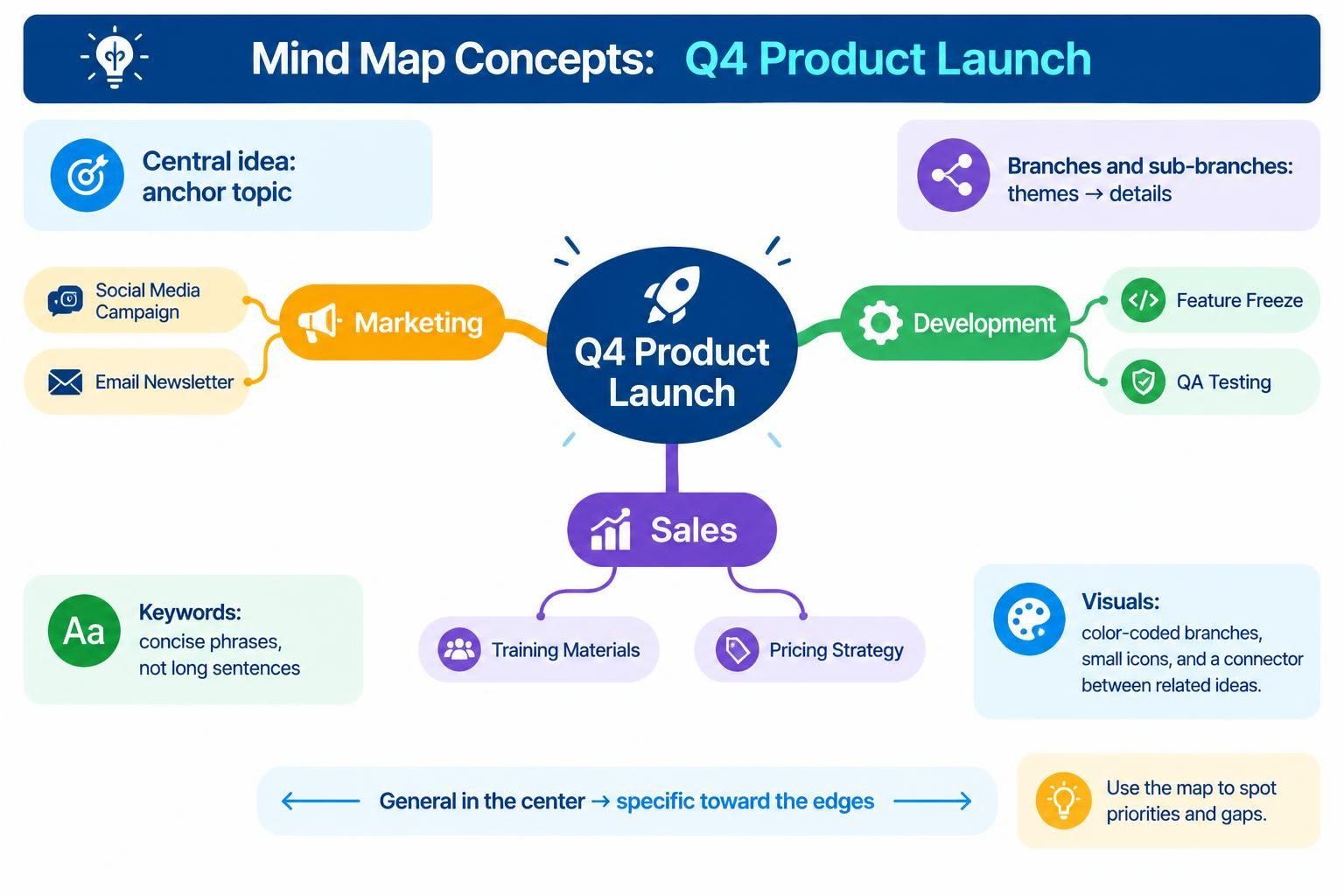
In the modern landscape of technical writing and product management, the ability to structure complex information is a critical skill. While traditional linear notes often fail to capture the non-linear nature of human thought, Mind Mapping offers a superior alternative. By combining the visual clarity of a diagram with the rigorous structure of Diagram-as-Code tools like VPasCode and Markmap, you can transform chaotic brainstorming sessions into organized, version-controlled knowledge bases.
The Architecture of Thought: Why “Code” Your Diagrams?
Traditionally, mind mapping has been a visual exercise performed on whiteboards or within drag-and-drop software interfaces. While intuitive, these methods often struggle with scalability. A massive map can become a visual clutter nightmare, and sharing it requires cumbersome file transfers.
The Diagram-as-Code paradigm flips this workflow. Instead of clicking buttons to draw lines, you write text that represents the structure of your ideas. This approach offers several distinct architectural advantages:
- Version Control: Just like your source code, your mind maps can be stored in Git repositories. You can track every change, revert to previous versions, and see exactly who modified a specific branch of your strategy.
- Collaboration: Changes are reviewed via pull requests, allowing teams to discuss the structure of a project before it is visualized.
- Automation & AI: Because the input is text, it can be easily generated by scripts or refined by Artificial Intelligence tools.
Understanding the Core Concepts
Before diving into the tools, it is essential to understand the underlying logic of a mind map. Think of it as a hierarchical data structure that radiates from a single point of origin.
1. The Central Anchor
Every map begins with a Central Idea. This is the anchor—the main topic that sits at the core of your canvas. Whether it is a “Q4 Product Launch” or a “Semester Exam Plan,” this central node provides the context for everything else.
2. Branches and Sub-branches
Radiating from the center are Branches. These represent major themes or categories. From there, Sub-branches break these categories down into specific details. This hierarchy moves from the general at the center to the specific at the edges.
3. The Power of Keywords
Unlike linear notes, which often rely on full sentences, effective mind mapping relies on Keywords and Phrases. Keeping your nodes concise forces your brain to process the core concept rather than getting bogged down in grammatical structure. This enhances memory retention and allows for rapid scanning.
4. Visual Hierarchy
Structure is key. The map should follow a logical hierarchy. To make this visually distinct, tools allow you to use Colors to differentiate branches (e.g., blue for technical, green for marketing) and Icons to add symbolic meaning to nodes.
Tooling: The VPasCode and Markmap Ecosystem
Visual Paradigm’s ecosystem, specifically the combination of VPasCode and Markmap, provides a robust environment for creating these diagrams programmatically.
Markmap: The Markdown Approach
Markmap is a lightweight tool that renders Markdown syntax directly into interactive mind maps. It is ideal for users who prefer a text-based editor and want a quick, clean visualization without complex configuration.
In Markmap, the hierarchy is defined by the number of hash symbols (#):
- # represents the Central Idea.
- ## represents a Main Branch.
- ### represents a Sub-branch.
This structure allows you to define the entire map using simple indentation and headers, which are then rendered into a dynamic, collapsible visualization.
VPasCode: Diagrams as Code
VPasCode extends this capability by supporting multiple diagramming languages, including PlantUML and Mermaid. It is particularly powerful when dealing with complex systems or when you need to integrate your diagrams directly into a software development workflow.
VPasCode allows you to:
- Define diagrams using specific syntax (like PlantUML tree structures or Mermaid mindmaps).
- Utilize AI Assistance to generate these diagrams from natural language prompts.
- Convert between different diagram formats seamlessly.
Practical Application: Brainstorming with AI
One of the most transformative features of modern tools like VPasCode is the integration of AI. Instead of staring at a blank canvas, you can leverage an AI assistant to generate the initial skeleton of your mind map.
Imagine you need to brainstorm a new product feature. You simply provide a prompt to the AI, such as: “Create a mind map for launching a new AI-powered meeting summarizer. Include branches for Product Features, Go-to-Market Strategy, and Technical Infrastructure.”
The AI will then generate the structured text (either Markdown or PlantUML code), which you can immediately visualize. This saves significant time on the initial setup, allowing you to focus on refining the content and strategy rather than worrying about the structure.
Best Practices for Structuring Your Maps
- Start Simple: Don’t aim for perfection. Begin with a rough sketch of your central idea and main branches. Refine the details as you go.
- Maintain Consistency: Stick to a consistent formatting hierarchy. If you use Markdown, ensure your indentation is correct so the rendering engine interprets the levels correctly.
- Keep it Balanced: Avoid having one branch that is significantly larger than the others. If a branch becomes too dense, consider splitting it into a separate, detailed map.
- Iterate: Treat your mind map as a living document. Revisit it as projects evolve. With version control, you can track these changes over time.
- Export and Share: These tools allow you to export your maps as images (PNG, SVG) or embed them directly into documentation platforms like Confluence or GitHub READMEs.
Conclusion
Mind mapping is more than just a creative exercise; it is a powerful method for knowledge organization and problem-solving. By moving from static, drag-and-drop tools to dynamic, code-based solutions like VPasCode and Markmap, you gain the ability to manage complexity with precision. Whether you are a product manager planning a roadmap or a student organizing exam notes, these tools empower you to visualize your thoughts clearly and act decisively.