
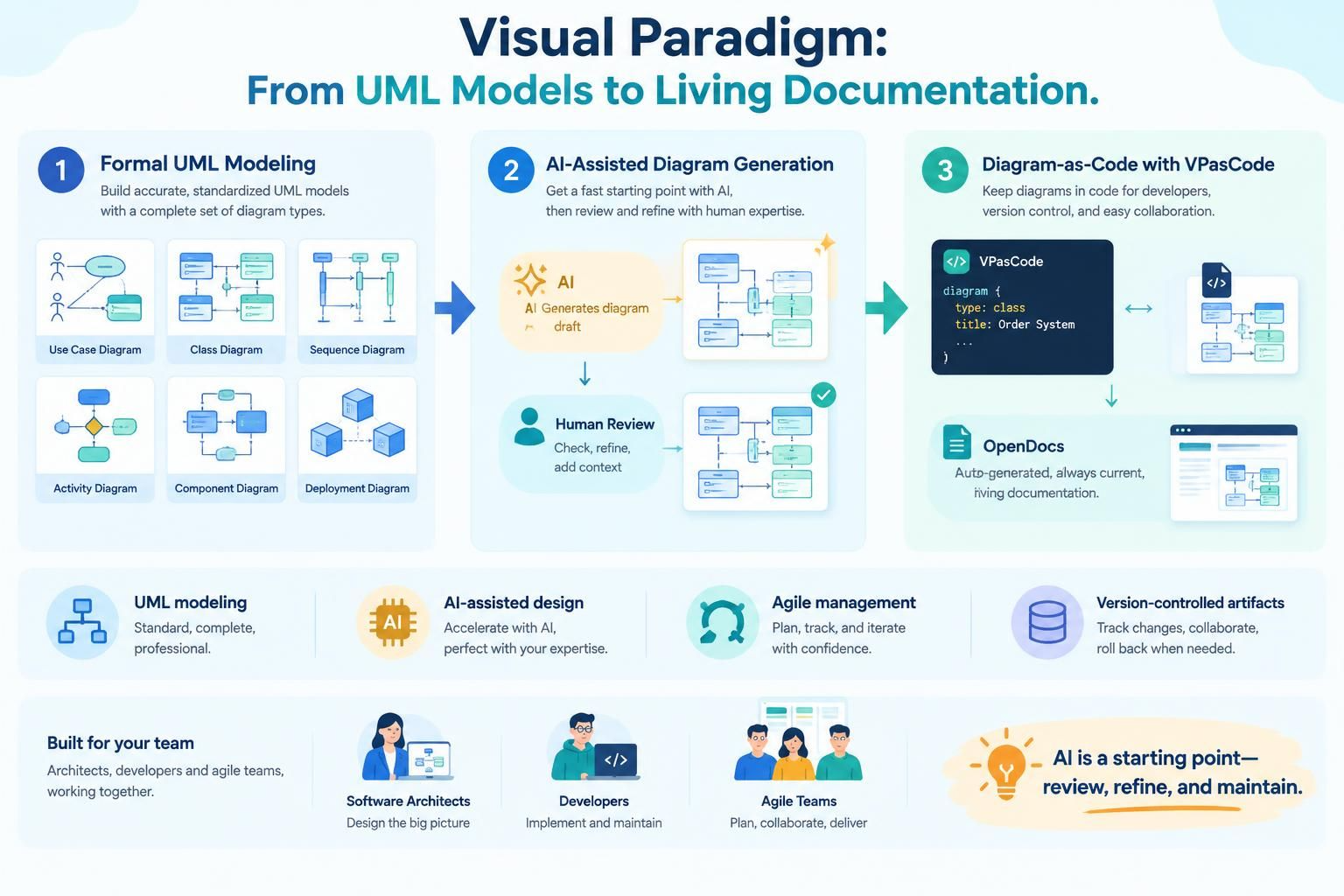
In the rapidly evolving landscape of software engineering, the gap between high-level architectural planning and agile execution is often filled by static documentation that becomes obsolete the moment it is created. Visual Paradigm addresses this challenge by evolving from a traditional Unified Modeling Language (UML) CASE tool into a comprehensive ecosystem. This guide explores how modern teams can leverage formal UML modeling, AI-assisted generation, and diagram-as-code workflows to maintain “living documentation” that stays synchronized with their codebases.
1. The Evolution of UML Modeling: Beyond Static Diagrams
Traditional UML tools often treated diagrams as isolated images—artifacts used for presentations or initial design phases. However, Visual Paradigm has shifted the paradigm to support a model repository. In this environment, diagrams are not merely pictures; they are dynamic views into a shared underlying model.
This approach ensures that changes in one diagram (such as a Class Diagram) automatically propagate to related views (like a Sequence Diagram), ensuring consistency across the entire project. The platform supports the full UML 2.x spectrum, including:
- Structural Diagrams: Class, Component, Deployment, Package, Object, and Composite Structure.
- Behavioral Diagrams: Use Case, Sequence, Activity, State Machine, Communication, Interaction Overview, and Timing.
Furthermore, the platform extends beyond UML to support SysML, BPMN, ERD, and DFD, providing a robust toolkit for system architects, business analysts, and developers alike.
2. Accelerating Agility with AI-Assisted Features
One of the most significant hurdles in adopting UML is the time required to create diagrams from scratch. Visual Paradigm integrates generative AI at multiple touchpoints to accelerate this process, making formal modeling accessible even for those who prefer natural language inputs.
2.1. Natural Language to Diagram
The AI chatbot allows users to convert plain-English descriptions directly into structured UML diagrams. For instance, a user can describe a user login sequence involving frontend credentials, an authentication service, and database validation. The AI analyzes this text, detects the necessary lifelines and messages, and automatically generates a compliant Sequence Diagram with correct layout and notation.
2.2. AI for State Machine and Behavioral Modeling
State machines are notoriously complex to define manually. The AI state machine generator identifies initial states, terminal states, transitions, guards, and events from a simple lifecycle description. For an order management system, the AI can automatically generate states such as “Order Created,” “Pending,” and “Shipped,” along with the appropriate transitions for cancellation or shipping.
2.3. Text Analysis for Model Extraction
To aid in requirements analysis, the platform includes a text analysis tool that identifies keywords and candidate classes from problem descriptions. This helps analysts bridge the gap between unstructured requirement text and structured model elements, facilitating a smoother transition from requirements to design.
3. The Power of Diagram-as-Code (VPasCode)
For development teams, maintaining diagrams in a visual editor can sometimes feel disconnected from the version control workflows they use for their application code. Visual Paradigm solves this with VPasCode, a browser-based editor that supports diagram-as-code.
VPasCode allows teams to write diagrams using standard syntax languages such as PlantUML, Mermaid, Graphviz, and D2 within a single editor. This integration offers several key benefits:
- Version Control: Diagrams can be stored in Git repositories alongside application code, allowing for reviewable diffs and rollbacks.
- Syntax Correction: The AI can flag syntax errors with specific line numbers and propose fixes via an “Fix with AI” button, reducing debugging friction.
- Live Preview: Changes are rendered instantly, allowing developers to see the visual impact of code edits in real-time.
4. Closing the Loop: Living Documentation with OpenDocs
A common issue in software development is the “export-stale-screenshot” problem, where documentation is exported as an image, becomes disconnected from the source, and requires manual updates. Visual Paradigm eliminates this through OpenDocs.
OpenDocs creates living documentation that embeds diagrams as live components. When a diagram is updated in the VPasCode editor or the main modeling environment, the documentation automatically reflects those changes. This ensures that stakeholders always have access to the current state of the architecture without the confusion of version mismatches.
5. Strategic Implementation: The AI + VPasCode + OpenDocs Workflow
To maximize the efficiency of the platform, teams should adopt a specific workflow that leverages the strengths of each component:
- Prompt the AI: Begin by describing the system or specific diagram logic using natural language. The AI generates the initial draft or code structure.
- Refine in VPasCode: Open the generated code in the VPasCode editor. Here, you can adjust styling, add missing relationships, or fix logical gaps using the live preview.
- Publish to OpenDocs: Embed the refined diagram into your project documentation. Because the link is live, any future updates to the code automatically update the documentation.
Best Practices for Agile Teams
- Treat AI as a Draft: While AI generation is powerful, it should be treated as a starting point. Human oversight is essential to ensure domain-specific nuances and naming conventions are applied correctly.
- Version-Control Everything: Store your diagram files in Git. This allows architecture changes to be reviewed via pull requests, just like application code.
- Use “As-Is” vs. “To-Be”: Leverage the tool’s ability to model current and future-state processes simultaneously to highlight exactly what needs to change during a transformation initiative.
6. Conclusion
Visual Paradigm’s strength lies in its ability to bridge the gap between formal UML modeling, developer-friendly diagram-as-code, and AI-accelerated design. By integrating these technologies, teams can move away from static, outdated documentation and toward a dynamic, living architecture that supports agile development cycles.
Whether you are a software architect designing the big picture, a developer implementing details, or a project manager tracking progress, the platform offers a unified environment for modeling, documentation, and agile management. The key to success is treating AI as a powerful accelerator for your initial drafts and utilizing the robust tooling to refine, maintain, and version-control your system designs.