
In the realm of Enterprise Architecture, few tools are as effective at aligning technical teams with business goals as the C4 Model. While many architects are familiar with the System Context diagram for a single application, the true power of the C4 model lies in its System Landscape view. This perspective provides a strategic map of an entire organization’s software ecosystem, revealing how disparate systems, external partners, and human actors interact.
This tutorial explores how to leverage Visual Paradigm‘s modeling ecosystem—specifically its C4 modeler and VPasCode—to create maintainable, high-level landscape diagrams. We will examine the conceptual boundaries of these diagrams, the strategic benefits of using “Diagrams-as-Code,” and how AI can accelerate the drafting process for Agile EA teams.
1. Conceptualizing the System Landscape
A System Landscape diagram is not merely a collection of boxes; it is a strategic artifact designed to answer the question: “How do the systems in this specific area fit together?”
Defining the Scope
Unlike a System Context diagram, which focuses on one specific system, a Landscape view steps back to cover a broader scope. This might be an entire enterprise, a specific business unit, or a product portfolio. The key to a successful landscape diagram is establishing a clear boundary.
- Internal Systems: These are the applications, services, and data stores that belong to your organization.
- External Systems: These are third-party services or legacy systems outside your direct control (e.g., Payment Providers, Identity Providers).
- People: Users, staff, and partners who interact with the systems.
Crucially, a landscape view is a structure diagram, not a process flow. It shows what systems exist and how they depend on one another, but it intentionally omits low-level details like API endpoints, database schemas, or deployment nodes. Those details belong in deeper views like Containers or Components.
2. The Visual Paradigm Approach: Visual Modeling
For teams that prefer graphical interfaces, Visual Paradigm offers a robust C4 Modeler. This tool allows architects to drag-and-drop elements onto a canvas, making it easy to visualize relationships and hierarchies.
Building the Landscape Visually
In the Visual Paradigm C4 environment, the workflow typically involves:
- Selecting the Diagram Type: Choose “System Landscape” from the diagram palette.
- Defining Boundaries: Use the
Enterprise Boundarytool to draw a box representing your organization (e.g., “Retail Company”). - Placing Systems: Drag and drop
SystemandPersonelements into the boundary. You can also addSystem_Extelements for external entities. - Connecting Elements: Draw relationships (lines) between people and systems. Visual Paradigm allows you to label these relationships with verbs that describe the data flow (e.g., “Submits Orders,” “Authenticates Customers”).
This visual approach is particularly effective for collaborative workshops where stakeholders can physically point to dependencies and discuss integration points. It also supports hierarchical modeling, allowing you to create a “Landscape” of the enterprise that links directly to detailed “Context” diagrams for individual systems.
3. The Modern Edge: C4 Landscape Diagrams as Code with VPasCode
While visual modeling is excellent for design, software architecture is increasingly moving towards Diagrams-as-Code. This approach treats diagrams as text files (typically using PlantUML) that can be version-controlled in Git, reviewed like code, and generated automatically.
VPasCode is Visual Paradigm’s browser-based tool that brings this methodology to the C4 model. It allows you to write the architecture in text and see it rendered in real-time.
Why Choose Diagram-as-Code for Landscapes?
- Reviewable Changes: You can use
git diffto see exactly which relationships were added or removed in a pull request. - Repeatability: The source code generates the image. There is no “drift” between the diagram and the code.
- AI Integration: VPasCode supports AI prompts to generate initial drafts of the code, which is a game-changer for large-scale landscapes.
Understanding the Syntax
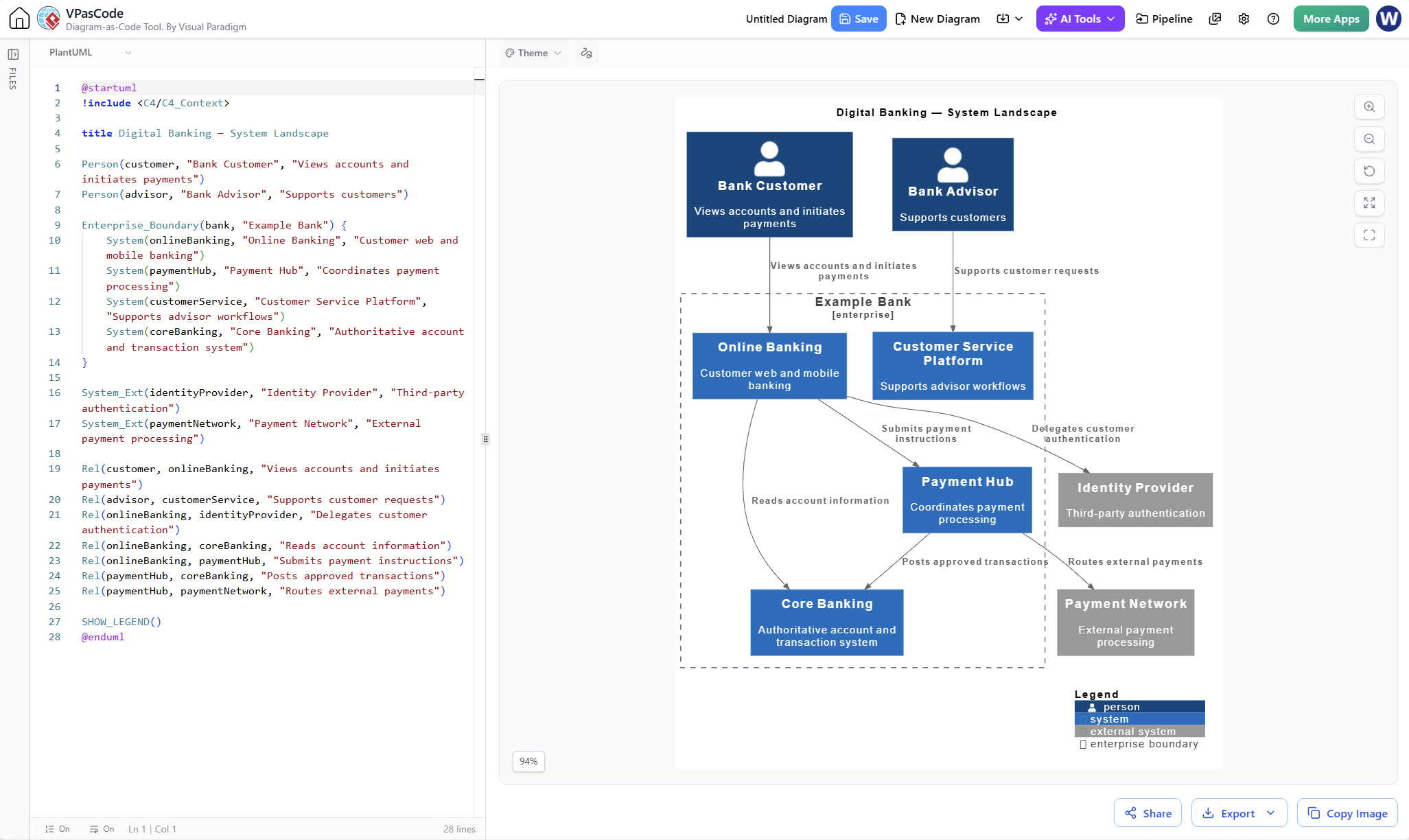
In VPasCode, a landscape diagram is defined using specific macros. You start by including the C4 context library, then define your boundary, systems, and relationships.
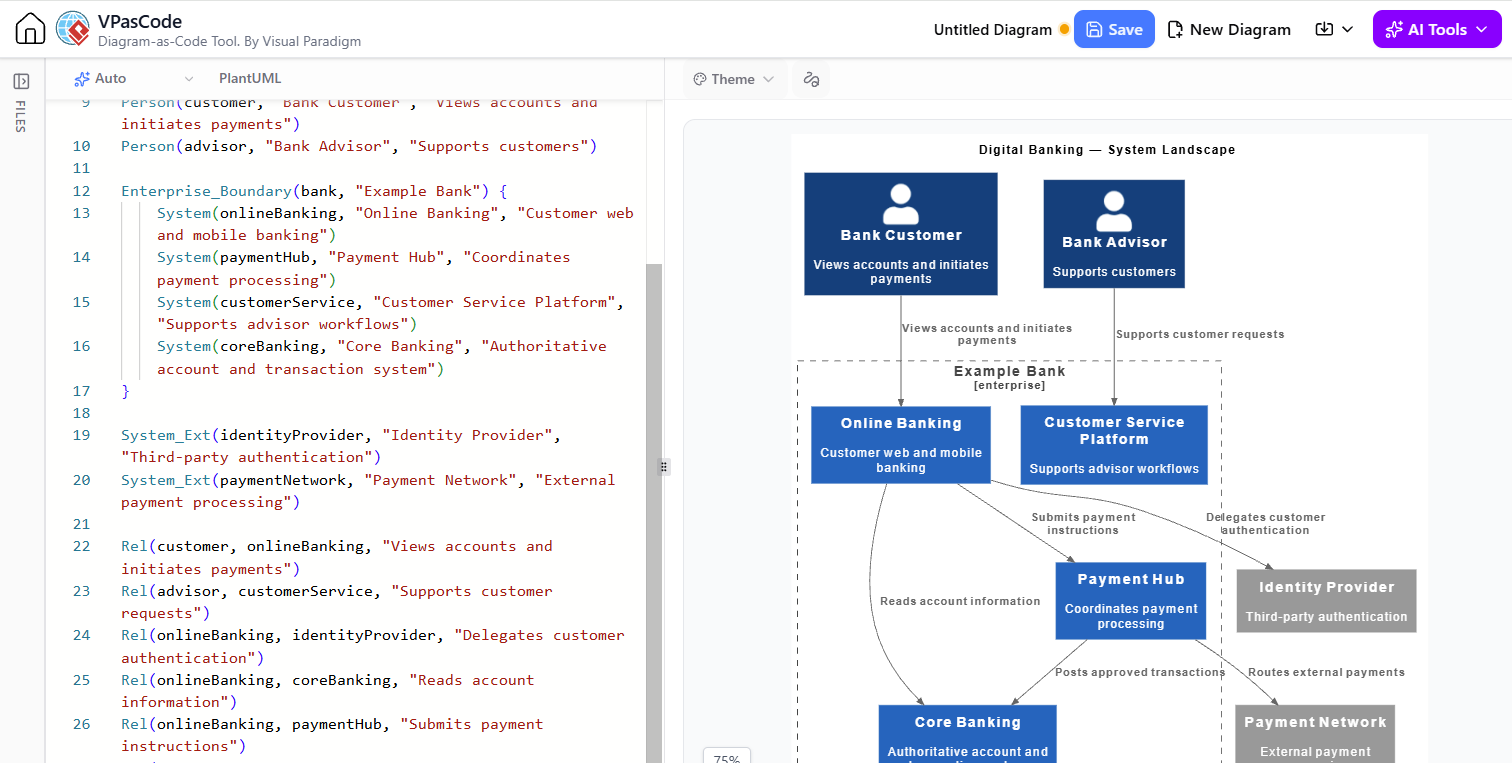
@startuml
!include https://static.visual-paradigm.com/plantuml-stdlib/C4-PlantUML/master/C4_Context.puml
LAYOUT_TOP_DOWN()
LAYOUT_WITH_LEGEND()
skinparam vpDiagramType C4modelSystemLandscapeDiagram

title Digital Banking — System Landscape

Person(customer, "Bank Customer", "Views accounts and initiates payments")
Person(advisor, "Bank Advisor", "Supports customers")

Enterprise_Boundary(bank, "Example Bank") {
    System(onlineBanking, "Online Banking", "Customer web and mobile banking")
    System(paymentHub, "Payment Hub", "Coordinates payment processing")
    System(customerService, "Customer Service Platform", "Supports advisor workflows")
    System(coreBanking, "Core Banking", "Authoritative account and transaction system")
}

System_Ext(identityProvider, "Identity Provider", "Third-party authentication")
System_Ext(paymentNetwork, "Payment Network", "External payment processing")

Rel(customer, onlineBanking, "Views accounts and initiates payments")
Rel(advisor, customerService, "Supports customer requests")
Rel(onlineBanking, identityProvider, "Delegates customer authentication")
Rel(onlineBanking, coreBanking, "Reads account information")
Rel(onlineBanking, paymentHub, "Submits payment instructions")
Rel(paymentHub, coreBanking, "Posts approved transactions")
Rel(paymentHub, paymentNetwork, "Routes external payments")

@enduml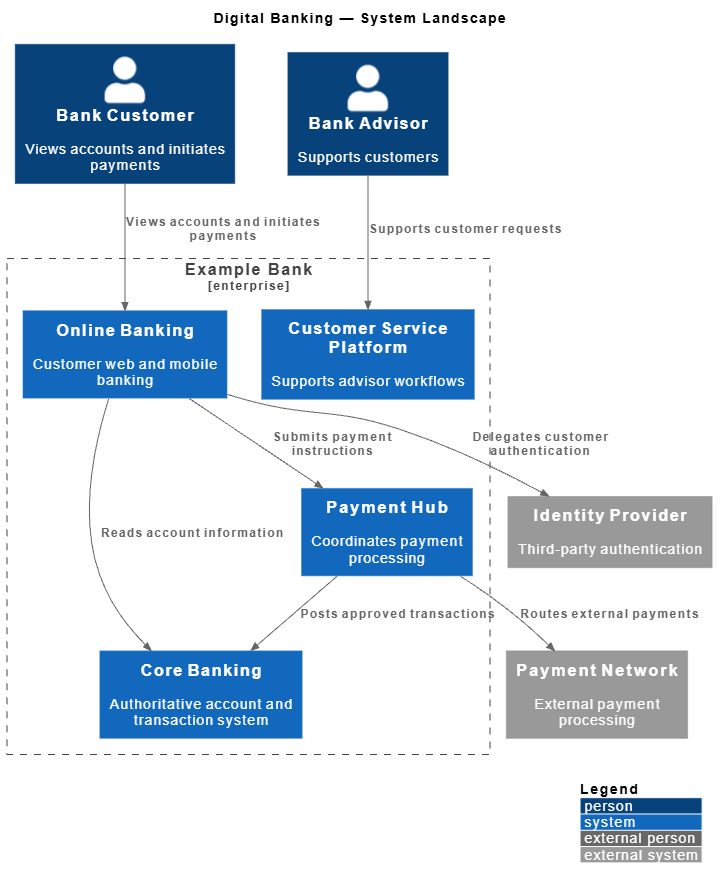
4. Integrating AI into the Landscape Workflow
One of the most powerful features of VPasCode is its ability to use AI to accelerate the creation of these diagrams. Instead of manually typing out every relationship, you can provide a natural language description of your organization’s scope.
The AI-Assisted Workflow
- Define the Prompt: Start with a clear scope. For example: “Create a C4-PlantUML system landscape for the Customer Services department. Include the Customer Portal, Identity Service, Case Management, and external Messaging Provider. Show a Customer and Support Agent.”
- Generate: VPasCode’s AI tool will generate the PlantUML code based on your prompt.
- Refine: Review the generated diagram. AI can infer relationships that might not exist or miss critical ones. You can then issue follow-up prompts to correct the code, such as: “Remove the relationship between the Customer Portal and the Messaging Provider; they do not interact directly.”
- Verify: Always validate the AI-generated diagram with system owners. AI is excellent for syntax and structure, but it cannot verify the actual business logic or dependencies.
5. Best Practices for Agile EA Teams
For Agile Enterprise Architecture teams, the Landscape diagram is a living document. Here are some strategies to keep it effective:
Keep it Maintainable
A landscape diagram that is not updated will mislead. Assign an “owner” for the diagram and set triggers for updates (e.g., when a new system is added to the portfolio). If the diagram becomes too dense, split it into smaller views (e.g., “Retail Operations Landscape” vs. “Finance Landscape”).
Design for the Audience
Don’t try to make one diagram serve every purpose. A leadership overview should emphasize major business systems and external partners, while an architecture discussion might need clearer technology or integration descriptions. Use the “Design Principles” of C4 to tailor the view.
Link to Deeper Views
The landscape is an entry point, not the final destination. Use links in your documentation to connect each system box to its corresponding System Context diagram. From there, teams can drill down into Container and Component views as needed.
Conclusion
The C4 System Landscape diagram is a vital tool for visualizing the complexity of modern software ecosystems. By combining the visual power of Visual Paradigm’s C4 Modeler with the precision and automation of VPasCode and AI, teams can create architecture documentation that is not only accurate but also easy to maintain and understand. Whether you choose to draw it or code it, the goal remains the same: to provide a shared big-picture understanding of how your software delivers value.