
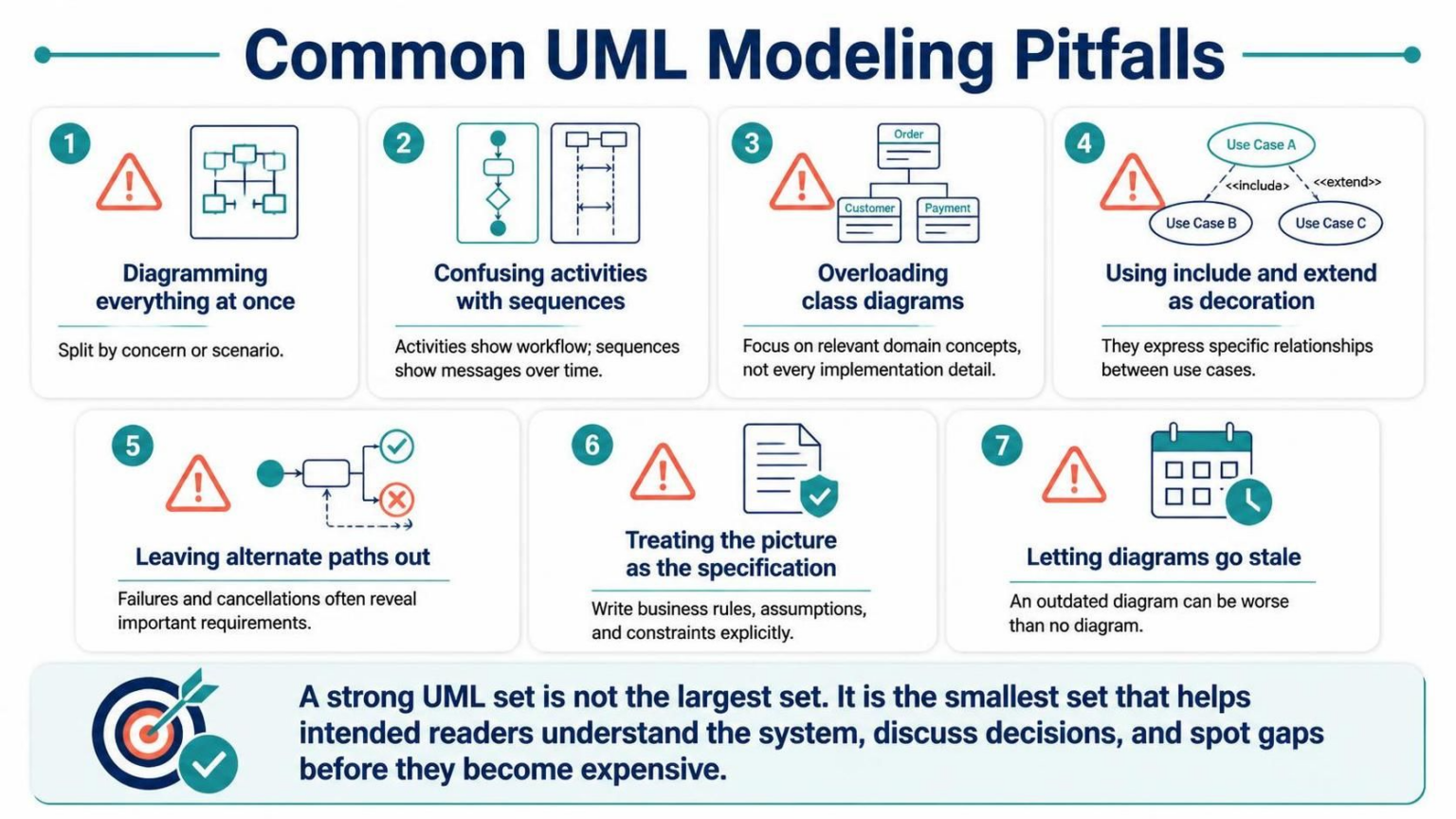
System architecture is not just about drawing boxes and arrows; it is about communication. When teams create complex diagrams without a clear strategy, the result is often a “spaghetti diagram” that confuses more than it clarifies. Based on the principles of effective modeling, this guide walks you through the most common UML pitfalls and how to navigate them using modern tooling like Visual Paradigm and VPasCode.
1. The Trap of “Diagramming Everything at Once”
One of the most frequent mistakes junior and intermediate modelers make is attempting to capture the entire system in a single view. Whether it is a massive class diagram or an all-encompassing sequence diagram, this approach leads to cognitive overload. Complexity kills clarity.
To avoid this, you must split your modeling efforts by concern or scenario.
- Split by Concern: Separate the “what” from the “how.” Use Class Diagrams for domain concepts and Component Diagrams for software structure.
- Split by Scenario: Instead of one giant flow, create specific Use Case diagrams or Sequence Diagrams for distinct user journeys (e.g., “User Login” vs. “Admin Report Generation”).
2. Distinguishing Activities from Sequences
Confusing Activity Diagrams with Sequence Diagrams is a structural error that obscures the nature of the system behavior. While they may look similar (both involve shapes and lines), they serve different analytical purposes.
- Activity Diagrams (Workflow): These focus on the flow of control and logic. They are best used to show algorithms, business processes, or complex conditional logic (e.g., “If payment fails, retry or cancel”).
- Sequence Diagrams (Interaction): These focus on the exchange of messages over time. They are essential for understanding how objects collaborate to achieve a specific result.
Code Example: Choosing the Right Syntax
When using VPasCode or PlantUML, ensure your syntax reflects your intent. An activity diagram uses state transitions, while a sequence diagram uses message definitions.
@startuml
' Correct: Activity Diagram (Workflow focus)
start
:Process Order;
if (Stock Available?) then (yes)
  :Charge Customer;
else (no)
  :Cancel Order;
endif
stop
@enduml

@startuml
' Correct: Sequence Diagram (Message focus)
Alice -> Bob : Request Payment
Bob -> Bob : Validate
Bob --> Alice : Payment Success
@enduml
3. The Danger of Overloading Class Diagrams
A Class Diagram is a map of your domain, not a dump of your database schema. A common pitfall is including every single implementation detail—such as private fields, database IDs, or temporary session variables—resulting in a diagram that is too dense to read.
Focus on relevant domain concepts. If a class is only used for a specific technical implementation and doesn’t represent a core business entity, consider hiding it or moving it to a separate technical view.
4. Using Include and Extend as Decoration
In Use Case modeling, relationships like <<include>> and <<extend>> are powerful tools, but they are often misused as mere decorations to make a diagram look “complete.”
- <<include>>: Use this only when a use case always requires the behavior of another (e.g., “Place Order” always includes “Validate Payment”).
- <<extend>>: Use this for optional or conditional behavior (e.g., “Apply Discount” might extend “Place Order” only if the user is a VIP).
5. The Cost of Ignoring Alternate Paths
Most tutorials show the “Happy Path”—the perfect scenario where everything works. However, in real-world architecture, failures and cancellations are just as important as success. Leaving alternate paths out is a recipe for bugs.
Failures and cancellations often reveal important requirements. If you model a system where a user can enter an invalid password, you must model the retry loop or the account lockout mechanism. These negative paths often expose security and validation constraints that are otherwise invisible.
6. Diagrams are NOT Specifications
A diagram is a visual aid, not a contract. A common pitfall is treating the picture as the specification, assuming that the diagram contains all the necessary business rules.
Explicitly document rules. If a rule is complex (e.g., “Tax is calculated differently for international shipping”), do not rely on a text label inside a box. Write it in a dedicated requirements document or a text annotation block. Diagrams should handle the structure; text should handle the logic.
7. Keeping Diagrams Fresh (The Staleness Problem)
There is a dangerous misconception that an outdated diagram is better than no diagram. In reality, an outdated diagram can be worse than no diagram because readers may trust it and make decisions based on incorrect information.
To prevent this, integrate your diagrams into your development workflow. If you use VPasCode, ensure your code generation is bidirectional. If the code changes, the diagram must update. If the requirements change, the diagram must be the first thing to update.
The Philosophy of a Strong UML Set
Ultimately, the goal of UML is not to create the most complex visual artifact possible. As noted in the source text, “A strong UML set is not the largest set. It is the smallest set of diagrams that lets the intended readers understand the system, discuss decisions, and spot gaps before they become expensive.”
Whether you are using Visual Paradigm for its robust modeling capabilities or leveraging AI-driven tools to generate initial drafts, always ask: Does this diagram help me understand the system? If not, remove it.