
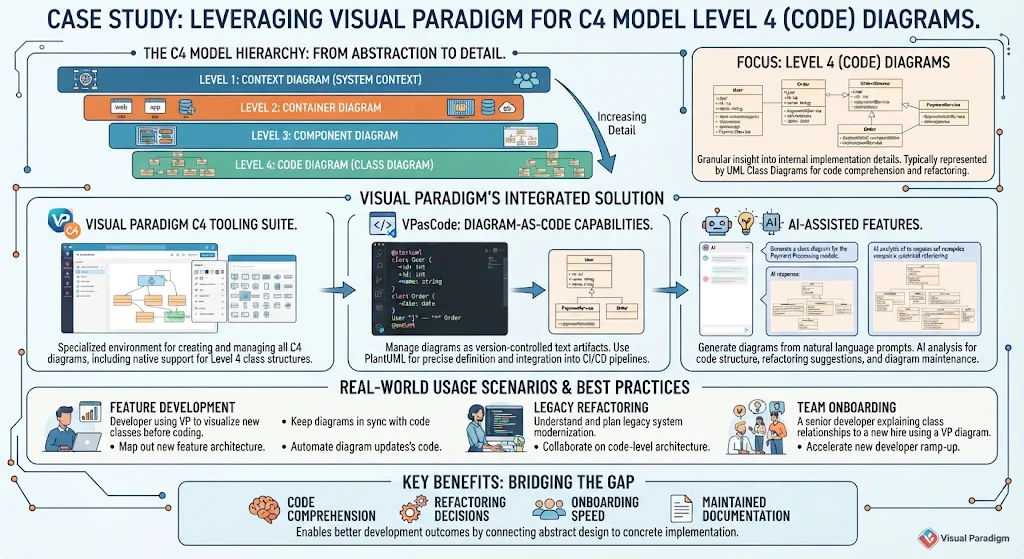
In the fast-paced world of modern software development, the gap between high-level architectural vision and the gritty reality of code implementation often leads to confusion. For Agile teams and Enterprise Architects, maintaining a “living” documentation of this architecture is a constant struggle. This tutorial explores how to bridge that gap using the C4 Model’s Level 4 diagrams, powered by Visual Paradigm’s VPasCode and AI-assisted features.
What is C4 Level 4? The Bridge to Implementation
The C4 model is a hierarchical approach to software architecture visualization. While Levels 1 through 3 (Context, Container, and Component) provide the “big picture,” Level 4—The Code Diagram—zooms in to show the internal details of a specific component.
Traditionally, this level was represented by static UML Class Diagrams. However, in an Agile environment, static diagrams quickly become outdated. The C4 Level 4 diagram is not just a picture of the code; it is a purpose-driven view that highlights specific classes, their relationships, and design patterns relevant to the problem at hand.
Key Principles of C4 Level 4 Diagrams
- Selective Detail: Do not diagram every single class in a file. Focus only on the classes necessary to explain a specific architectural concern, such as a domain model or a design pattern.
- Consistency: The classes shown here must align with the components defined in Level 3.
- Living Documentation: These diagrams should evolve alongside the code, not lag behind it.
The Modern Toolkit: Visual Paradigm + VPasCode + AI
Visual Paradigm offers a comprehensive ecosystem to manage these diagrams without the maintenance burden of traditional tools.
1. Visual Paradigm C4 Tooling
The platform provides native support for the C4 model, allowing teams to switch seamlessly between levels. You can start with a high-level Context diagram and drill down into the specific code details of a container, ensuring that architectural intent is preserved from the executive suite to the developer’s IDE.
2. VPasCode: Diagram-as-Code
One of the biggest challenges in software architecture is keeping diagrams in sync with code. VPasCode (Visual Paradigm as Code) solves this by treating diagrams as text artifacts.
- Version Control: Diagram definitions can be stored in Git alongside source code.
- Automation: Diagrams can be generated automatically from code annotations.
- CI/CD Integration: You can include diagram generation in your build pipelines to ensure the documentation is always up-to-date.
3. AI-Assisted Features
Modern AI capabilities streamline the creation process. Instead of manually drawing boxes, you can use natural language prompts to generate the initial structure of a class diagram. AI can scan existing codebases to suggest class relationships and identify design patterns, significantly reducing the time spent on documentation.
Practical Application: The “Diagram-as-Code” Workflow
To effectively use C4 Level 4 diagrams in an Agile team, we recommend a workflow that integrates with your daily development process.
Step 1: Define the Scope
Before drawing, ask: “What am I trying to explain?” Is it a new domain model for an e-commerce feature? Is it the strategy pattern used for payment processing? Focus your Level 4 diagram on that specific narrative.
Step 2: Generate with AI and VPasCode
Use Visual Paradigm’s AI to generate a base diagram from a description or existing code. You can define the classes and relationships using PlantUML syntax within the VPasCode editor.
Step 3: Refine and Annotate
Review the generated diagram. Remove unnecessary attributes and methods (Selective Detail). Add notes to explain why certain patterns were chosen. This turns a technical map into a communication tool.
Step 4: Commit and Sync
Commit the diagram definition to your repository. This ensures that as developers refactor code, the diagram can be regenerated to reflect those changes, keeping the documentation “living.”
Real-World Use Cases
1. Onboarding New Developers
Instead of handing a new hire a 500-page document, provide them with focused Level 4 diagrams of the critical modules (e.g., Order Processing or Inventory Management). This accelerates their understanding of the business logic.
2. Microservices Migration
When decomposing a monolith, use class diagrams to identify coupling. High coupling between classes suggests they should move together into a new microservice, while low coupling indicates good separation boundaries.
3. Technical Debt Assessment
Visualizing dependencies can reveal “God Classes” or circular dependencies that are difficult to maintain. These visual cues help teams prioritize refactoring efforts.
Conclusion
C4 Level 4 diagrams, when combined with Visual Paradigm’s VPasCode and AI tools, transform from static, often-ignored artifacts into strategic assets. They provide a clear, maintainable link between abstract design and concrete implementation, benefiting everyone from developers to product managers. By adopting this modern, code-centric approach, Agile teams can ensure their architectural documentation remains as dynamic and valuable as the software they build.