
Introduction
Software architecture is often misunderstood as a collection of complex diagrams filled with boxes, arrows, and technical jargon that only senior architects can decipher. The C4 model, created by Simon Brown, challenges this notion by introducing a hierarchical set of abstractions that make software architecture diagrams accessible, consistent, and valuable to diverse audiences—from business stakeholders to development teams.
The C4 model stands for Context, Containers, Components, and Code—the four levels of abstraction that help you describe the static structure of a software system at different granularities. Unlike traditional UML diagrams that can become overwhelming, C4 encourages simplicity, clarity, and progressive disclosure of detail.
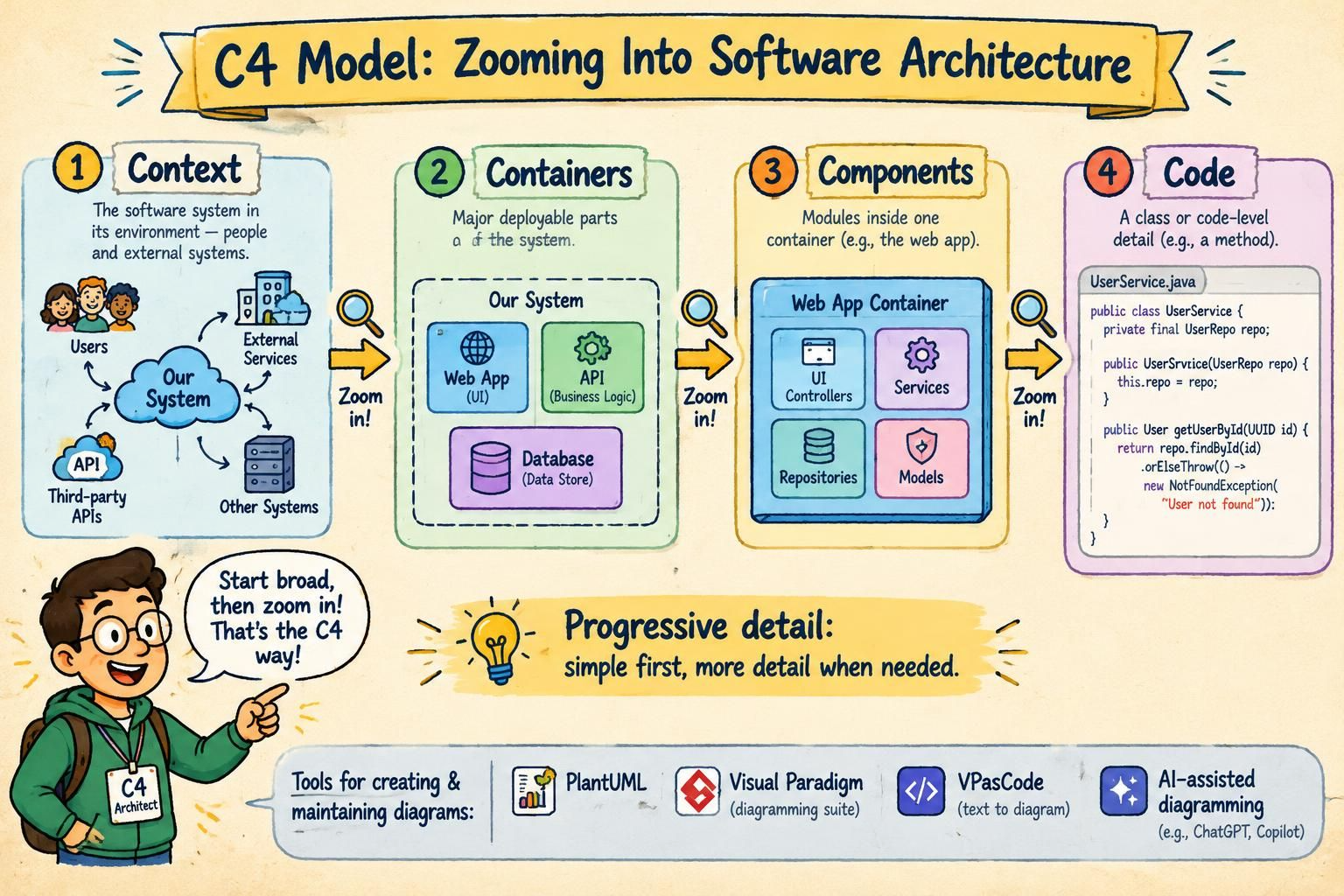
This guide provides a comprehensive overview of C4 modeling, including key concepts, practical examples, usage cases, and hands-on PlantUML code snippets. We’ll also explore modern tooling options like Visual Paradigm’s C4 Model support combined with VPasCode (Diagram-as-Code) and AI-assisted features that streamline the diagramming process. Whether you’re a product manager, software architect, or developer, this guide will equip you with the knowledge and tools to create effective architecture documentation that communicates clearly and scales with your system.
Key Concepts of the C4 Model
The Four Levels of Abstraction
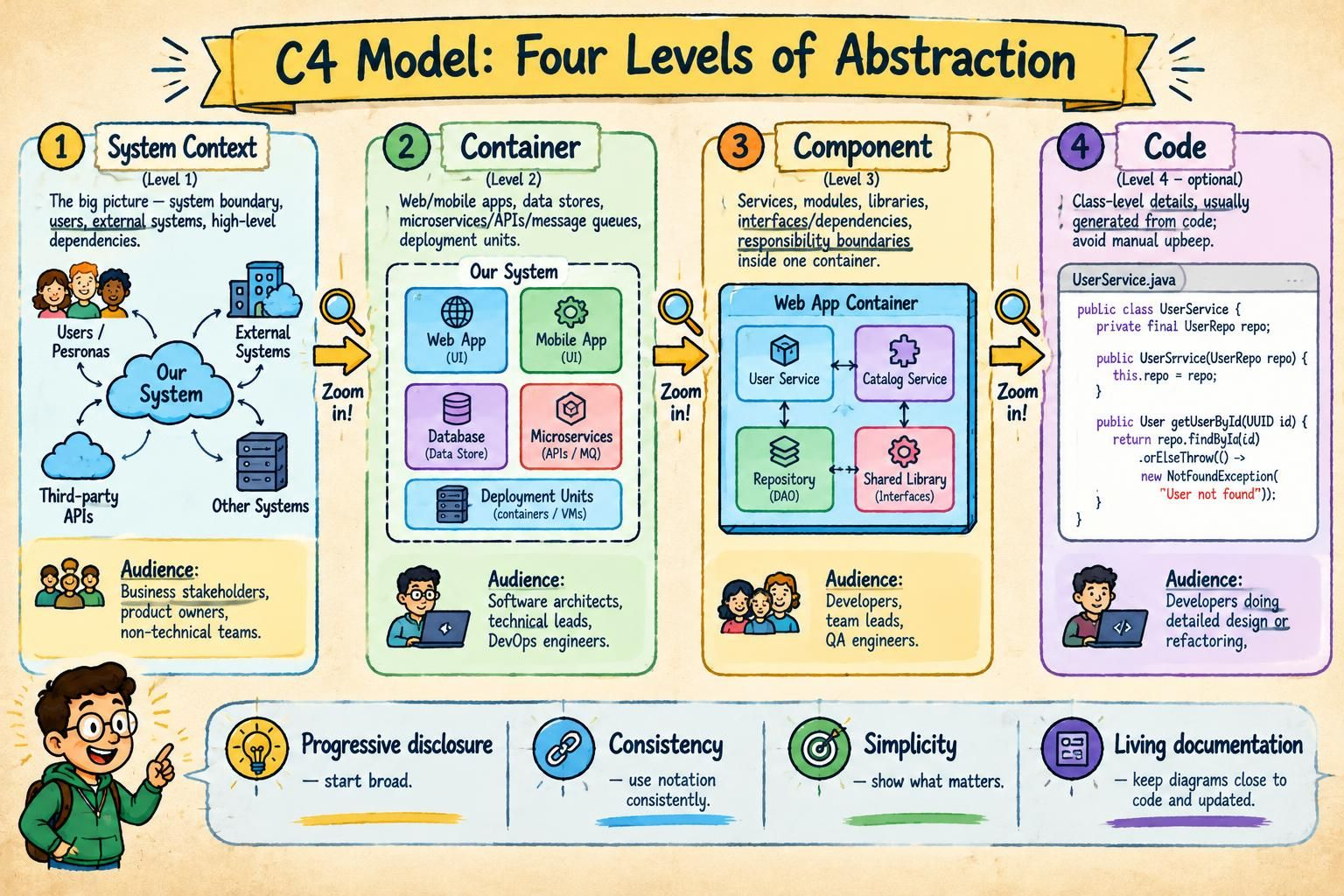
1. System Context Diagram (Level 1)
Shows how your software system fits into the wider world. It identifies:
-
The system boundary
-
Users (personas)
-
External systems it interacts with
-
High-level dependencies
Audience: Business stakeholders, product owners, non-technical teams.
2. Container Diagram (Level 2)
Zooms into the system to show high-level technology choices and responsibilities:
-
Applications (web apps, mobile apps)
-
Data stores (databases, file systems)
-
Microservices, APIs, message queues
-
Deployment units
Audience: Software architects, technical leads, DevOps engineers.
3. Component Diagram (Level 3)
Drills down into a single container to show its internal building blocks:
-
Services, modules, libraries
-
Interfaces and dependencies between components
-
Responsibility boundaries
Audience: Developers, team leads, QA engineers.
4. Code Diagram (Level 4)
Optional level showing class-level details, typically generated from code using tools. Not recommended for manual creation due to maintenance overhead.
Audience: Developers during detailed design or refactoring.
Core Principles
-
Progressive Disclosure: Start high-level, drill down only when needed.
-
Consistency: Use consistent notation across all diagrams.
-
Simplicity: Avoid unnecessary detail; focus on what matters for the audience.
-
Living Documentation: Keep diagrams close to code and update them regularly.
Usage Cases: Who Benefits and Why?
Beneficiaries
| Role | Benefit |
|---|---|
| Product Managers | Understand system boundaries, dependencies, and impact of feature changes without getting lost in technical details. |
| Software Architects | Communicate architectural decisions clearly, onboard new team members faster, and maintain a shared mental model. |
| Developers | Navigate codebases more effectively, understand component responsibilities, and identify integration points. |
| DevOps/SRE Teams | Visualize deployment topology, monitor container interactions, and plan infrastructure changes. |
| Stakeholders & Clients | Gain confidence in system design through clear, non-technical visuals that explain value and risk. |
Standout Advantages
-
Universal Language: C4 uses simple shapes and labels that anyone can understand, reducing miscommunication.
-
Tool-Agnostic: Works with any diagramming tool, from whiteboards to code-based generators.
-
Scalable: Suitable for small startups and large enterprise systems alike.
-
Integrates with Agile: Fits naturally into sprint planning, backlog refinement, and retrospectives.
-
Supports Remote Collaboration: Digital C4 diagrams are easy to share, version-control, and review asynchronously.
Tips and Tricks for Effective C4 Modeling
-
Start with Context: Always begin with Level 1. If stakeholders don’t understand the big picture, deeper diagrams won’t help.
-
Limit Detail per Diagram: Each diagram should answer one specific question. Avoid cramming multiple concerns into one view.
-
Use Color Consistently: Assign colors to types (e.g., blue for applications, green for databases) and stick to them.
-
Name Things Clearly: Use descriptive names like “Customer Web App” instead of “WebApp1.”
-
Show Direction of Dependencies: Arrows should indicate data flow or dependency direction, not just connections.
-
Automate Where Possible: Generate Component/Code diagrams from source code to reduce manual effort.
-
Review Regularly: Treat diagrams as living documents. Schedule quarterly reviews to ensure accuracy.
-
Combine with Other Artifacts: Pair C4 diagrams with ADRs (Architecture Decision Records), API docs, and runbooks.
-
Avoid Over-Engineering Level 4: Manual code-level diagrams become obsolete quickly. Use automated tools if needed.
-
Tell a Story: Each diagram should narrate a part of the system’s story. Add annotations or legends if necessary.
Diagram Examples Using C4-PlantUML
Below are practical examples using PlantUML with the C4-PlantUML library. You can render these in any PlantUML-compatible editor or integrate them into Visual Paradigm via VPasCode.
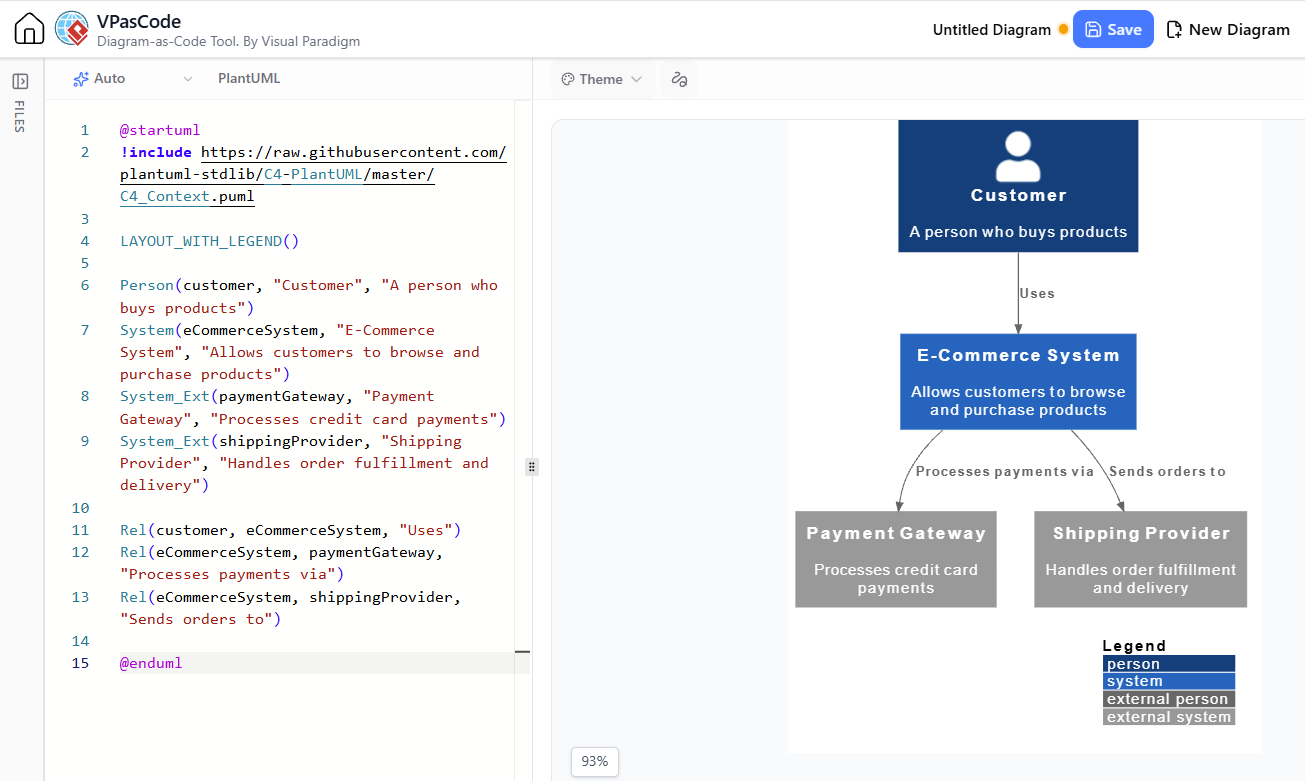
Example 1: System Context Diagram
@startuml
!include https://raw.githubusercontent.com/plantuml-stdlib/C4-PlantUML/master/C4_Context.puml

LAYOUT_WITH_LEGEND()

Person(customer, "Customer", "A person who buys products")
System(eCommerceSystem, "E-Commerce System", "Allows customers to browse and purchase products")
System_Ext(paymentGateway, "Payment Gateway", "Processes credit card payments")
System_Ext(shippingProvider, "Shipping Provider", "Handles order fulfillment and delivery")

Rel(customer, eCommerceSystem, "Uses")
Rel(eCommerceSystem, paymentGateway, "Processes payments via")
Rel(eCommerceSystem, shippingProvider, "Sends orders to")

@enduml
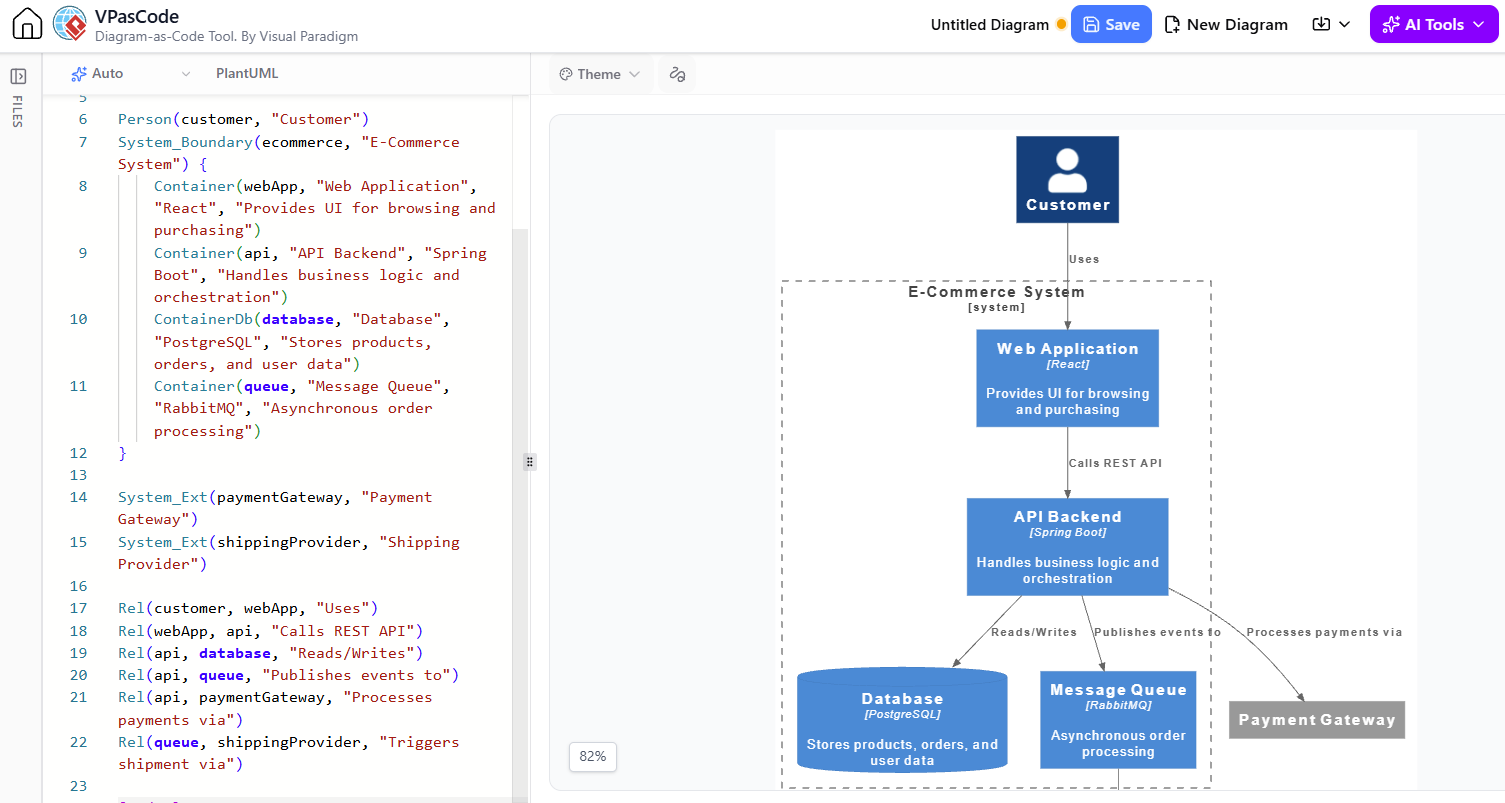
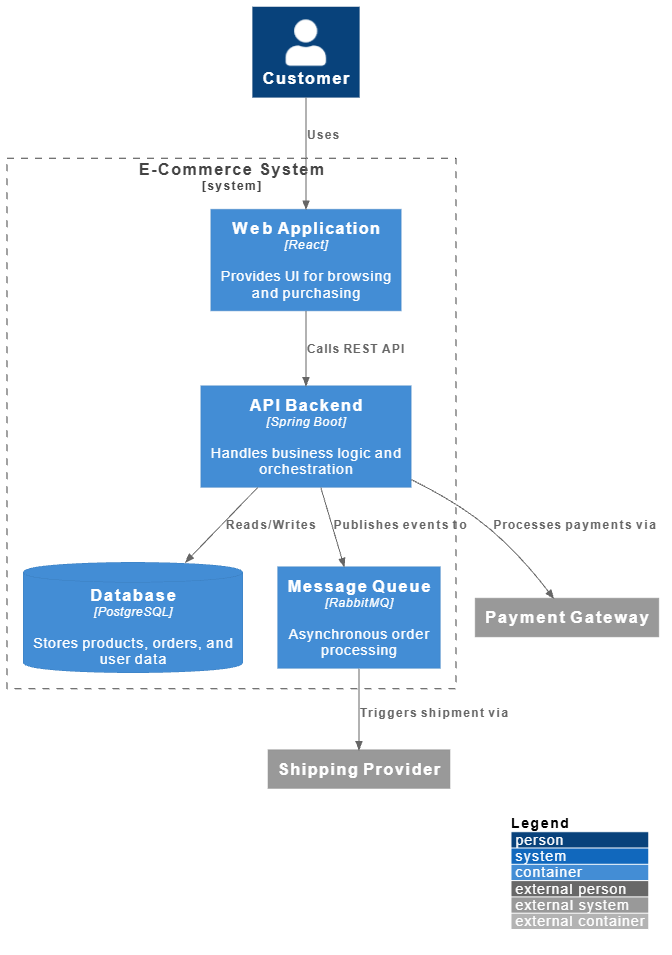
Example 2: Container Diagram
@startuml
!include https://raw.githubusercontent.com/plantuml-stdlib/C4-PlantUML/master/C4_Container.puml

LAYOUT_WITH_LEGEND()

Person(customer, "Customer")
System_Boundary(ecommerce, "E-Commerce System") {
    Container(webApp, "Web Application", "React", "Provides UI for browsing and purchasing")
    Container(api, "API Backend", "Spring Boot", "Handles business logic and orchestration")
    ContainerDb(database, "Database", "PostgreSQL", "Stores products, orders, and user data")
    Container(queue, "Message Queue", "RabbitMQ", "Asynchronous order processing")
}

System_Ext(paymentGateway, "Payment Gateway")
System_Ext(shippingProvider, "Shipping Provider")

Rel(customer, webApp, "Uses")
Rel(webApp, api, "Calls REST API")
Rel(api, database, "Reads/Writes")
Rel(api, queue, "Publishes events to")
Rel(api, paymentGateway, "Processes payments via")
Rel(queue, shippingProvider, "Triggers shipment via")

@enduml
Example 3: Component Diagram (for API Backend)
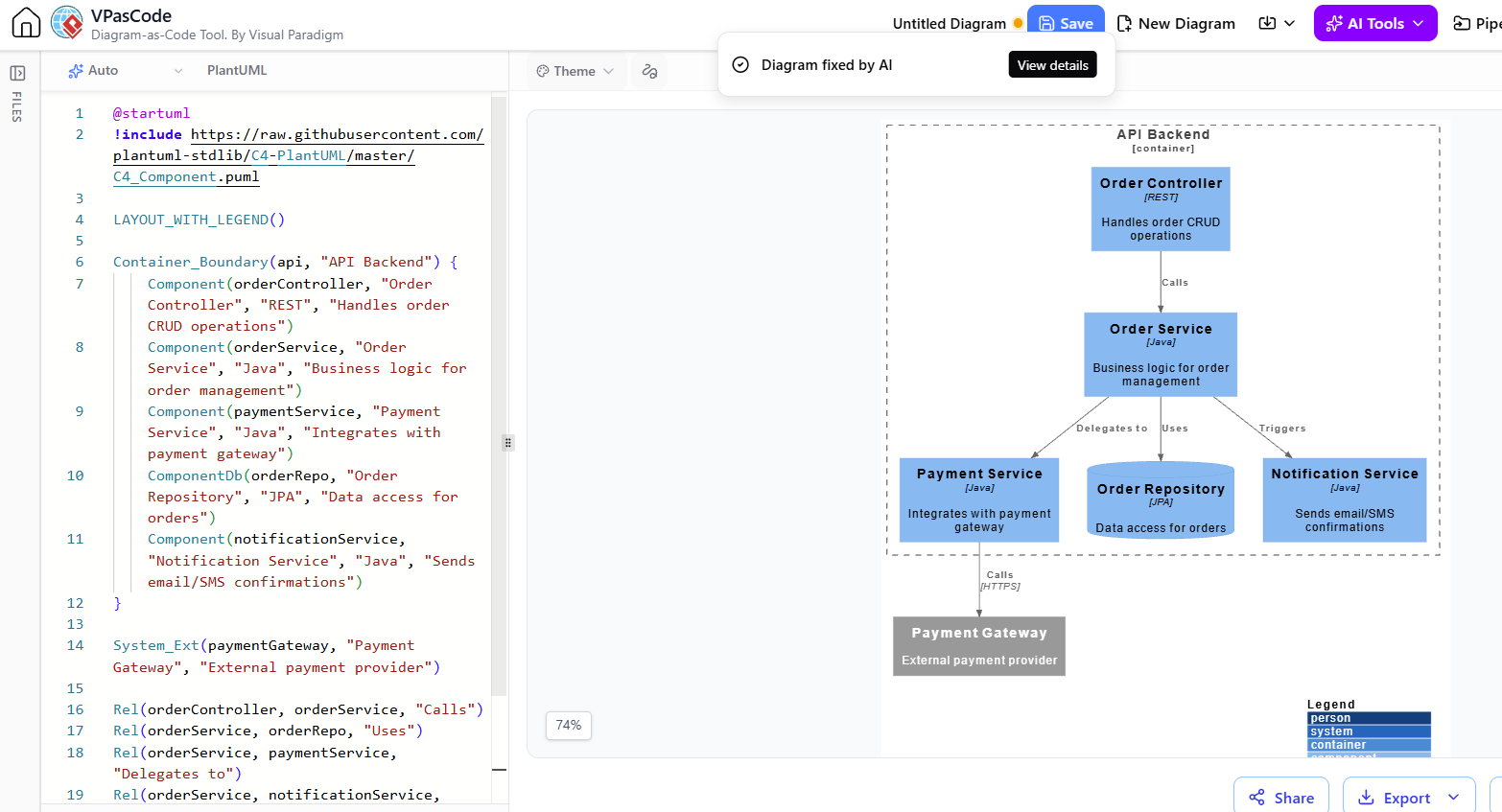
@startuml
!include https://raw.githubusercontent.com/plantuml-stdlib/C4-PlantUML/master/C4_Component.puml

LAYOUT_WITH_LEGEND()

Container_Boundary(api, "API Backend") {
    Component(orderController, "Order Controller", "REST", "Handles order CRUD operations")
    Component(orderService, "Order Service", "Java", "Business logic for order management")
    Component(paymentService, "Payment Service", "Java", "Integrates with payment gateway")
    ComponentDb(orderRepo, "Order Repository", "JPA", "Data access for orders")
    Component(notificationService, "Notification Service", "Java", "Sends email/SMS confirmations")
}

Rel(orderController, orderService, "Calls")
Rel(orderService, orderRepo, "Uses")
Rel(orderService, paymentService, "Delegates to")
Rel(orderService, notificationService, "Triggers")
Rel(paymentService, "Payment Gateway", "Calls HTTPS")

@enduml
Tooling: Visual Paradigm C4 Model + VPasCode + AI Assistance
Why Visual Paradigm?
Visual Paradigm is a powerful enterprise-grade modeling tool that now supports the C4 model natively. Its standout features include:
-
Native C4 Shapes & Templates: Pre-built stencils for Context, Container, Component, and Code diagrams.
-
VPasCode Integration: Write diagrams as code using PlantUML, Mermaid, or custom DSLs, and render them instantly within VP.
-
AI-Assisted Diagram Generation: Describe your system in natural language, and VP’s AI engine suggests diagram structures, auto-generates boilerplate, and recommends improvements.
-
Version Control Friendly: Since VPasCode uses text-based definitions, diagrams can be stored in Git, reviewed via pull requests, and diffed easily.
-
Collaboration Features: Real-time co-editing, comments, and approval workflows for team-based architecture reviews.
Workflow with VPasCode + AI
-
Describe Your System: Use natural language prompts like “Create a C4 container diagram for an e-commerce system with React frontend, Spring Boot backend, PostgreSQL, and RabbitMQ.”
-
AI Generates Code: VP’s AI assistant produces PlantUML or VPasCode syntax.
-
Render & Refine: Preview the diagram, tweak layout, add annotations, or adjust styling.
-
Export & Share: Export to PNG, PDF, or embed in Confluence, Notion, or wikis.
-
Iterate: As the system evolves, update the code definition and regenerate.
Example: AI Prompt for VPasCode
“Generate a C4 context diagram for a healthcare appointment booking system. Include patients, doctors, the booking app, an external calendar service, and a notification SMS gateway.”
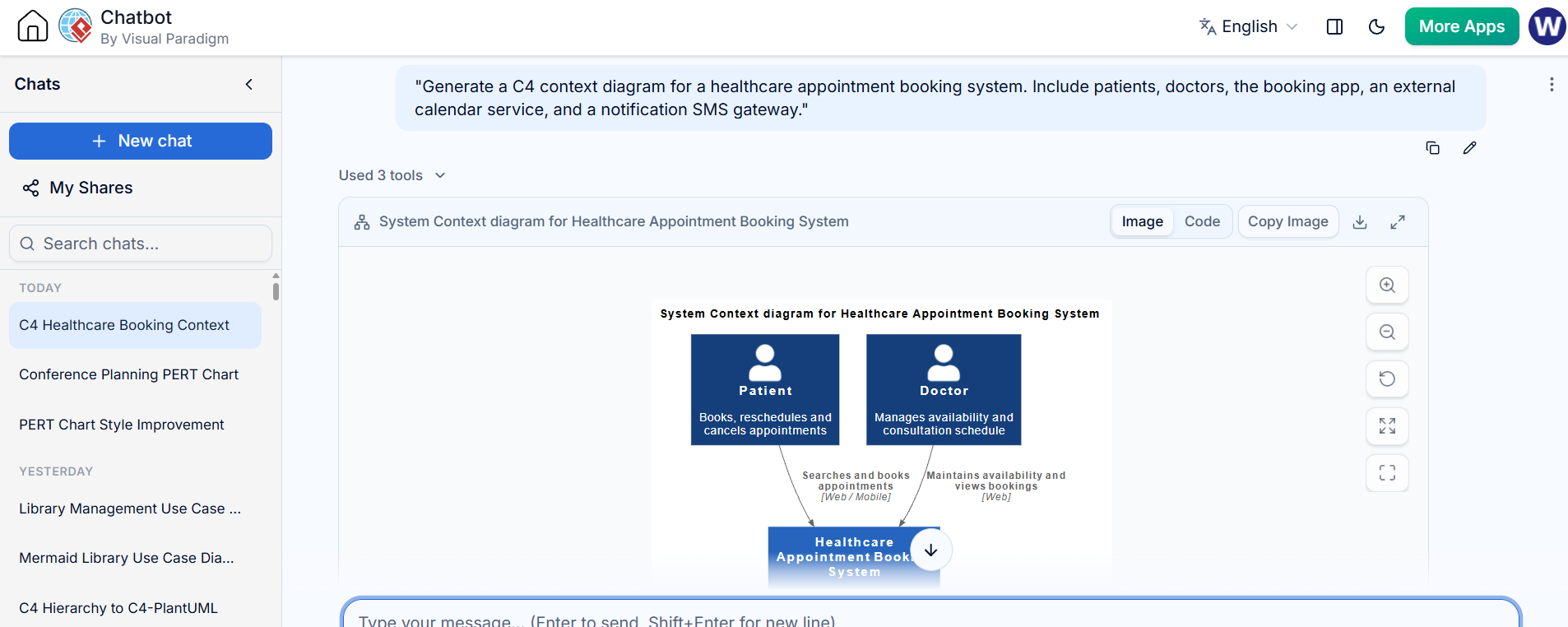
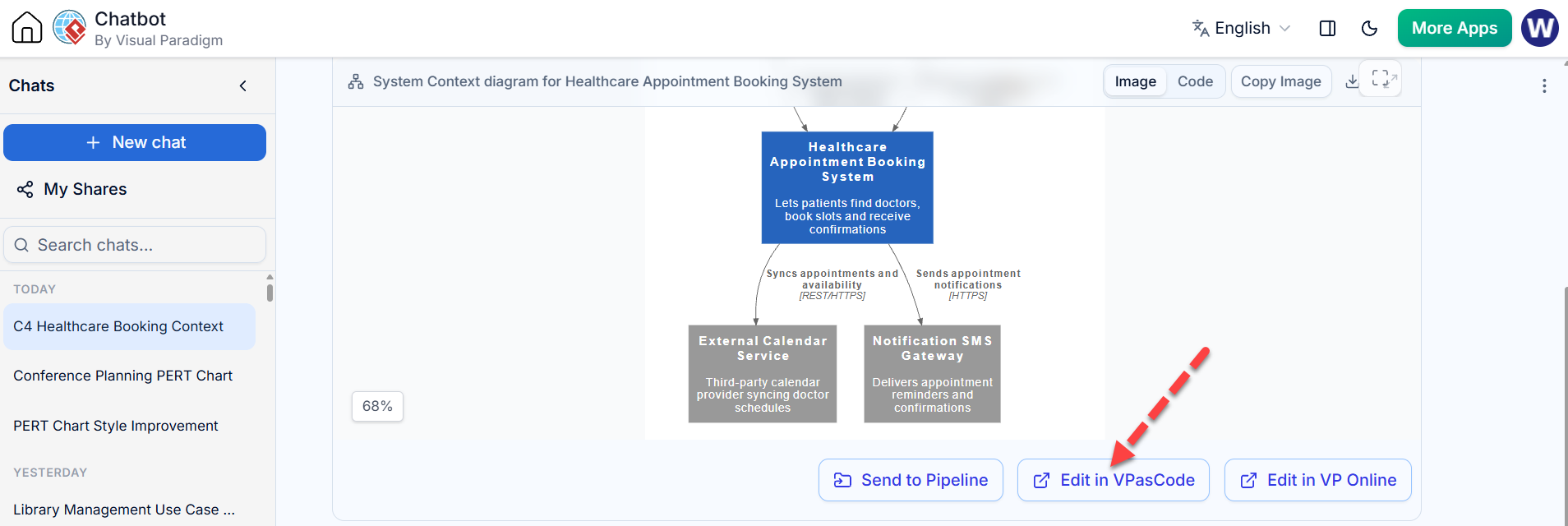
The AI would output something like: (Switch to VPasCode Tool for Larger View of the Context Diagram:
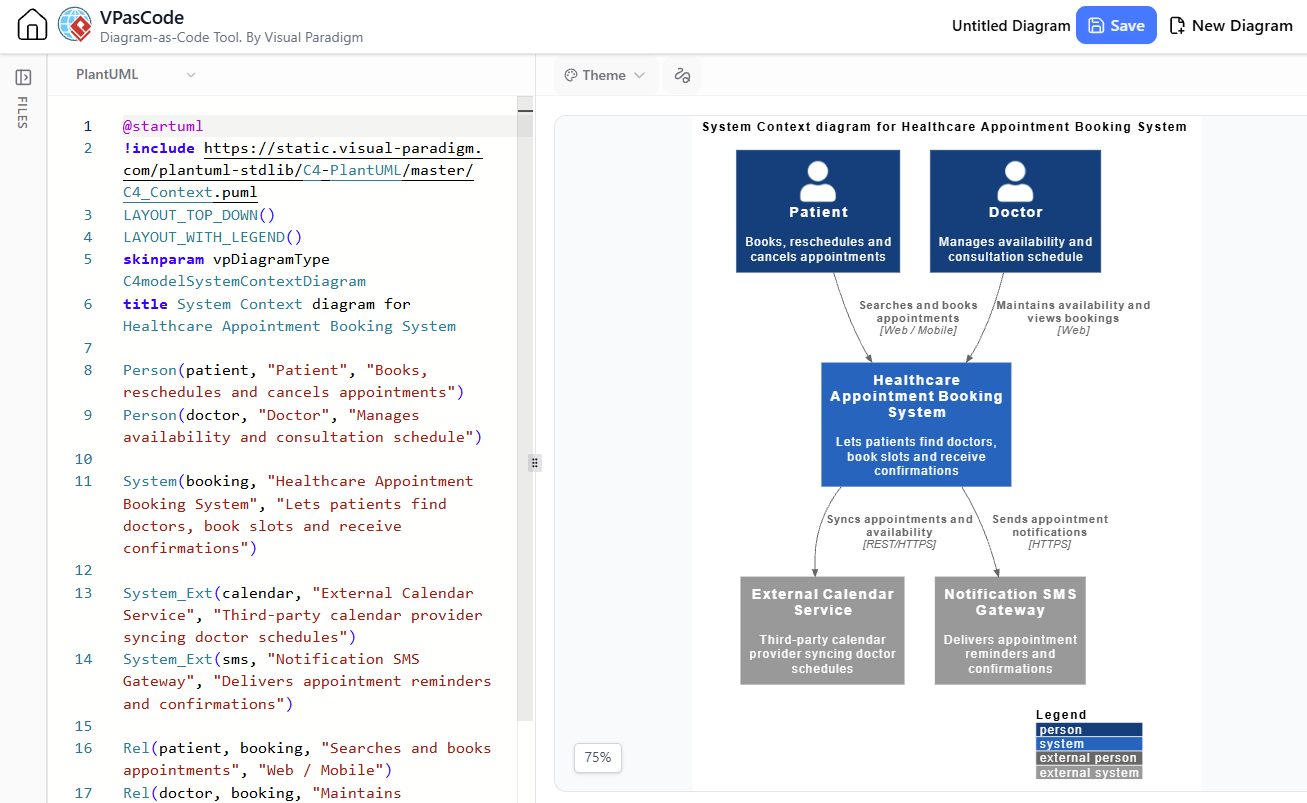
Which renders into a clean C4 Context diagram automatically.
Conclusion
The C4 model democratizes software architecture by making it accessible, scalable, and maintainable. By adopting a layered approach—Context, Containers, Components, and Code—you can tailor your communication to the right audience without overwhelming them with unnecessary detail. When combined with modern tooling like Visual Paradigm’s C4 support, VPasCode’s diagram-as-code capabilities, and AI-assisted generation, creating and maintaining architecture diagrams becomes less of a chore and more of a strategic advantage.
For product managers like yourself, C4 diagrams bridge the gap between business goals and technical implementation. They help you articulate system boundaries, assess risks, and collaborate effectively with engineering teams. For architects and developers, they provide a shared language that accelerates onboarding, reduces ambiguity, and supports agile evolution.
Start small: sketch a System Context diagram for your next project. Iterate, refine, and gradually introduce deeper levels as needed. With practice and the right tools, C4 modeling will become an indispensable part of your product and architecture toolkit—enabling clearer communication, better decisions, and more resilient systems.
Happy modeling! 🎨📐