
Introduction
Mind mapping is a visual thinking tool that helps structure information, analyze, comprehend, synthesize, recall, and generate new ideas. Unlike traditional linear notes, mind maps mimic the way our brains naturally work—radiating from a central concept outward through branches of related ideas. This non-linear approach enhances creativity, improves memory retention, and facilitates better problem-solving.
In today’s fast-paced digital world, mind mapping has evolved beyond pen and paper. Modern tools like Visual Paradigm’s Markmap and VPasCode (Diagram as Code) combine the flexibility of text-based diagramming with AI assistance, making mind mapping more efficient, collaborative, and powerful than ever before.
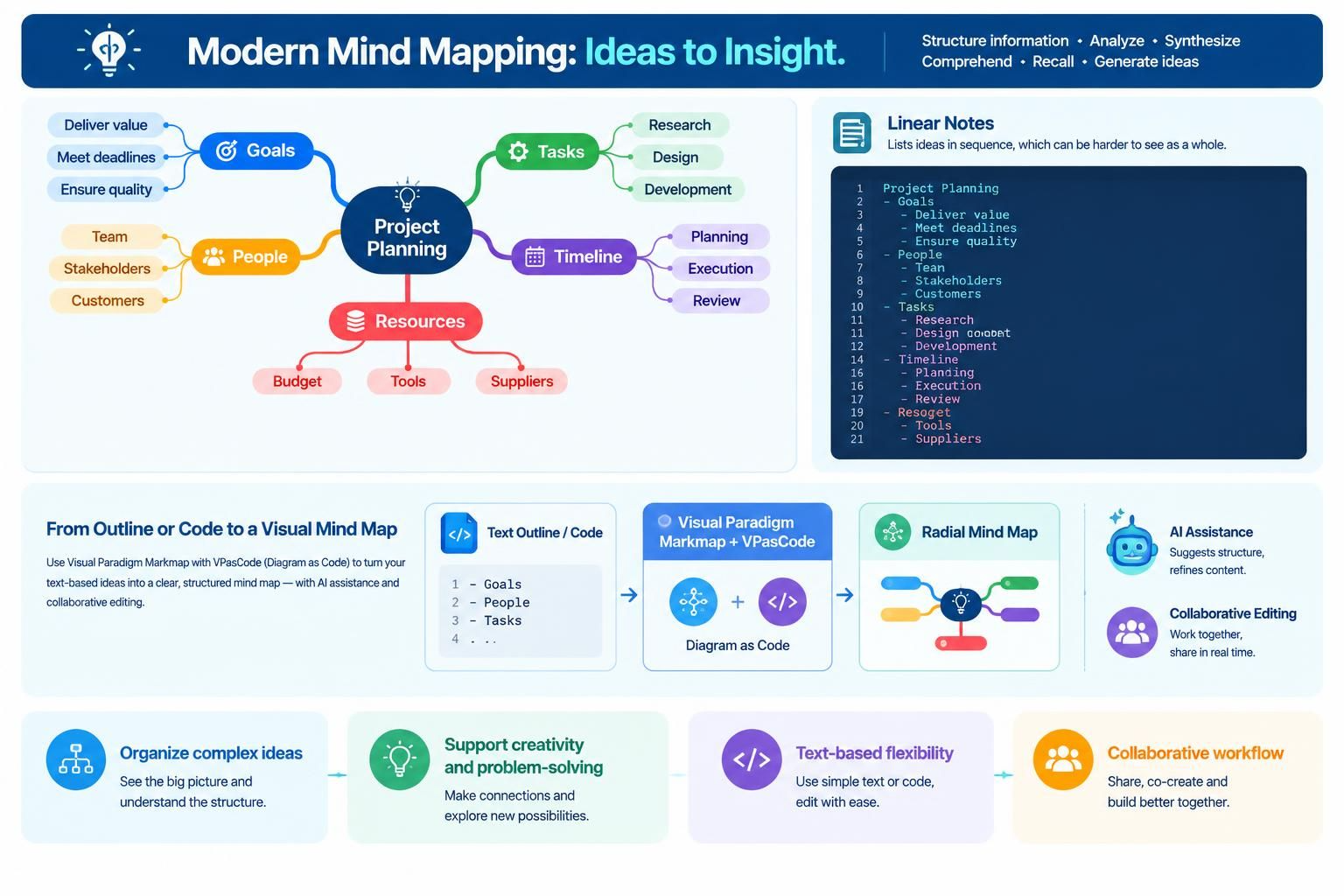
This guide will walk you through the key concepts, practical use cases, tooling options, and advanced techniques to master mind mapping in both personal and professional contexts.
Key Concepts and Examples
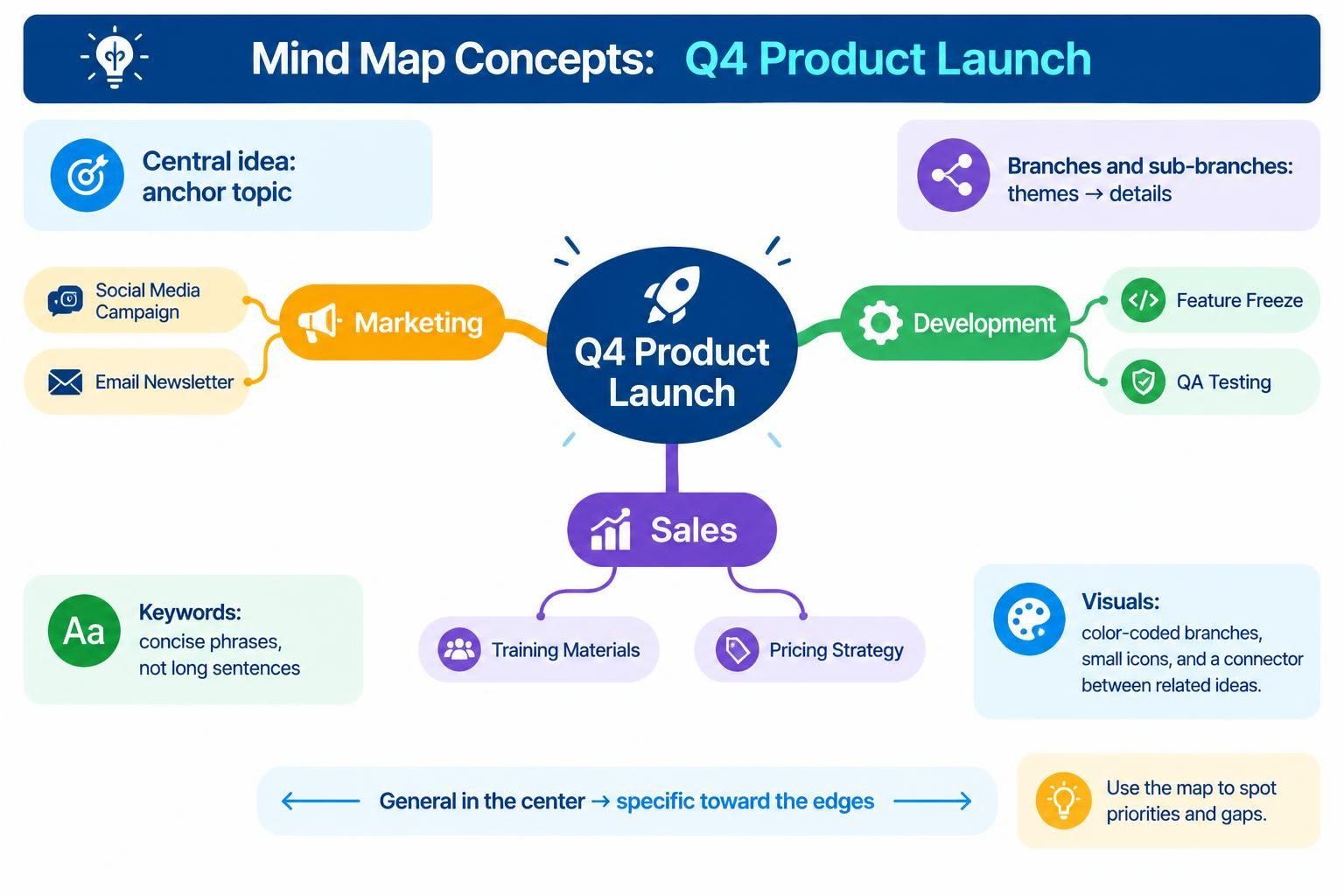
1. Central Idea
Every mind map starts with a central topic or main idea placed in the center of the canvas. This serves as the anchor for all subsequent branches.
Example: If you’re planning a product launch, your central idea might be “Q4 Product Launch.”
2. Branches and Sub-branches
Branches radiate from the central idea, representing major categories or themes. Sub-branches break these down further into specific details.
Example:
-
Central Idea: Q4 Product Launch
-
Branch 1: Marketing
-
Sub-branch: Social Media Campaign
-
Sub-branch: Email Newsletter
-
-
Branch 2: Development
-
Sub-branch: Feature Freeze
-
Sub-branch: QA Testing
-
-
Branch 3: Sales
-
Sub-branch: Training Materials
-
Sub-branch: Pricing Strategy
-
-
3. Keywords and Phrases
Use concise keywords or short phrases instead of long sentences. This keeps the map clean and encourages quick comprehension.
4. Visual Elements
-
Colors: Differentiate branches by color to improve visual organization.
-
Icons/Images: Add symbols or images to enhance memory association.
-
Connectors: Use arrows or lines to show relationships between distant branches.
5. Hierarchy and Structure
Mind maps follow a hierarchical structure, moving from general (center) to specific (outer branches). This helps prioritize information and identify gaps.
Usage Cases
Mind mapping is versatile and applicable across various domains:
1. Product Management
-
Roadmap planning
-
Feature prioritization
-
User story mapping
-
Stakeholder alignment
2. Project Planning
-
Task breakdown (WBS – Work Breakdown Structure)
-
Resource allocation
-
Risk identification
-
Timeline visualization
3. Brainstorming & Ideation
-
Generating new product ideas
-
Solving complex problems
-
Creative writing outlines
-
Innovation workshops
4. Learning & Education
-
Study notes summarization
-
Exam preparation
-
Concept mapping for complex topics
-
Lecture note organization
5. Meeting Facilitation
-
Agenda structuring
-
Real-time note-taking
-
Action item tracking
-
Decision documentation
6. Personal Organization
-
Goal setting
-
Travel planning
-
Event coordination
-
Habit tracking
Tooling: Visual Paradigm Markmap + VPasCode (Diagram as Code)
Why Use Diagram-as-Code Tools?
Traditional drag-and-drop mind mapping tools are intuitive but can become cumbersome for large, complex maps. Diagram-as-Code approaches offer several advantages:
-
Version Control: Store diagrams in Git alongside your codebase.
-
Collaboration: Easy to review changes via pull requests.
-
Reusability: Template common structures for consistent formatting.
-
Automation: Generate diagrams programmatically from data sources.
-
AI Integration: Leverage AI to auto-generate or refine diagrams from text prompts.
Visual Paradigm Markmap Tool
Markmap is a Markdown-based mind mapping tool integrated into Visual Paradigm. It allows you to create mind maps using simple Markdown syntax, which is then rendered into interactive visualizations.
Benefits:
-
Lightweight: No complex UI; just write Markdown.
-
Portable: Easy to share and embed in documentation.
-
Interactive: Zoom, collapse/expand branches dynamically.
Example: Markmap Syntax
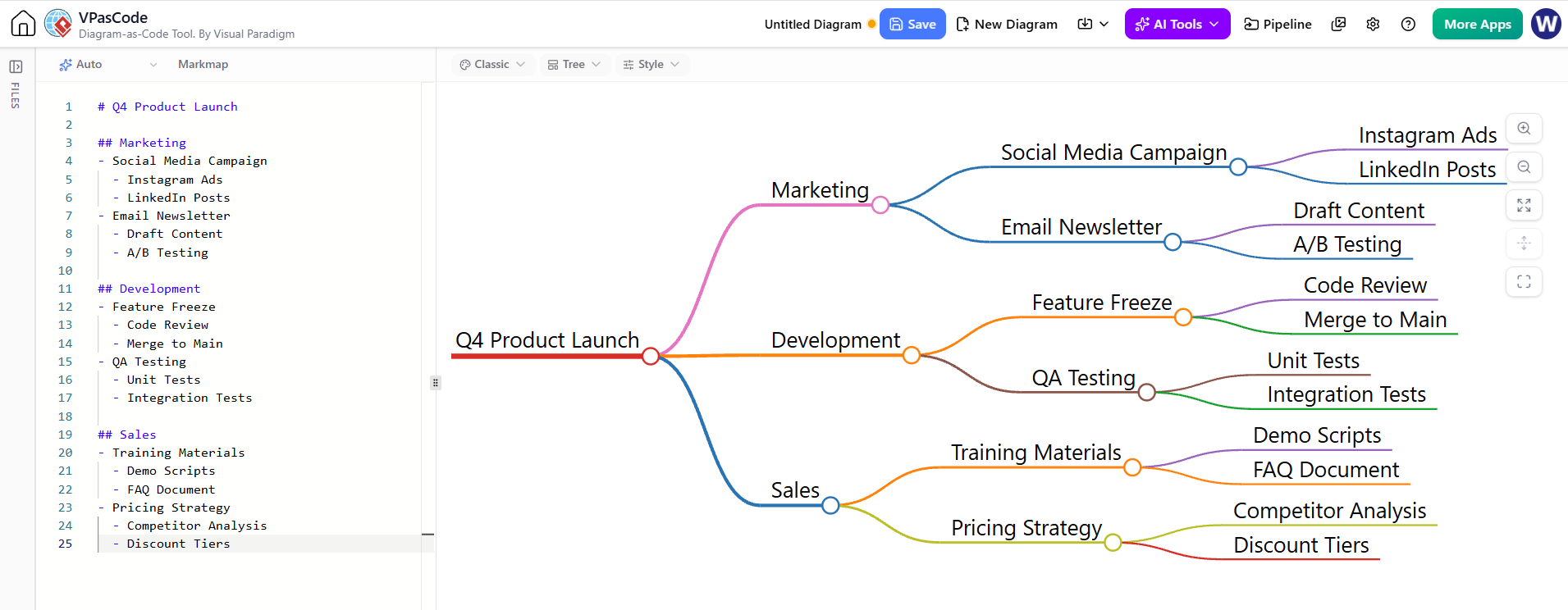
# Q4 Product Launch

## Marketing
- Social Media Campaign
  - Instagram Ads
  - LinkedIn Posts
- Email Newsletter
  - Draft Content
  - A/B Testing

## Development
- Feature Freeze
  - Code Review
  - Merge to Main
- QA Testing
  - Unit Tests
  - Integration Tests

## Sales
- Training Materials
  - Demo Scripts
  - FAQ Document
- Pricing Strategy
  - Competitor Analysis
  - Discount Tiers
This Markdown renders into an interactive mind map where each # level becomes a branch.
VPasCode: Diagram as Code with PlantUML & Mermaid
VPasCode extends Visual Paradigm’s capabilities by supporting multiple diagram-as-code languages, including PlantUML and Mermaid, alongside AI-assisted generation.
1. PlantUML for Mind Maps
PlantUML is primarily known for UML diagrams but supports mind map-like structures through its tree syntax.
Example: PlantUML Mind Map
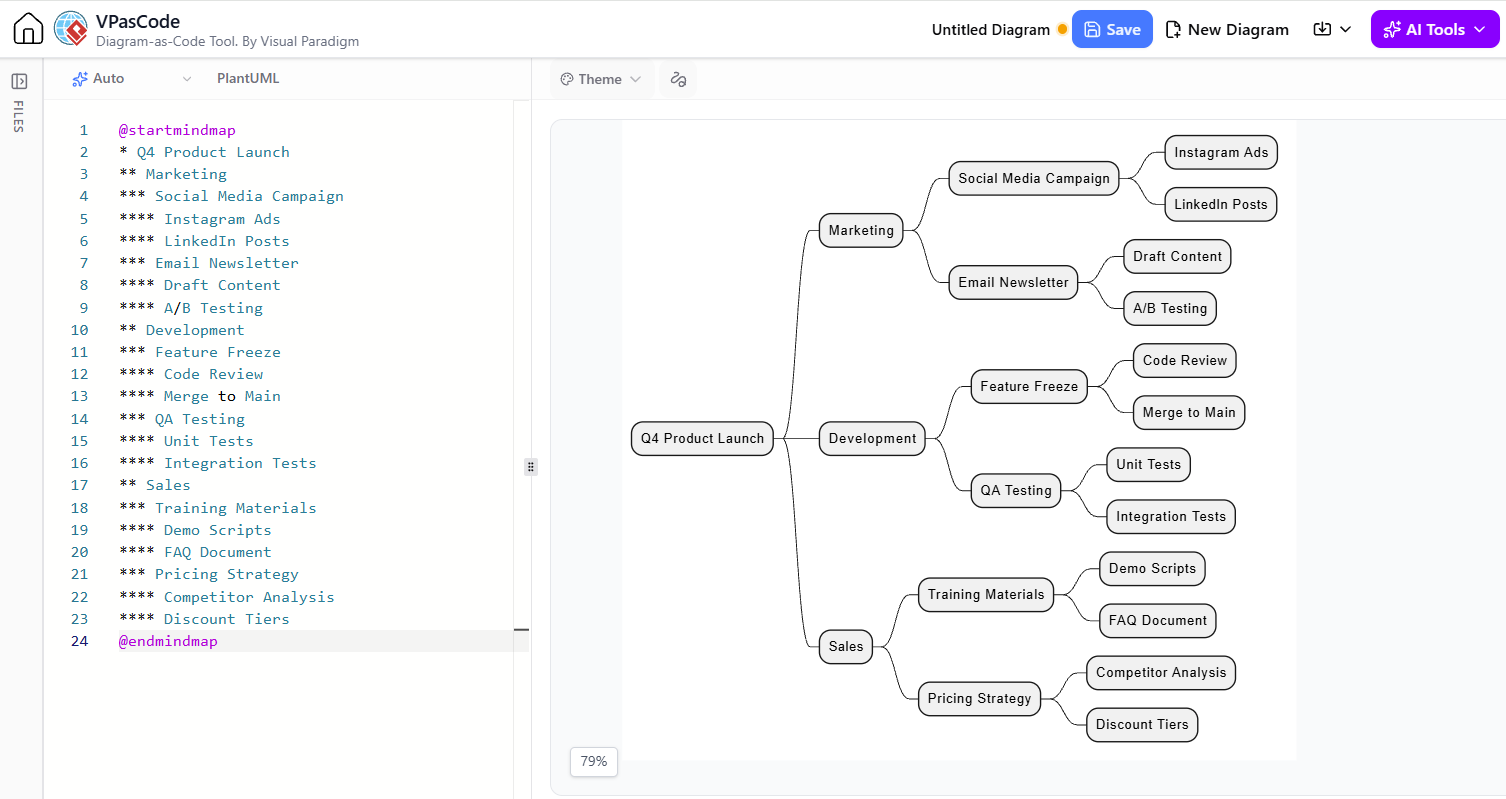
@startmindmap
* Q4 Product Launch
** Marketing
*** Social Media Campaign
**** Instagram Ads
**** LinkedIn Posts
*** Email Newsletter
**** Draft Content
**** A/B Testing
** Development
*** Feature Freeze
**** Code Review
**** Merge to Main
*** QA Testing
**** Unit Tests
**** Integration Tests
** Sales
*** Training Materials
**** Demo Scripts
**** FAQ Document
*** Pricing Strategy
**** Competitor Analysis
**** Discount Tiers
@endmindmap
2. Mermaid for Mind Maps
Mermaid is a JavaScript-based diagramming tool that supports flowcharts, sequence diagrams, and mind maps.
Example: Mermaid Mind Map
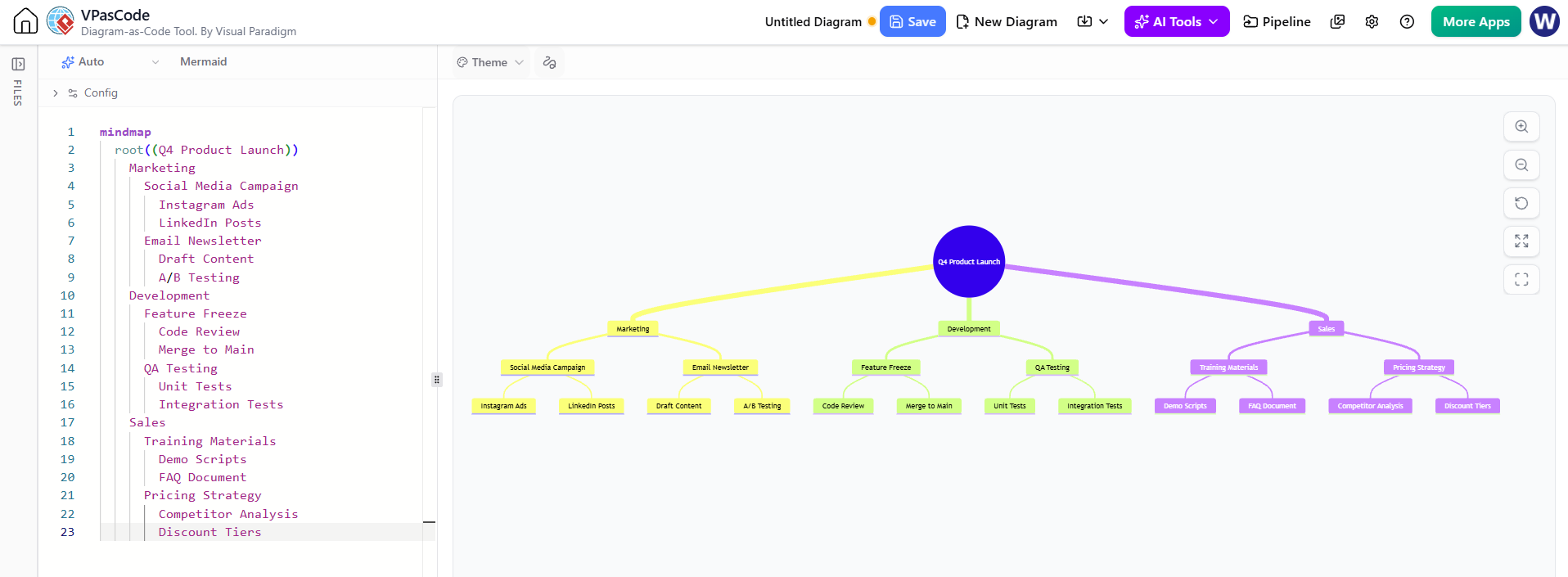
mindmap
  root((Q4 Product Launch))
    Marketing
      Social Media Campaign
        Instagram Ads
        LinkedIn Posts
      Email Newsletter
        Draft Content
        A/B Testing
    Development
      Feature Freeze
        Code Review
        Merge to Main
      QA Testing
        Unit Tests
        Integration Tests
    Sales
      Training Materials
        Demo Scripts
        FAQ Document
      Pricing Strategy
        Competitor Analysis
        Discount Tiers

3. AI-Assisted Feature
Visual Paradigm’s AI assistant can:
-
Generate diagrams from text prompts: Describe your idea, and AI creates the initial structure.
-
Refine existing diagrams: Ask AI to reorganize, simplify, or expand branches.
-
Convert between formats: Transform Markdown to PlantUML or Mermaid automatically.
-
Suggest improvements: AI analyzes your map for completeness, balance, and clarity.
Example Prompt:
“Create a mind map for launching a new AI-powered meeting summarizer product. Include branches for Product Features, Go-to-Market Strategy, Technical Infrastructure, and Customer Support.”
The AI generates a structured diagram that you can further customize.
Who Benefits?
1. Product Managers
-
Quickly visualize roadmaps and feature dependencies.
-
Align stakeholders with clear, visual representations.
-
Iterate on ideas during brainstorming sessions.
2. Developers & Engineers
-
Document system architecture decisions.
-
Plan sprint tasks and break down user stories.
-
Collaborate on technical designs using version-controlled diagrams.
3. Designers & UX Researchers
-
Map user journeys and pain points.
-
Organize research findings thematically.
-
Brainstorm design solutions collaboratively.
4. Students & Educators
-
Summarize lecture notes efficiently.
-
Prepare for exams with structured revision maps.
-
Teach complex concepts visually.
5. Business Leaders & Strategists
-
Develop strategic plans with clear hierarchies.
-
Identify risks and opportunities systematically.
-
Communicate vision to teams effectively.
6. Freelancers & Solopreneurs
-
Manage multiple projects simultaneously.
-
Track client requirements and deliverables.
-
Plan content calendars and marketing campaigns.
Standout Features of VPasCode + Markmap
-
Hybrid Approach: Combine the simplicity of Markdown with the power of PlantUML/Mermaid.
-
AI-Powered Generation: Reduce manual effort by leveraging AI to create initial drafts.
-
Version Control Friendly: Store diagrams as code in Git, enabling traceability and collaboration.
-
Cross-Platform Compatibility: Export to PNG, SVG, PDF, or embed in web pages.
-
Interactive Rendering: Collapse/expand branches, zoom, and navigate large maps effortlessly.
-
Template Library: Pre-built templates for common use cases (e.g., SWOT analysis, project planning).
-
Integration with IDEs: Use directly in VS Code, IntelliJ, or other editors with plugins.
Tips and Tricks
1. Start Simple
Begin with a rough sketch of your central idea and main branches. Don’t worry about perfection initially; refine as you go.
2. Use Consistent Formatting
Stick to a consistent hierarchy (e.g., # for main branches, ## for sub-branches) to maintain readability.
3. Leverage Colors and Icons
Assign colors to different categories (e.g., blue for technical, green for marketing) to improve visual scanning.
4. Keep It Balanced
Avoid having one branch significantly larger than others. If a branch becomes too dense, consider splitting it into a separate map.
5. Iterate with AI
Use AI to generate a first draft, then manually refine it. This saves time while ensuring accuracy.
6. Collaborate in Real-Time
Share your Markmap or VPasCode files with teammates for feedback. Use comments or annotations to discuss specific branches.
7. Export and Share
Export your final mind map as an image or PDF for presentations, or embed the interactive version in Confluence, Notion, or GitHub READMEs.
8. Regularly Update
Treat mind maps as living documents. Revisit and update them as projects evolve or new information emerges.
9. Combine with Other Diagrams
Use mind maps for ideation, then transition to flowcharts, sequence diagrams, or Gantt charts for detailed planning.
10. Practice Regularly
Like any skill, mind mapping improves with practice. Start with small personal projects and gradually apply it to complex professional scenarios.
Conclusion
Mind mapping is a powerful technique for organizing thoughts, fostering creativity, and enhancing collaboration. By combining traditional mind mapping principles with modern tools like Visual Paradigm’s Markmap and VPasCode, you can unlock new levels of efficiency and clarity.
The integration of Diagram-as-Code approaches (PlantUML, Mermaid) with AI assistance transforms mind mapping from a static exercise into a dynamic, version-controlled, and collaborative process. Whether you’re a product manager planning a roadmap, a developer designing a system, or a student preparing for exams, these tools empower you to think visually and act decisively.
Start small, experiment with different formats, and leverage AI to accelerate your workflow. With practice, mind mapping will become an indispensable part of your productivity toolkit, helping you navigate complexity and drive innovation.