
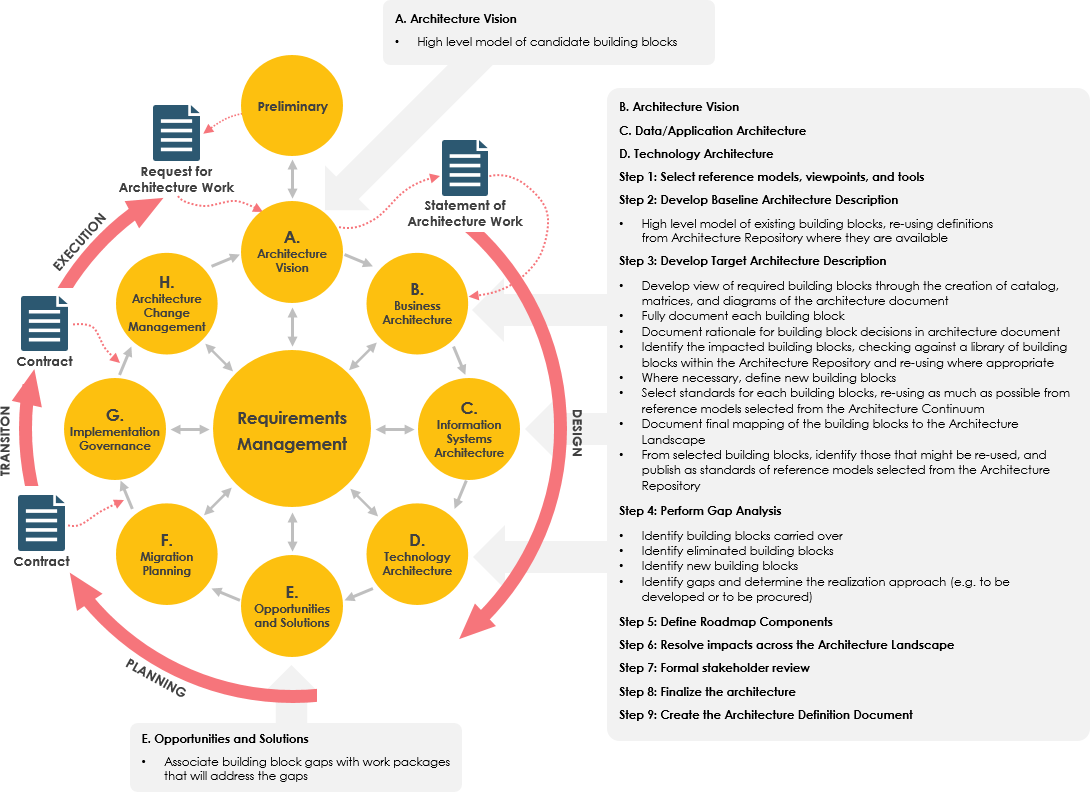
Welcome to this comprehensive tutorial on Enterprise Architecture (EA). In the rapidly evolving landscape of digital transformation, organizations rely on structured frameworks to visualize complex systems. While traditional methods often involve drawing diagrams manually, a modern shift towards “Architecture as Code” is changing the game. This guide explores how to leverage ArchiMate—the standard language for EA—combined with the VPasCode tool to automate, standardize, and streamline your architectural modeling.
Unlike static diagrams that become outdated the moment they are drawn, using VPasCode allows you to treat your architecture like software: versionable, testable, and reproducible. We will walk through the core architectural domains and the lifecycle process depicted in industry standards, translating them into a code-first workflow.
1. The Core Architecture Domains (The “What”)
Before diving into the process, it is essential to understand the structural pillars of the architecture. The diagram highlights the standard “Business, Information Systems, and Technology” triad. When modeling with VPasCode, you define these domains as distinct layers within your code.
Business Architecture (B)
This layer represents the organization’s strategy, governance, and business processes. In your ArchiMate model, this includes:
- Business Services: The value delivered to stakeholders.
- Business Processes: The flow of activities to achieve a goal.
- Business Roles: The actors performing the work.
Information Systems Architecture (C)
This is the bridge between business needs and technology. It is divided into two sub-domains:
- Application Architecture: The software applications that support the business processes (e.g., ERP, CRM).
- Data/Information Architecture: The logical data structures and information objects.
Technology Architecture (D)
This layer defines the physical infrastructure. It includes:
- Hardware: Servers, networks, and devices.
- Software: System software and middleware.
- Networks: Connectivity and communication protocols.
2. The Architecture Development Method (The “How”)
The central engine of the diagram is the Architecture Development Method (ADM). In VPasCode, this is not a linear drawing process but an iterative development cycle. The process flows through four main phases: Preliminary, Planning, Design, and Execution.
Phase 1: Preliminary & Planning
Every journey begins with a vision. The Preliminary step involves defining the architecture scope and principles. The Planning phase (Step 5-8 in the diagram) focuses on defining the roadmap and resolving impacts.
VPasCode Approach: You start by defining the project scope in your configuration file. You then map out the “Opportunities and Solutions” (E), identifying gaps between the current state and the desired future state.
Phase 2: Design (The Iteration Core)
The Design phase is where the heavy lifting occurs. It involves developing the Baseline (current state) and Target (future state) architectures.
- Step 1: Select Reference Models. Choose your standards (e.g., TOGAF) and viewpoints.
- Step 2: Develop Baseline Architecture. Model the “As-Is” state.
- Step 3: Develop Target Architecture. Model the “To-Be” state using new building blocks.
- Step 4: Gap Analysis. Identify what is carried over, what is eliminated, and what is new.
Phase 3: Execution & Transition
Once the target is defined, the project moves to Execution (Implementation) and Transition (Migration Planning). The diagram shows “Contracts” and “Implementation Governance” (G) ensuring the actual IT projects align with the architectural vision.
3. Modeling with ArchiMate as Code
Now, let’s look at how to represent these concepts using the VPasCode tool. Instead of clicking and dragging shapes, you write declarative code to define your architecture. This approach ensures that your diagrams are always consistent with your data.
Defining the Architecture
In VPasCode, you define the layers (Business, Application, Technology) and the relationships between them. Here is a conceptual representation of how you might structure your code to reflect the architecture vision:
// Define the Layers
layer BusinessLayer {
  id: B
  name: "Business Architecture"
}

layer ApplicationLayer {
  id: A
  name: "Information Systems Architecture"
}

layer TechnologyLayer {
  id: T
  name: "Technology Architecture"
}

// Define the Vision (Preliminary Phase)
element ArchitectureVision {
  type: "BusinessRole"
  id: V1
  description: "High level model of candidate building blocks"
}

// Define the Gap Analysis
element GapAnalysis {
  type: "BusinessProcess"
  id: G1
  description: "Identify gaps between Baseline and Target"
}

// Define Relationships
relationship B1_to_A1 {
  source: "BusinessProcess_PlaceOrder"
  target: "ApplicationService_OrderProcessing"
  type: "Serves"
}

relationship A1_to_T1 {
  source: "ApplicationComponent_OrderDB"
  target: "TechnologyNode_Server"
  type: "Serves"
}
Automating the Lifecycle
One of the greatest benefits of using VPasCode for the ADM process is automation. You can script the transition from the “Baseline” to the “Target” architecture.
- Baseline: Load your existing model data.
- Target: Apply changes to the code to reflect new requirements.
- Gap Analysis: Run a comparison script to automatically generate the list of “Eliminated” and “New” building blocks.
4. Benefits for EA Teams
Why make the switch to an “Architecture as Code” approach using VPasCode? The benefits are transformative for Enterprise Architecture teams.
Consistency and Standardization
Manual drawing often leads to inconsistent styles and broken relationships. VPasCode enforces strict syntax and ArchiMate rules, ensuring that every diagram adheres to the standard. If a relationship is invalid in ArchiMate, the tool will flag it immediately.
Traceability and Impact Analysis
When you model as code, the relationships are data, not just lines. You can easily trace how a change in a “Technology Node” impacts a “Business Service.” This is crucial for the “Architecture Change Management” (H) phase shown in the diagram.
Version Control
Just like software, your architecture can be stored in Git. You can track who changed the “Migration Planning” roadmap, revert to previous versions, and branch your architecture to test different scenarios.
Conclusion
Mastering Enterprise Architecture requires more than just understanding the domains; it requires a disciplined process. By combining the structured framework of ArchiMate with the automation capabilities of VPasCode, you transform architecture from a static documentation exercise into a dynamic, living system. Whether you are performing a high-level Gap Analysis or defining a detailed Migration Plan, this code-first approach ensures your architecture remains accurate, consistent, and aligned with your organization’s strategic vision.