
Introduction
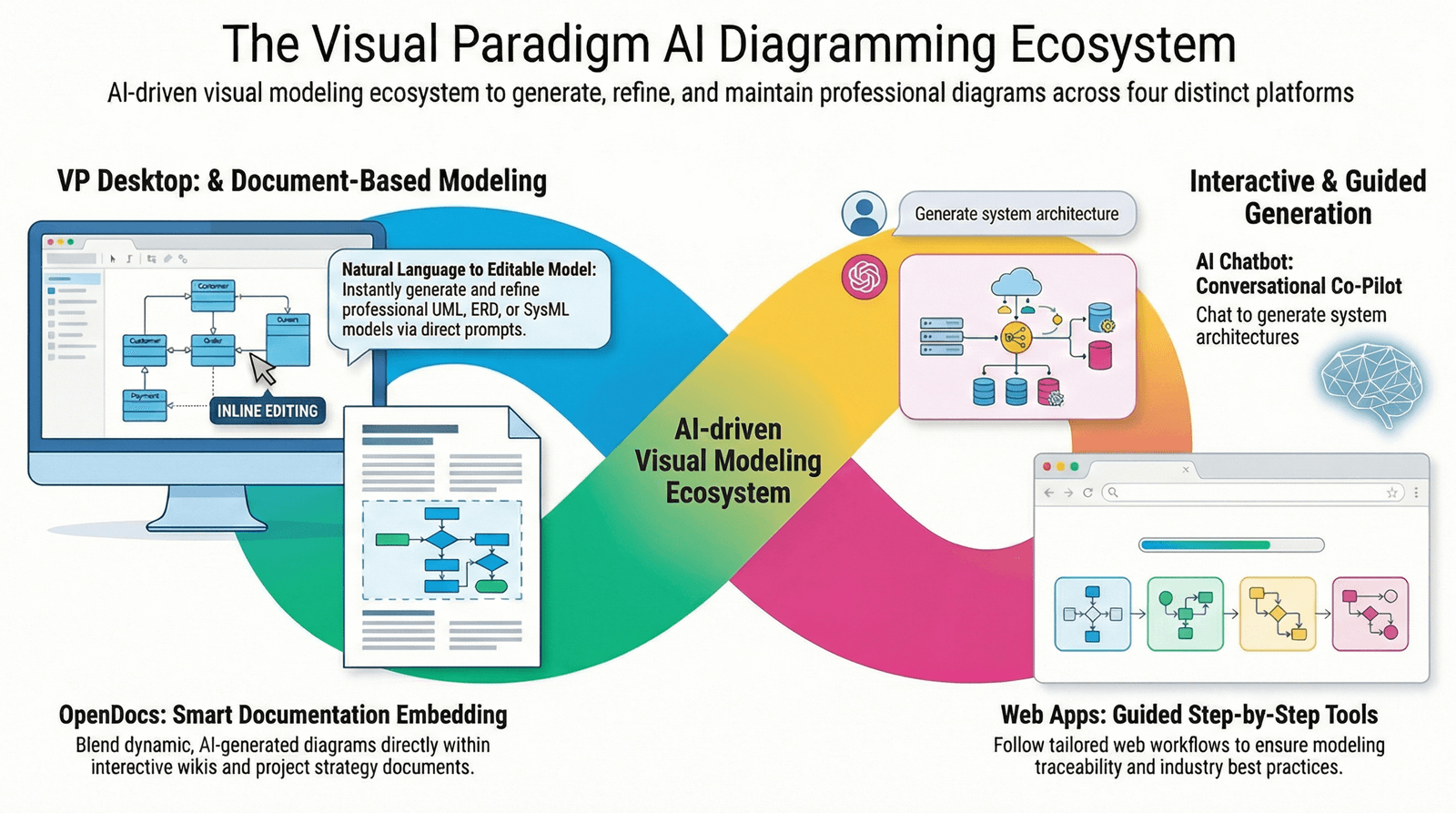
Visual Paradigm has revolutionized the way software architects, developers, and business analysts approach system modeling by integrating cutting-edge artificial intelligence into their comprehensive UML modeling ecosystem. This guide provides an in-depth exploration of how Visual Paradigm’s AI-powered tools transform natural language requirements into professional, standards-compliant diagrams, making sophisticated software design accessible to teams of all skill levels.
The platform delivers AI-enhanced modeling capabilities through two primary channels: a web-based AI Chatbot for rapid iterations and collaborative design sessions, and integrated Desktop AI tools for advanced, professional-grade modeling within the Visual Paradigm Desktop environment.
Understanding UML Fundamentals
What is UML?
Unified Modeling Language (UML) is a standardized modeling language developed by the Object Management Group (OMG) to help system and software developers specify, visualize, construct, and document the artifacts of software systems. Beyond software, UML also supports business modeling and other non-software systems.
UML represents a collection of best engineering practices that have proven successful in modeling large and complex systems. It uses primarily graphical notations to express software project designs, enabling project teams to communicate effectively, explore potential designs, and validate architectural decisions.
The Evolution of UML
UML emerged in the mid-1990s from the unification of three leading object-oriented methodologies:
-
Object Modeling Technique (OMT) by James Rumbaugh (1991) – Excelled at analysis and data-intensive information systems
-
Booch Method by Grady Booch (1994) – Superior for design and implementation
-
Object-Oriented Software Engineering (OOSE) by Ivar Jacobson (1992) – Introduced the powerful Use Cases technique
These “Three Amigos” joined forces at Rational Corp to create the Unified Method, which evolved into the Unified Modeling Language. The first UML 1.0 was submitted to OMG in January 1997, with widespread industry support from companies including IBM, Microsoft, Oracle, and HP. The current version is UML 2.5.
The 4+1 Views of Software Architecture
UML supports multiple perspectives of a system through the 4+1 Views model:
-
Use Case View (Central): Describes system functionality and external interfaces
-
Logical View: Shows system structure in terms of classes, packages, and interfaces
-
Implementation View: Organizes development artifacts in the file system
-
Process View: Describes runtime behavior and interactions
-
Deployment View: Maps the system to hardware infrastructure
UML Diagram Categories
UML 2 defines 14 diagram types, broadly categorized into two groups:
Structural Diagrams (Static):
-
Class Diagram
-
Object Diagram
-
Component Diagram
-
Deployment Diagram
-
Package Diagram
-
Composite Structure Diagram
-
Profile Diagram
Behavioral Diagrams (Dynamic):
-
Use Case Diagram
-
Activity Diagram
-
State Machine Diagram
-
Sequence Diagram
-
Communication Diagram
-
Interaction Overview Diagram
-
Timing Diagram
Core AI Capabilities for UML
Visual Paradigm’s AI ecosystem provides transformative capabilities that automate and enhance the UML modeling process:
1. Natural Language Generation
The AI Diagram Generator converts plain English descriptions into structured, professional diagrams instantly. Simply describe your system requirements in conversational language, such as:
“Create a banking system with Account and Customer classes, where customers can have multiple accounts and perform transactions.”
The AI interprets this input and generates a complete UML diagram with appropriate classes, attributes, operations, and relationships—eliminating the need to manually place symbols or memorize UML syntax.
2. Conversational Refinement
Visual Paradigm’s AI Chatbot enables iterative model development through natural conversation. Users can refine existing diagrams by providing feedback such as:
-
“Add a Reservation class that links to Member and Book”
-
“Extract a common superclass from these three classes”
-
“Add error handling to this workflow”
-
“Make this relationship many-to-many”
The AI updates diagrams in real-time, allowing for rapid exploration of design alternatives and continuous improvement of models.
3. Automated Validation & Error Detection
The AI analyzes diagrams to detect logical inconsistencies and potential design flaws:
-
State Machine Diagrams: Identifies unreachable states, deadlocks, and missing transitions
-
Class Diagrams: Detects inconsistent multiplicities, circular dependencies, and design pattern violations
-
Activity Diagrams: Finds disconnected nodes, infinite loops, and workflow bottlenecks
-
Sequence Diagrams: Highlights missing return messages and improper message ordering
The system provides actionable recommendations to improve model quality and adherence to UML standards.
4. Design-to-Code Automation
After finalizing AI-generated diagrams, Visual Paradigm can generate boilerplate code in multiple programming languages:
-
Java: Complete class definitions with attributes, methods, and relationships
-
C#: Property implementations and interface contracts
-
Python: Class structures with type hints and documentation strings
-
Other Languages: Support for additional languages through customizable templates
This bridges the gap between design and implementation, accelerating development workflows.
5. Architectural Guidance
The AI acts as an intelligent “co-pilot” throughout the design process:
-
Design Pattern Suggestions: Recommends appropriate patterns (Singleton, Factory, Observer, etc.) based on system requirements
-
Architectural Critiques: Provides feedback on coupling, cohesion, and scalability
-
Best Practice Recommendations: Suggests improvements aligned with industry standards
-
Alternative Designs: Proposes different architectural approaches to consider
6. Documentation Generation
The AI automatically generates comprehensive documentation including:
-
Diagram summaries and descriptions
-
Requirements traceability matrices
-
Technical specifications
-
Slide-ready presentations for stakeholder reviews
This ensures that documentation stays synchronized with visual models.
Supported UML Diagram Types
Visual Paradigm’s AI specifically targets several key UML notations, each with specialized generation and refinement capabilities:
1. Class Diagrams
Purpose: Visualize the static structure of a system, showing classes, attributes, operations, and relationships.
AI Capabilities:
-
Automatically identifies classes from textual requirements
-
Suggests appropriate attributes and data types
-
Generates methods based on system behaviors
-
Establishes relationships (associations, inheritance, composition, aggregation)
-
Applies design patterns automatically
Example Prompt: “Generate a Class Diagram for an e-commerce system with Product, Customer, Order, and Shopping Cart classes”
Use Cases:
-
Rapid prototyping of software architecture
-
Database schema design
-
Object-oriented analysis and design
-
Code reverse engineering
2. Sequence Diagrams
Purpose: Model the dynamic interactions between objects over time, showing message flows in a specific scenario.
AI Capabilities:
-
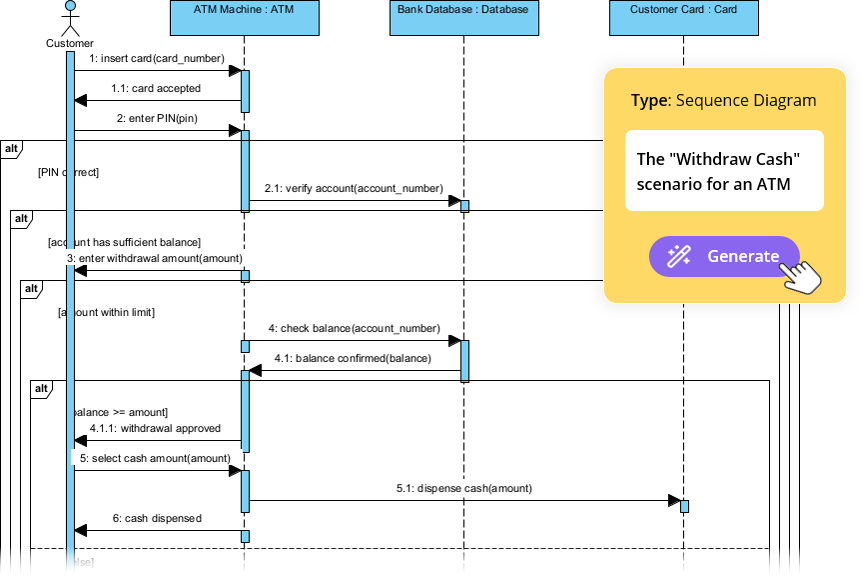
Converts use case narratives into interaction sequences
-
Identifies participants (lifelines) automatically
-
Generates synchronous and asynchronous messages
-
Creates interaction fragments (alt, opt, loop)
-
Suggests performance optimizations
Example Prompt: “Show the sequence of interactions when a user places an order, including payment validation and inventory check”
Use Cases:
-
API design and documentation
-
Use case elaboration
-
Debugging complex interactions
-
Test case design
3. Activity Diagrams
Purpose: Represent workflows of stepwise activities and actions, supporting choice, iteration, and concurrency.
AI Capabilities:
-
Transforms use case descriptions into visual workflows
-
Automatically handles decision nodes, forks, and joins
-
Identifies parallel processes
-
Detects workflow bottlenecks
-
Suggests process optimizations
Example Prompt: “Create an activity diagram for the user registration process, including email verification and profile completion”
Use Cases:
-
Business process modeling
-
Algorithm visualization
-
Workflow analysis
-
Process improvement initiatives
4. State Machine Diagrams
Purpose: Visualize object lifecycles, showing states, transitions, and events that trigger state changes.
AI Capabilities:
-
Extracts states from behavioral descriptions
-
Identifies transition triggers and guards
-
Detects unreachable states and deadlocks
-
Suggests missing transitions
-
Validates lifecycle completeness
Example Prompt: “Model the lifecycle of an Order object from creation through delivery, including cancellation and return scenarios”
Use Cases:
-
Object lifecycle modeling
-
Protocol specification
-
Event-driven system design
-
State-based validation
5. Use Case Diagrams
Purpose: Capture system functional requirements from the user’s perspective, showing actors and their interactions with the system.
AI Capabilities:
-
Identifies actors from system descriptions
-
Extracts use cases from requirements
-
Suggests include/extend relationships
-
Detects missing scenarios
-
Refines basic diagrams with hidden use cases
Example Prompt: “Create a use case diagram for a library management system showing interactions between librarians, members, and the system”
Use Cases:
-
Requirements elicitation
-
System scope definition
-
Stakeholder communication
-
Project planning
6. Package Diagrams
Purpose: Organize complex systems into logical groups (packages) and show dependencies between them.
AI Capabilities:
-
Structures complex software projects automatically
-
Identifies logical groupings
-
Maps dependencies between components
-
Suggests architectural layers
-
Detects circular dependencies
Example Prompt: “Organize a microservices architecture into packages showing dependencies between User Service, Order Service, and Payment Service”
Use Cases:
-
System architecture design
-
Module organization
-
Dependency management
-
Release planning
7. Deployment Diagrams
Purpose: Visualize the physical deployment of software artifacts to hardware nodes and execution environments.
AI Capabilities:
-
Maps infrastructure from high-level concepts
-
Identifies nodes, devices, and execution environments
-
Shows communication paths
-
Suggests deployment patterns
-
Analyzes scalability and redundancy
Example Prompt: “Create a deployment diagram for a web application with load balancers, application servers, and database clusters in a cloud environment”
Use Cases:
-
Infrastructure planning
-
System deployment documentation
-
Capacity planning
-
DevOps communication
8. Component Diagrams
Purpose: Show how software components are wired together to form larger systems, illustrating architectural structure.
AI Capabilities:
-
Identifies components from system architecture
-
Maps interfaces and dependencies
-
Suggests component boundaries
-
Validates component interactions
Use Cases:
-
Software architecture design
-
Component-based development
-
System integration planning
9. Object Diagrams
Purpose: Show instances of classes (objects) and their relationships at a specific point in time.
AI Capabilities:
-
Generates object instances from class diagrams
-
Populates realistic data values
-
Illustrates data structure examples
Use Cases:
-
Data structure visualization
-
Example scenario illustration
-
Testing and validation
10. Communication Diagrams
Purpose: Model object collaborations emphasizing structural organization rather than time sequence.
AI Capabilities:
-
Converts sequence diagrams to communication diagrams
-
Identifies collaboration patterns
-
Shows message flow between objects
Use Cases:
-
Object collaboration modeling
-
Structural interaction analysis
11. Interaction Overview Diagrams
Purpose: Provide a high-level overview of interaction flows, combining activity and sequence diagram concepts.
AI Capabilities:
-
Links multiple interaction diagrams
-
Shows control flow between interactions
-
Provides navigability between diagrams
Use Cases:
-
Complex interaction modeling
-
System behavior overview
12. Timing Diagrams
Purpose: Show behavior of objects over a specific time period, emphasizing timing constraints.
AI Capabilities:
-
Models time-based behaviors
-
Shows state changes over time
-
Validates timing constraints
Use Cases:
-
Real-time system modeling
-
Performance analysis
-
Timing constraint validation
Workflow Integration
Visual Paradigm’s AI features are designed to fit seamlessly into professional development lifecycles:
Accessibility Options
AI Chatbot (https://chat.visual-paradigm.com)
-
Best For: Quick iterations, brainstorming sessions, collaborative design reviews
-
Features:
-
Browser-based, no installation required
-
Real-time collaboration via shareable links
-
Natural language conversation interface
-
Instant diagram generation
-
Export to multiple formats (PNG, SVG, PlantUML, JSON)
-
Visual Paradigm Desktop AI
-
Best For: Advanced modeling, code engineering, enterprise projects
-
Features:
-
Full-featured modeling environment
-
Offline capabilities
-
Integration with code generation tools
-
Advanced validation and analysis
-
Team collaboration features
-
AI-Integrated Toolboxes
-
Best For: Specialized workflows
-
Features:
-
Embedded AI assistants within modeling interface
-
Context-aware suggestions
-
Step-by-step guided workflows
-
Documentation Synchronization
OpenDocs Integration
Visual Paradigm’s OpenDocs knowledge management system allows you to:
-
Embed AI-generated diagrams directly into technical documentation
-
Keep knowledge bases synchronized with visual models
-
Generate comprehensive reports automatically
-
Create slide-ready presentations for stakeholders
-
Maintain version history and change tracking
Collaborative Sharing
Team Collaboration Features:
-
Share AI modeling sessions via secure, unique links
-
Real-time feedback and commenting
-
Role-based access control
-
Integration with project management tools
-
Export to standard formats (XMI, PNG, SVG, PDF)
Integration with Development Tools
Code Engineering:
-
Forward engineering: Generate code from diagrams
-
Reverse engineering: Create diagrams from existing code
-
Round-trip engineering: Keep code and diagrams synchronized
-
Support for Java, C#, Python, and other languages
Database Modeling:
-
Map class diagrams to database schemas
-
Generate SQL scripts
-
Reverse engineer existing databases
-
DBModeler AI for automatic schema generation
Agile & DevOps:
-
User story mapping
-
Sprint planning with visual models
-
CI/CD pipeline integration
-
Automated documentation updates
Getting Started with AI-Powered UML
Step-by-Step Guide: Creating Your First AI-Generated Diagram
Method 1: Using the AI Chatbot

-
Access the Chatbot: Navigate to https://chat.visual-paradigm.com
-
Describe Your System: Enter a natural language description:
Create a Class Diagram for a hotel reservation system with Guest, Room, Reservation, and Payment classes -
Review the Generated Diagram: The AI creates a complete diagram with:
-
Classes with appropriate attributes
-
Methods for each class
-
Relationships (associations, dependencies)
-
Proper UML notation
-
-
Refine Through Conversation:
Add a method to check room availability Make the relationship between Guest and Reservation one-to-many Add a Cancellation class -
Export and Share:
-
Download as PNG, SVG, or PDF
-
Export PlantUML code
-
Share via unique link
-
Save to Visual Paradigm Desktop
-
Method 2: Using Visual Paradigm Desktop
-
Launch the Application: Open Visual Paradigm Desktop (latest version)
-
Access AI Diagram Generation:
-
Go to Tools > AI Diagram Generation
-
Or use the AI Toolbox panel
-
-
Select Diagram Type: Choose from available UML diagram types
-
Input Requirements:
-
Enter detailed system description
-
Or use step-by-step wizard
-
Upload existing documentation
-
-
Configure Generation Settings:
-
Choose level of detail
-
Select design patterns to apply
-
Set naming conventions
-
-
Generate and Refine:
-
Review AI-generated diagram
-
Use validation checklist
-
Apply AI suggestions
-
Make manual adjustments
-
-
Generate Analysis Report:
-
Get AI-powered critique
-
Review design quality metrics
-
Identify improvement opportunities
-
Practical Examples
Example 1: E-Commerce System
Prompt:
Generate a complete UML model for an online shopping platform with:
- Users who can browse products, add to cart, and place orders
- Products with categories, prices, and inventory
- Shopping cart functionality
- Order processing with payment and shipping
- Admin features for inventory management
AI Generates:
-
Class Diagram with all entities and relationships
-
Use Case Diagram showing actor interactions
-
Sequence Diagram for checkout process
-
Activity Diagram for order fulfillment workflow
Example 2: Library Management System
Prompt:
Create diagrams for a library system where:
- Members can borrow and return books
- Books have multiple copies
- Overdue books incur fines
- Librarians manage the catalog
- Reservations are supported
AI Generates:
-
Class Diagram with Member, Book, BookCopy, Loan, Reservation
-
State Machine Diagram for book lifecycle
-
Sequence Diagram for borrowing process
-
Activity Diagram for fine calculation
Example 3: Microservices Architecture
Prompt:
Design a microservices architecture for a food delivery app with:
- User Service for authentication
- Restaurant Service for menu management
- Order Service for order processing
- Payment Service for transactions
- Delivery Service for tracking
AI Generates:
-
Component Diagram showing service boundaries
-
Deployment Diagram for cloud infrastructure
-
Package Diagram for code organization
-
Sequence Diagram for order placement
Best Practices and Tips
Writing Effective AI Prompts
Be Specific and Detailed:
-
✅ Good: “Create a Class Diagram for a banking system with Account, Customer, and Transaction classes. Accounts have account numbers, balances, and creation dates. Customers have names, addresses, and can own multiple accounts.”
-
❌ Poor: “Make a banking diagram”
Use Domain Terminology:
-
✅ Good: “Model an MVC architecture for a blog with Post, Comment, and User models, including RESTful API controllers”
-
❌ Poor: “Make a website diagram”
Specify Relationships Clearly:
-
✅ Good: “A Customer can place multiple Orders, but each Order belongs to one Customer. Orders contain multiple OrderItems, each referencing one Product”
-
❌ Poor: “Connect customers to orders”
Iterate and Refine:
-
Start with a broad description
-
Review the initial diagram
-
Provide specific refinement instructions
-
Repeat until satisfied
Design Quality Guidelines
Follow SOLID Principles:
-
Single Responsibility: Each class should have one reason to change
-
Open/Closed: Open for extension, closed for modification
-
Liskov Substitution: Subtypes must be substitutable for base types
-
Interface Segregation: Many specific interfaces > one general interface
-
Dependency Inversion: Depend on abstractions, not concretions
Apply Design Patterns Appropriately:
-
Creational: Singleton, Factory, Builder for object creation
-
Structural: Adapter, Decorator, Facade for class composition
-
Behavioral: Observer, Strategy, Command for object interaction
Maintain Low Coupling and High Cohesion:
-
Minimize dependencies between classes
-
Group related functionality together
-
Use interfaces to reduce coupling
Validation and Testing
Use AI Validation Features:
-
Run automated best practice checks
-
Review AI-generated analysis reports
-
Address identified design issues
-
Validate against UML standards
Test Your Models:
-
Generate object diagrams to verify structure
-
Create sequence diagrams for key scenarios
-
Simulate state machines for edge cases
-
Review activity diagrams for workflow completeness
Collaboration Strategies
Share Early and Often:
-
Generate shareable links for team review
-
Embed diagrams in documentation
-
Present to stakeholders regularly
-
Gather feedback iteratively
Version Control:
-
Save projects in JSON format
-
Use meaningful version names
-
Document design decisions
-
Track changes over time
Common Pitfalls to Avoid
-
Over-Engineering: Don’t create unnecessary complexity
-
Under-Specification: Provide enough detail for accurate generation
-
Ignoring AI Suggestions: Review and consider AI recommendations
-
Skipping Validation: Always run validation checks
-
Poor Naming: Use clear, consistent naming conventions
-
Neglecting Documentation: Keep diagrams and docs synchronized
Advanced Features
AI-Powered System Architecture Generator
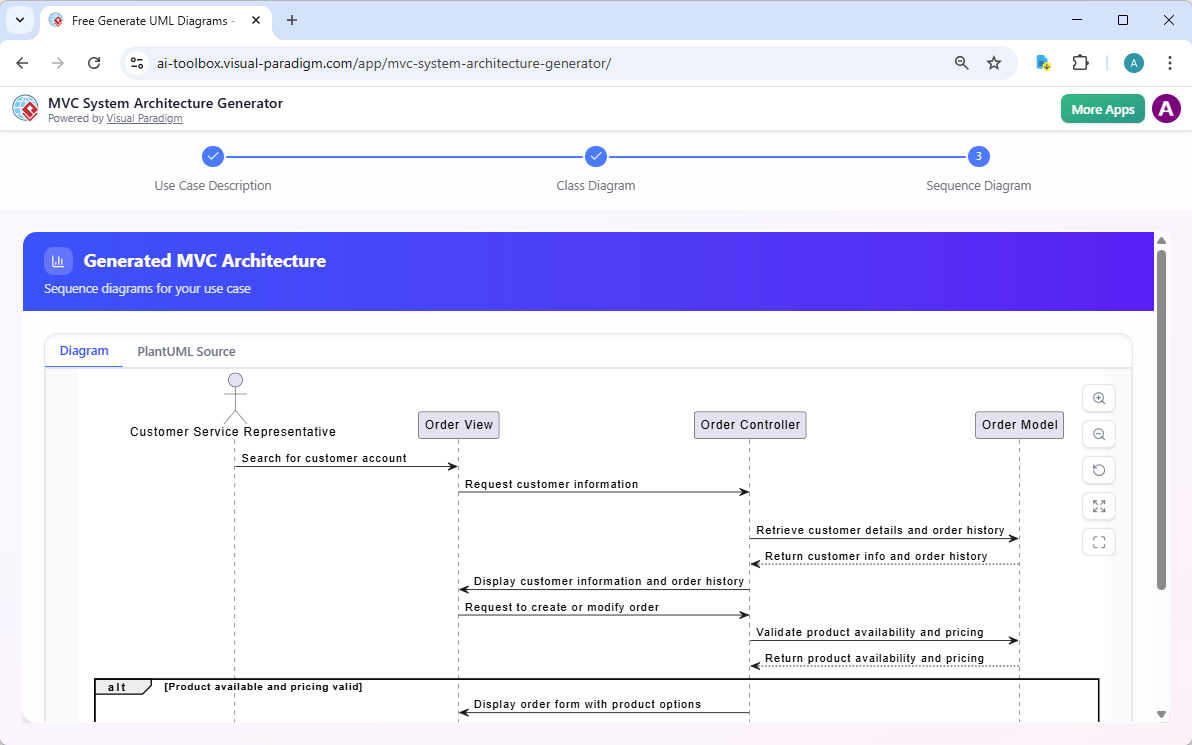
Generate high-level Model-View-Controller (MVC) architectures from natural language:
Example:
Generate an MVC architecture for an e-learning platform where students
can enroll in courses, watch video lectures, submit assignments, and
receive grades
The AI creates:
-
Controller classes for each use case
-
Model classes for domain entities
-
View components for user interfaces
-
Complete interaction flows
DBModeler AI
Automatically map class models to database schemas:
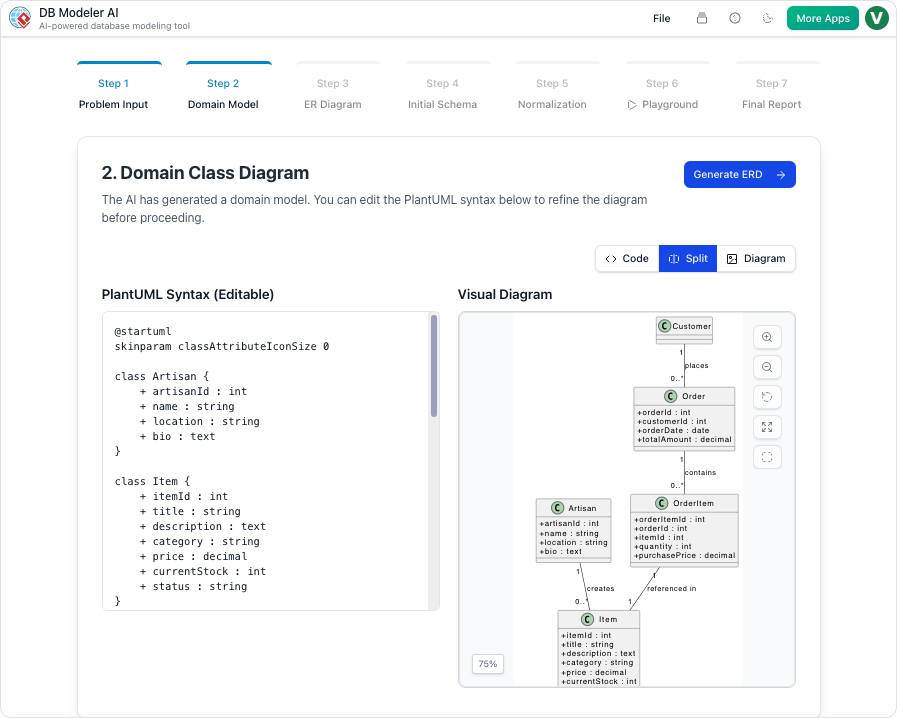
Features:
-
Forward engineering: Classes → Database schema
-
Reverse engineering: Database → Class diagram
-
Support for multiple database systems
-
Automatic relationship detection
-
Index and constraint generation
Use Case to Activity Diagram Converter
Transform textual requirements into visual workflows:
Process:
-
Define use case with actors and preconditions
-
Detail main, alternate, and exception flows
-
AI generates activity diagram automatically
-
Review and export with comprehensive report
Textual Analysis
Convert natural language documents into structured models:
Capabilities:
-
Extract classes from requirements documents
-
Identify actors and use cases
-
Detect relationships and dependencies
-
Generate initial diagram drafts
Conclusion
Visual Paradigm’s AI-powered UML modeling ecosystem represents a paradigm shift in software design and architecture. By combining the rigor of standardized UML notation with the accessibility of natural language processing, Visual Paradigm makes professional-grade modeling available to teams of all sizes and skill levels.
Key Takeaways
-
Accessibility: Describe your system in plain English and get professional diagrams instantly
-
Comprehensiveness: Support for all 14 UML diagram types plus specialized diagrams
-
Integration: Seamless workflow from requirements to code to documentation
-
Intelligence: AI-powered validation, suggestions, and architectural guidance
-
Collaboration: Real-time sharing and team-based refinement
-
Standards Compliance: Professional, OMG-compliant output suitable for enterprise use
The Future of Modeling
AI-powered modeling is not about replacing human expertise—it’s about amplifying it. By automating repetitive tasks and handling notation details, Visual Paradigm’s AI frees architects and developers to focus on what matters most: designing elegant, robust, and effective systems.
Whether you’re a student learning UML fundamentals, a developer prototyping a new feature, or an enterprise architect designing complex distributed systems, Visual Paradigm’s AI tools provide the capabilities you need to succeed.
Getting Started Today
-
Try the AI Chatbot: Visit https://chat.visual-paradigm.com for instant diagram generation
-
Download Visual Paradigm: Get the free Community Edition or professional desktop version
-
Explore Tutorials: Access comprehensive guides and documentation
-
Join the Community: Connect with other users and share best practices
-
Start Modeling: Transform your ideas into professional diagrams today
The future of software design is here—and it’s conversational, intelligent, and powered by AI.
References
- What is Unified Modeling Language (UML)?: Comprehensive guide covering UML fundamentals, history, diagram types, and the 4+1 views of software architecture.
- AI-Powered UML Class Diagram Creation in Visual Paradigm: Overview of Visual Paradigm’s AI ecosystem for automated class diagram generation, including chatbot and desktop integration.
- Comprehensive Review: Visual Paradigm’s AI Diagram Generation Features: Detailed review of AI-powered diagram generation capabilities, strengths, limitations, and practical applications across UML, BPMN, and ArchiMate.
- Generate UML Class Diagrams with AI: Step-by-step guide demonstrating AI class diagram generation from natural language descriptions with real-world examples.
- AI-Assisted UML Class Diagram Generator: Feature documentation for the guided 10-step wizard that combines AI assistance with educational tips for creating professional class diagrams.
- UML Class Diagram: The Definitive Guide to Modeling System Structure with AI: Comprehensive guide to generating and refining class diagrams through conversational AI, with practical examples and best practices.
- Comprehensive Guide to UML State Machine Diagrams with Visual Paradigm and AI: In-depth exploration of state machine diagram creation using AI, covering lifecycle modeling and state-based system design.
- AI Use Case Diagram Refinement Tool: Feature guide for AI-powered use case diagram enhancement, including actor identification and relationship suggestions.
- UML Practical Guide – All You Need to Know About UML Modeling: Complete reference covering all 14 UML diagram types with examples, notation guides, and modeling best practices.
- How to Visualize Your System Infrastructure with an AI Deployment Diagram Generator: Guide to generating deployment diagrams from natural language descriptions of system architecture and infrastructure.
- UML Sequence Diagram: A Definitive Guide to Modeling Interactions with AI: Comprehensive tutorial on creating sequence diagrams through AI, covering message flows, interaction fragments, and dynamic behavior modeling.
- Visual Paradigm Desktop AI Activity Diagram Generation: Release announcement and feature overview of AI-powered activity diagram generation in Visual Paradigm Desktop.
- Use Case to Activity Diagram: Tool documentation for automatically transforming textual use case descriptions into UML activity diagrams with AI assistance.
- AI Diagram Generator: Package Diagrams in Visual Paradigm: Feature release detailing AI capabilities for generating package diagrams to organize complex software architectures.
- AI-Enhanced Education: Transforming UML Learning: Research publication showcasing the transformative potential of AI-enhanced UML modeling in educational contexts and replicable teaching strategies.
- Visual Paradigm AI Chatbot: Web-based conversational AI interface for instant UML diagram generation, refinement, and collaborative modeling sessions.
Ready to transform your software design workflow? Start exploring Visual Paradigm’s AI-powered UML modeling tools today and experience the future of system architecture design.