
Introduction
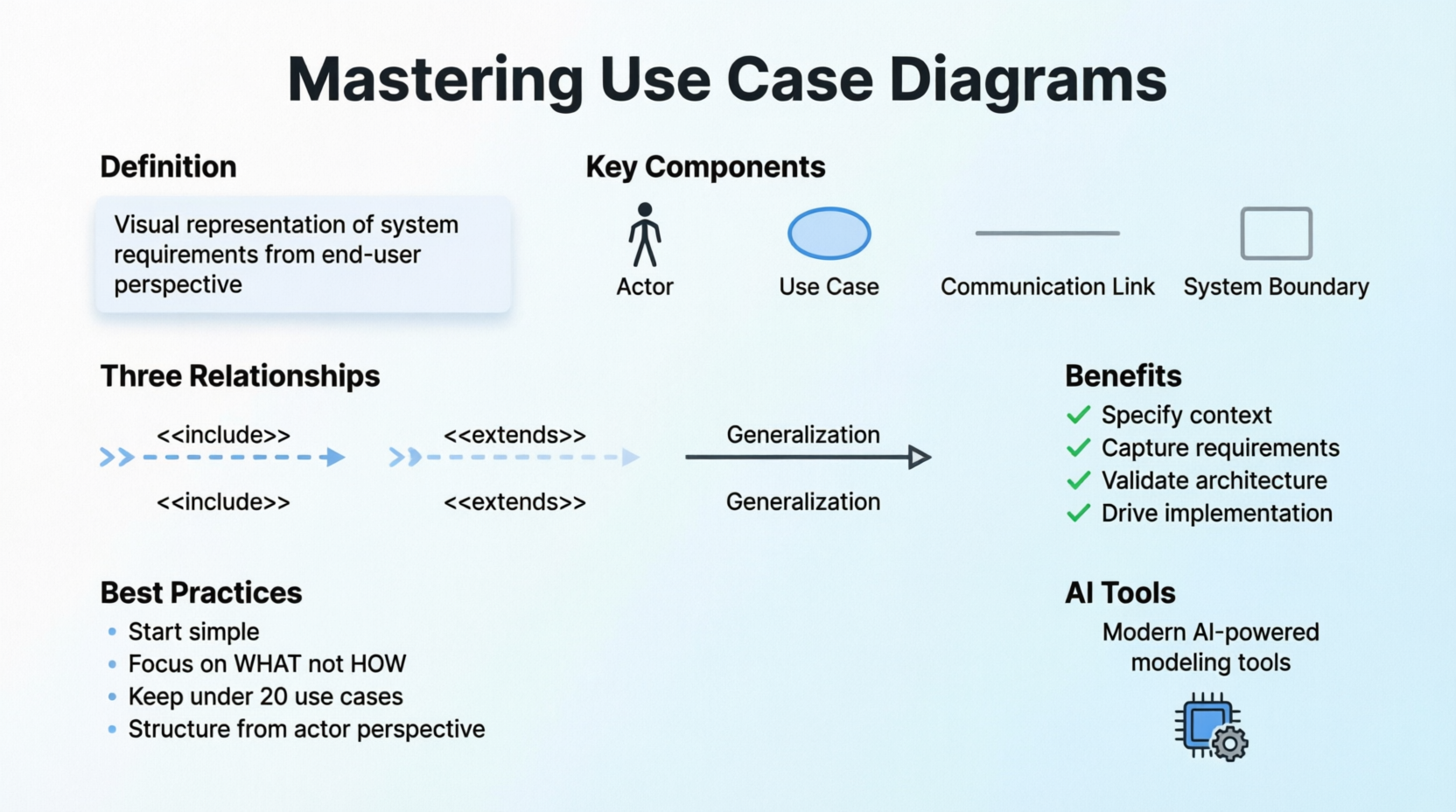
In the complex world of software development, bridging the gap between stakeholder needs and technical implementation remains one of the most challenging aspects of project success. Use case diagrams have emerged as a cornerstone technique for capturing functional requirements from the end-user perspective, yet many development teams either overlook their potential or struggle to apply them effectively. This comprehensive guide demystifies use case modeling, providing you with essential concepts, practical guidelines, and proven strategies to leverage this powerful UML technique. Whether you’re a business analyst, software architect, or developer, mastering use case diagrams will transform how you communicate system behavior, validate requirements, and drive successful software delivery. We’ll also explore how modern AI-powered tools are revolutionizing traditional use case modeling, making it faster, more accurate, and accessible than ever before.
What is a Use Case Diagram?
Frequently asked questions in the UML community include: What is a use case diagram? Why use case diagram? or simply, Why use cases? Some practitioners remain unfamiliar with use cases, while others underestimate their value in developing robust software products. Are use case diagrams underrated? The answer becomes clear as you explore this guide.
A UML use case diagram serves as the primary form of system/software requirements for new software development. Use cases specify the expected behavior (what), not the exact implementation method (how). Once specified, use cases can be represented both textually and visually through use case diagrams.
Key Concept
The fundamental principle of use case modeling is designing systems from the end user’s perspective. This technique effectively communicates system behavior in user terms by specifying all externally visible system functionality.
Characteristics of Use Case Diagrams
Use case diagrams maintain simplicity by design:
-
They summarize relationships between use cases, actors, and systems
-
They do not show the sequence of steps performed to achieve use case goals
-
They should remain simple with limited shapes—if your diagram contains more than 20 use cases, you’re likely misusing the technique

Important Notes:
-
Various UML diagrams serve different purposes (as shown in the hierarchy above). Detailed specifications belong in other UML diagram types and documents, linked from use cases
-
Use cases represent functional requirements only. Other requirements—business rules, quality of service requirements, and implementation constraints—must be documented separately using other UML diagrams
Historical Background: Origin of Use Cases
While use case modeling is now closely associated with UML, it predates UML’s existence:
-
1986 – Ivar Jacobson first formulated textual and visual modeling techniques for specifying use cases
-
1992 – His co-authored book Object-Oriented Software Engineering – A Use Case Driven Approach popularized the technique for capturing functional requirements, particularly in software development
Purpose and Benefits of Use Case Diagrams
Use case diagrams are typically developed during early development stages for the following purposes:
✓ Specify system context
✓ Capture system requirements
✓ Validate system architecture
✓ Drive implementation and generate test cases
✓ Facilitate collaboration between analysts and domain experts
Use Case Diagram Components: A Visual Guide
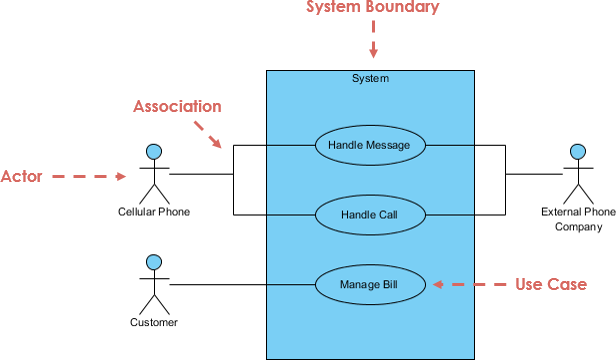
A standard use case diagram follows the Unified Modeling Language specification:
Core Notations Explained
| Notation | Description | Visual Representation |
|---|---|---|
| Actor | • Interacts with use cases (system functions) • Named using nouns • Represents a role in the business • Similar to “user” concept, but one user can play multiple roles • Example: A professor can be both instructor and researcher • Triggers use cases • Has responsibilities (inputs) and expectations (outputs) from the system |
 |
| Use Case | • Represents system functions (automated or manual processes) • Named using verb + noun (or noun phrase) • Format: “Do something” • Each actor must link to at least one use case • Some use cases may exist without actor connections |
 |
| Communication Link | • Shows actor participation in use cases • Represented by solid lines connecting actors to use cases • Indicates message communication between actors and use cases |
 |
| System Boundary | • Represents the entire system as defined in requirements • For complex systems, each module can form a boundary • Example: In an ERP system, modules like personnel, payroll, accounting each form boundaries • The complete system spans all modules showing overall boundary |
 |
Structuring Use Case Diagrams with Relationships
Use cases share different relationship types that model dependencies and enable reuse. Defining these relationships is a critical decision for software analysts. Proper use of relationships reduces overall system development effort.
Relationship Types
| Relationship Type | Description | Visual Representation |
|---|---|---|
| Extends | • Indicates that an extending use case (e.g., “Invalid Password”) may include behavior from a base use case (e.g., “Login Account”) under specified conditions • Depicted with a dotted directed arrow • Arrowhead points to the base use case • Child use case connects at the arrow base • Stereotype: <<extends>> |
 |
| Include | • Shows when a use case utilizes functionality from another use case • Also called “uses” relationship • Base use case includes behavior from the child use case as part of its business process • Supports reuse of common behavior • Depicted with a dotted directed arrow • Arrowhead points to the child use case • Parent use case connects at the arrow base • Stereotype: <<include>> |
 |
| Generalization | • Represents a parent-child relationship between use cases • Child use case enhances the parent use case • Child may add or override parent behavior • Shown as a directed arrow with triangle arrowhead • Child connects at arrow base • Arrow tip connects to parent use case |
 |
Practical Use Case Examples
Example 1: Association Link
This example demonstrates basic actor-use case relationships:

Example 2: Include Relationship
The include relationship adds functionality not specified in the base use case, supporting common behavior reuse:

Example 3: Extend Relationship
Extend relationships show optional functionality or system behavior:

Example 4: Generalization Relationship
Child use cases inherit parent behavior and meaning, with the ability to add or override functionality:

Example 5: Vehicle Sales System
This comprehensive example demonstrates that even large systems like vehicle sales require fewer than 10 use cases—showcasing the elegance of use case modeling:

Guidelines for Identifying Actors
Start requirements elicitation by identifying actors. Use these questions (Schneider and Winters, 1998):
Primary Questions:
-
Who uses the system?
-
Who installs the system?
-
Who starts up the system?
-
Who maintains the system?
-
Who shuts down the system?
Secondary Questions:
-
What other systems use this system?
-
Who receives information from this system?
-
Who provides information to the system?
-
Does anything happen automatically at predetermined times?
Guidelines for Identifying Use Cases
Once actors are identified, ask these questions to uncover use cases (Schneider and Winters, 1998):
Functional Questions:
-
What functions will the actor want from the system?
-
Does the system store information? Which actors will create, read, update, or delete this information?
-
Does the system need to notify actors about internal state changes?
-
Are there external events the system must know about? Which actor informs the system of these events?
Use Case Levels of Detail
Use case granularity refers to information organization within specifications and the level of detail. Achieving appropriate granularity improves stakeholder communication and project planning.
Alastair Cockburn’s Writing Effective Use Cases visualizes goal levels using a sea metaphor:

Key Insights:
-
Use case diagrams provide high-level blueprints, while detailed specifications drill into specifics
-
Write use cases at coarser granularity when less detail suffices
-
Match detail level to stakeholder needs and project phase
Best Practices: Tips and Tricks for Effective Use Case Modeling
✅ DO:
-
Structure from Actor Perspective – Always organize use case diagrams around actors
-
Start Simple – Begin with high-level views, then refine and detail progressively
-
Focus on “What” – Emphasize functionality, not implementation details
-
Limit Scope – Keep diagrams manageable (under 20 use cases)
-
Use Relationships Wisely – Apply include/extend for reuse and optional behavior
-
Name Properly – Use verb+noun for use cases, nouns for actors
-
Collaborate Early – Develop use cases with domain experts and stakeholders
❌ DON’T:
-
Overcomplicate – Avoid excessive detail in diagrams
-
Show Sequence – Use activity diagrams for workflow details
-
Mix Levels – Maintain consistent granularity within diagrams
-
Ignore Non-Functional Requirements – Document these separately
-
Create in Isolation – Always validate with stakeholders
Revolutionize Requirements Elicitation with AI
Modern AI tools are transforming use case modeling from a manual, time-consuming process into an automated, intelligent workflow. Visual Paradigm’s AI ecosystem streamlines requirements engineering—from initial brainstorming to sophisticated automated documentation.
Multi-Platform AI Support
🖥️ VP Desktop
Generate Use Case Diagrams via AI and link them to detailed design artifacts using professional modeling tools.
💬 AI Chatbot
Draft, refine, and perfect use case models through conversational AI at AI Chat interface.
📄 OpenDocs
Create and embed live Use Case Diagram pages directly into project documentation.
Specialized Use Case AI Applications
🛠️ Use Case Modeling Studio
End-to-end AI workspace from scope definition to complete Software Design Documents.
📝 Description Generator
Instantly transform problem domains into specifications and PlantUML diagrams.
⚡ Refinement Tool
Automatically apply UML best practices and <<include>>/<<extend>> relationships.
🔄 Use Case to Activity
Bridge textual elaboration to visual behavioral modeling with AI.
📋 Report Generator
Convert visual diagrams into structured, detailed Markdown documentation.
Explore the next generation of Use Case modeling:
AI Use Case Guide | Full AI Ecosystem
AI-Powered Use Case Modeling: Feature Overview
Visual Paradigm’s AI Ecosystem automates the transition from natural language descriptions to structured system models and documentation, centered around the Use Case Modeling Studio.
Core Components
Use Case Modeling Studio
Web-based application transforming plain language system descriptions into complete models and documentation.
AI Chatbot
Cloud-based assistant integrated into Visual Paradigm Desktop that generates diagrams through conversation.
UCDD Assistant
The Use Case Driven Development Assistant guides users through the entire lifecycle from problem statement to implementation.
Specialized AI Apps
Library of tools including Textual Analysis Tool for domain class identification and ERD Tool for database design.
Key Feature Categories
🎨 Automated Modeling & Diagramming
Text-to-Diagram
Instantly generates Use Case, Activity, Sequence, Class, and ER diagrams from simple goal statements or prompts.
Diagram Refinement
Analyzes existing diagrams to suggest and apply UML relationships like <<include>> and <<extend>>.
Activity Diagram Generator
Maps detailed use case narratives into visual flowcharts.
🔍 Advanced Requirements Analysis
AI Use Case Description
Automatically generates structured descriptions including preconditions, postconditions, and standard/alternative/exception flows.
Scenario Analyzer
Converts text-based use cases into structured decision tables and matrices.
Textual Analysis
Identifies candidate domain classes, attributes, and operations from problem statements.
📚 Documentation & Testing
AI-Powered Test Case Creation
Produces detailed test scenarios, steps, and expected results directly from use case specifications.
Automated SDD Reporting
Assembles scope, models, and test cases into professional Software Design Documents (PDF or Markdown) with one click.
Gherkin Scenario Generation
Converts flows into Gherkin format for automated QA and acceptance testing.
🔄 Integration & Workflow
Desktop & Web Sync
Features created in the VP Online workspace import into Visual Paradigm Desktop for advanced modeling.
Interactive Dashboard
Provides real-time project health overview, including description completeness and diagram coverage.
Get Started with Use Case Diagrams Today
You now understand what use case diagrams are and how to create them effectively. It’s time to apply this knowledge to your own projects.
Download Visual Paradigm Community Edition – a free, easy-to-use UML software with an intuitive Use Case Diagram tool.
For advanced AI-powered modeling capabilities, explore the comprehensive AI ecosystem to accelerate your requirements engineering process.
Conclusion
Use case diagrams remain an indispensable tool in modern software development, offering a clear, user-centric approach to capturing functional requirements. By focusing on what the system should do rather than how it should do it, use cases bridge the communication gap between technical teams and stakeholders. The key to success lies in maintaining simplicity, starting with high-level views, and progressively refining details as needed.
The evolution of use case modeling through AI-powered tools has made this technique more accessible and efficient than ever before. Whether you choose traditional manual modeling or leverage intelligent automation, the fundamental principles remain constant: understand your actors, identify their goals, and model the interactions that deliver value.
As you implement use case diagrams in your projects, remember that they are living artifacts that should evolve with your system. Regular validation with stakeholders, appropriate granularity, and integration with other UML diagrams will ensure your use cases drive successful software delivery. The investment in mastering use case modeling pays dividends throughout the development lifecycle—from clearer requirements to better testing to more satisfied end users.
- References
- Unified Modeling Language (UML): Comprehensive overview of UML as a standardized modeling language for software development.
- Object-Oriented Software Engineering – A Use Case Driven Approach: Ivar Jacobson’s seminal book that popularized use case-driven software development methodology.
- Ivar Jacobson: Biography of the software engineer who pioneered use case modeling techniques in 1986.
- Visual Paradigm AI Chatbot: Conversational AI interface for drafting and refining use case models through natural language interaction.
- OpenDocs: Tool for creating and embedding live Use Case Diagram pages directly into project documentation.
- Use Case Modeling Studio: End-to-end AI workspace transforming plain language descriptions into complete use case models and Software Design Documents.
- Use Case Description Generator: AI tool that instantly transforms problem domains into structured specifications and PlantUML diagrams.
- Use Case Diagram Refinement Tool: Automated application of UML best practices and <>/<> relationships to existing diagrams.
- Use Case to Activity Diagram Generator: AI-powered tool bridging textual use case elaboration to visual behavioral modeling.
- Use Case Diagram Report Generator: Converts visual use case diagrams into structured, detailed Markdown documentation.
- AI Use Case Diagram Generator Guide: Comprehensive guide to using AI for automated use case diagram generation.
- Visual Paradigm AI Ecosystem: Overview of the complete AI-powered diagram generation ecosystem.
- Visual Paradigm Community Edition: Free UML software supporting all UML diagram types with intuitive, easy-to-use interface.
- Overview of 14 UML Diagram Types: Complete guide to all UML diagram types and their specific purposes.
- AI Chatbot Features: Cloud-based AI assistant integrated into Visual Paradigm Desktop for conversational diagram generation.
- Use Case Driven Development Assistant: UCDD Assistant guiding users through the complete development lifecycle from problem statement to implementation.
- AI Textual Analysis: Tool for identifying domain classes, attributes, and operations from problem statements.
- ERD Tool: Database design tool for creating Entity Relationship Diagrams.
- VP Online Workspace: Web-based AI workspace with synchronization capabilities to Visual Paradigm Desktop.
- AI-Powered Use Case Modeling Studio Release: Release notes and features of the AI-powered Use Case Modeling Studio.
- AI Use Case Diagram Refinement Tool: Automated tool for applying UML relationships and best practices to use case diagrams.
- Use Case to Activity Diagram: Feature for converting use case specifications into activity diagrams.
- AI Use Case Scenario Analyzer: Tool for converting text-based use cases into structured decision tables and matrices.
- AI Use Case Description Generator: Automated generation of structured use case descriptions including preconditions, postconditions, and flow scenarios.
- Comprehensive Guide to Use Case Modeling with Visual Paradigm’s AI Ecosystem: Detailed guide on leveraging Visual Paradigm’s AI tools for use case modeling.
- Comprehensive Guide to Use Case Modeling with Visual Paradigm’s AI Ecosystem – Part 2: Continuation of the comprehensive guide covering advanced AI-powered use case modeling techniques.
- Visual Paradigm AI Use Case Tutorial: Video tutorial demonstrating AI-powered use case diagram generation and modeling techniques.
- Advanced Use Case Modeling with AI: Video guide covering advanced features of AI-assisted use case modeling and requirements engineering.
Related posts:
 Exploring Visual Paradigm AI Desktop Support: A Detailed Overview
Exploring the Visual Paradigm AI Chatbot: A Key Pillar in the VP AI Ecosystem
Exploring Visual Paradigm AI Desktop Support: A Detailed Overview
Exploring the Visual Paradigm AI Chatbot: A Key Pillar in the VP AI Ecosystem
 Visual Paradigm AI OpenDocs Support: A Core Pillar of the VP AI Ecosystem
Visual Paradigm’s AI Ecosystem: A Deep Dive into 50+ AI Web Apps and Their Purposes
Visual Paradigm AI OpenDocs Support: A Core Pillar of the VP AI Ecosystem
Visual Paradigm’s AI Ecosystem: A Deep Dive into 50+ AI Web Apps and Their Purposes