
In the rapidly evolving world of visual modeling and diagramming, Visual Paradigm stands out with its comprehensive AI-powered ecosystem. This suite of tools is designed to streamline the creation, refinement, and integration of diagrams across various platforms, catering to professionals in software development, enterprise architecture, business strategy, and more. At the heart of this ecosystem is the AI Visual Modeling Chatbot, a conversational AI assistant that transforms complex diagramming tasks into intuitive, natural language interactions. Drawing from the insights in Visual Paradigm’s guide on the best AI diagram generators, this article delves into the details of the AI chatbot’s support features, its integration within the broader VP AI ecosystem, and how it empowers users to achieve professional-grade results efficiently.
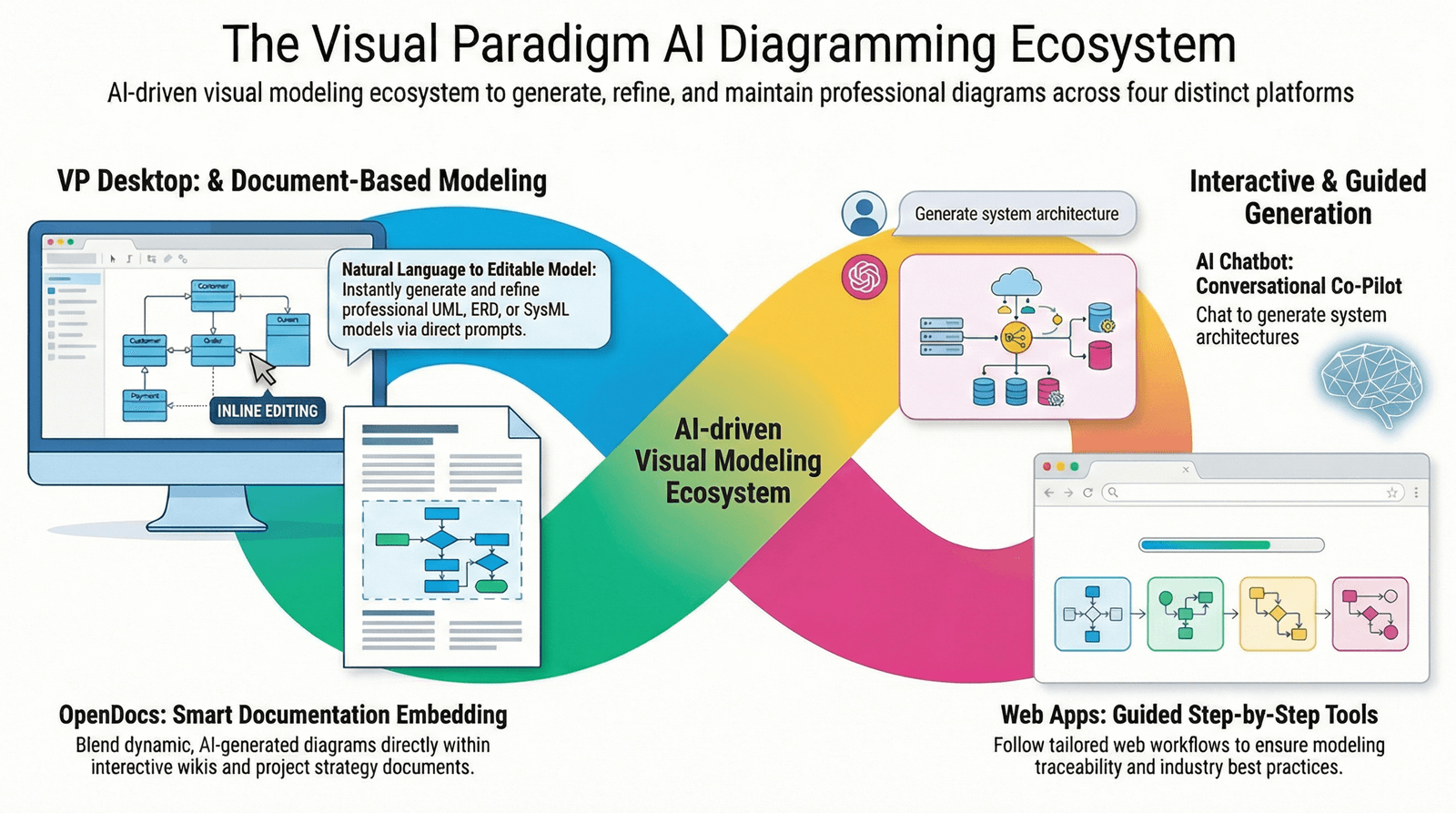
Overview of the Visual Paradigm AI Ecosystem
Before diving into the chatbot specifics, it’s essential to understand the ecosystem it inhabits. Visual Paradigm’s AI ecosystem comprises four interconnected platforms: VP Desktop (Visual Model), OpenDocs, the AI Visual Modeling Chatbot, and Web Apps Step-by-Step / Guided Tools. These components work in harmony to support a wide array of diagram types, including UML, SysML, C4 models, IT diagrams, enterprise architecture frameworks like ArchiMate, cloud architectures (e.g., AWS and Azure), strategic analyses (SWOT, PEST, Porter’s Five Forces), growth strategies (Ansoff Matrix, BCG Matrix), prioritization tools (Eisenhower Matrix, RACI), general diagrams (mind maps, organization charts, PERT charts), and data visualizations via AI-Powered BI Analytics.
The ecosystem emphasizes real traceability, refinement, and integration, ensuring that diagrams are not isolated artifacts but interconnected elements that can be refined collaboratively. This setup allows for seamless workflows, from offline deep modeling in VP Desktop to dynamic embeds in OpenDocs, structured guidance in web apps, and interactive prototyping via the chatbot. The result is a versatile environment that accelerates design processes while maintaining accuracy and professionalism.
The AI Visual Modeling Chatbot: Core Features and Capabilities
The AI Visual Modeling Chatbot serves as a conversational co-pilot, making diagramming accessible to both novices and experts. Accessible standalone at https://chat.visual-paradigm.com/ or integrated with other ecosystem tools, it leverages natural language processing to generate and refine diagrams instantly. Users can describe their needs in plain English—such as “create a sequence diagram for a user login process”—and the chatbot responds with a fully formed diagram, complete with explanations and suggestions for iterations.
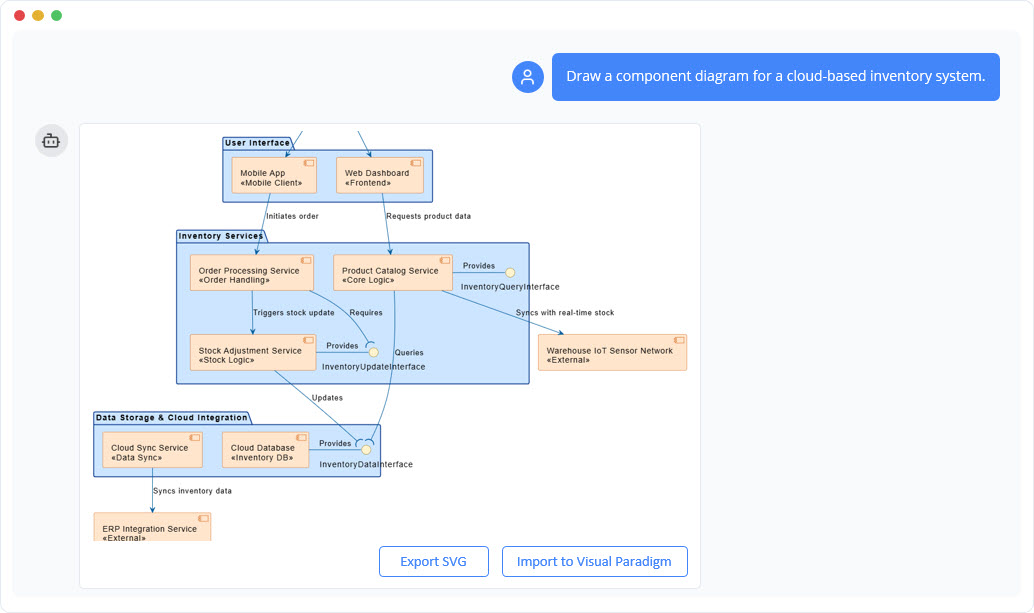
Key capabilities include:
- Instant Diagram Generation: The chatbot supports an extensive range of diagram types, marked with full AI assistance in the ecosystem’s support matrices. This encompasses UML diagrams (use case, class, sequence, activity, state machine, deployment, component, object, package, composite structure), SysML diagrams (requirement, internal block, block definition), C4 models (system context, container, component, system landscape, dynamic, deployment), IT diagrams (entity relationship, data flow), enterprise architecture elements (ArchiMate, decision tables), cloud architectures, strategic analyses, growth strategies, prioritization frameworks, general diagrams, and data visualizations. It overcomes the “blank canvas” syndrome by providing rapid prototypes based on textual descriptions.
- Refinement and Iteration: Beyond initial creation, the chatbot excels in refining diagrams through follow-up interactions. Tools like the AI Sequence Diagram Refinement Tool allow users to tweak elements, add details, or analyze flows. It also incorporates AI-Powered Textual Analysis to derive diagrams from descriptive text, ensuring iterative design that aligns with user intent.
- Explanations and Analyses: Acting as an intelligent assistant, the chatbot provides in-depth explanations of generated models, helping users understand underlying concepts. This is particularly useful for educational purposes or bridging skill gaps in teams.
- Export and Integration Options: Diagrams created in the chatbot can be exported to other formats or seamlessly integrated into VP Desktop for advanced editing, OpenDocs for embedding in documents, or guided web apps for structured workflows. This ensures that chatbot outputs are production-ready and traceable across the ecosystem.
Integration Within the VP AI Ecosystem
The chatbot doesn’t operate in isolation; it’s deeply woven into the fabric of the Visual Paradigm ecosystem. For instance:
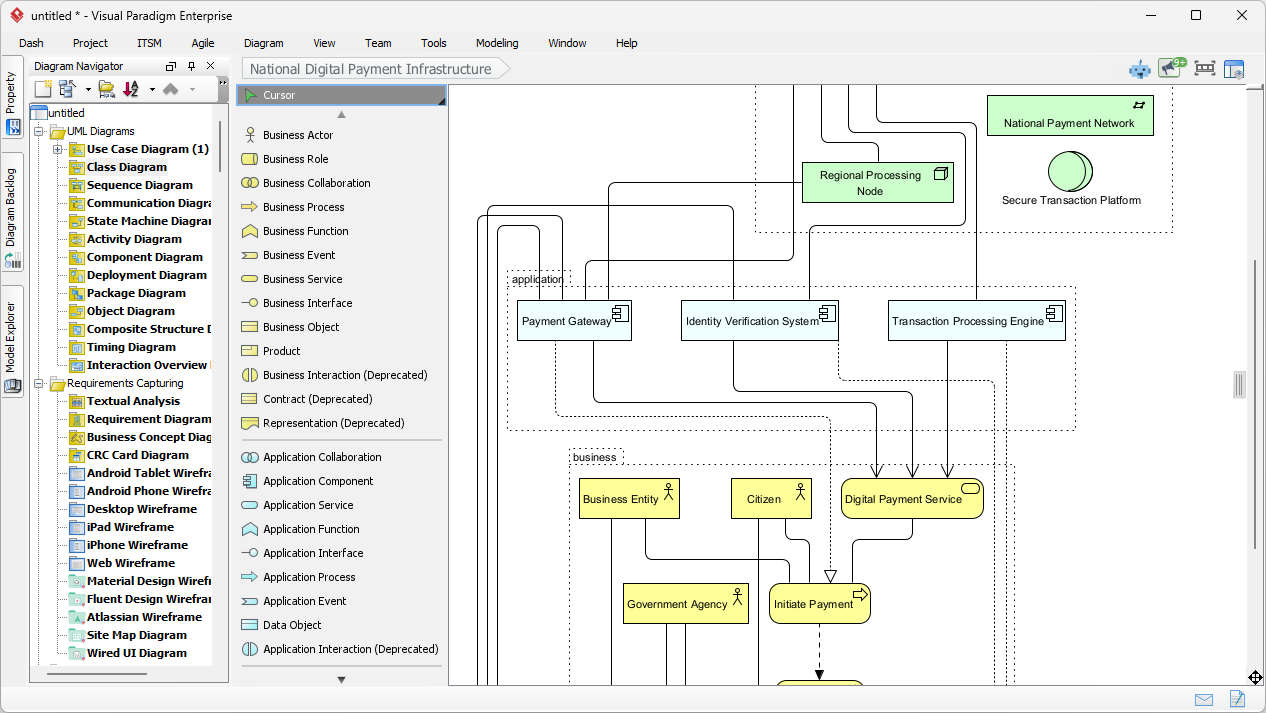
- With VP Desktop: Users can import chatbot-generated models into this flagship application for offline, precision-based editing, version control, and code generation. This is ideal for complex projects requiring robust tools.
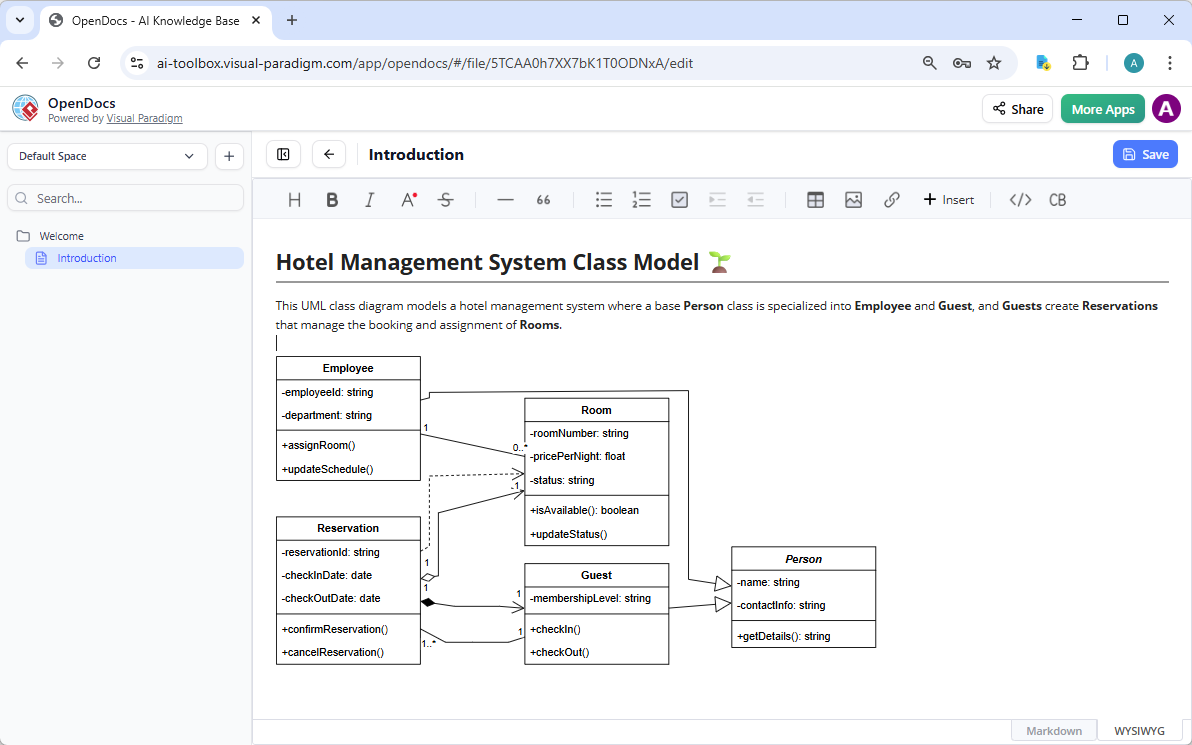
- With OpenDocs: Diagrams from the chatbot can be dynamically embedded into knowledge bases or reports, enabling real-time updates and collaborative refinement. This integration is perfect for team-aligned documentation where visuals enhance textual content.
- With Web Apps Step-by-Step / Guided Tools: The chatbot complements structured tools like AI-Powered Use Case Modeling Studio or AI MVC System Architecture Generator by providing initial prototypes that can then be refined in guided environments. These web apps enforce best practices, preventing errors and promoting consistency.
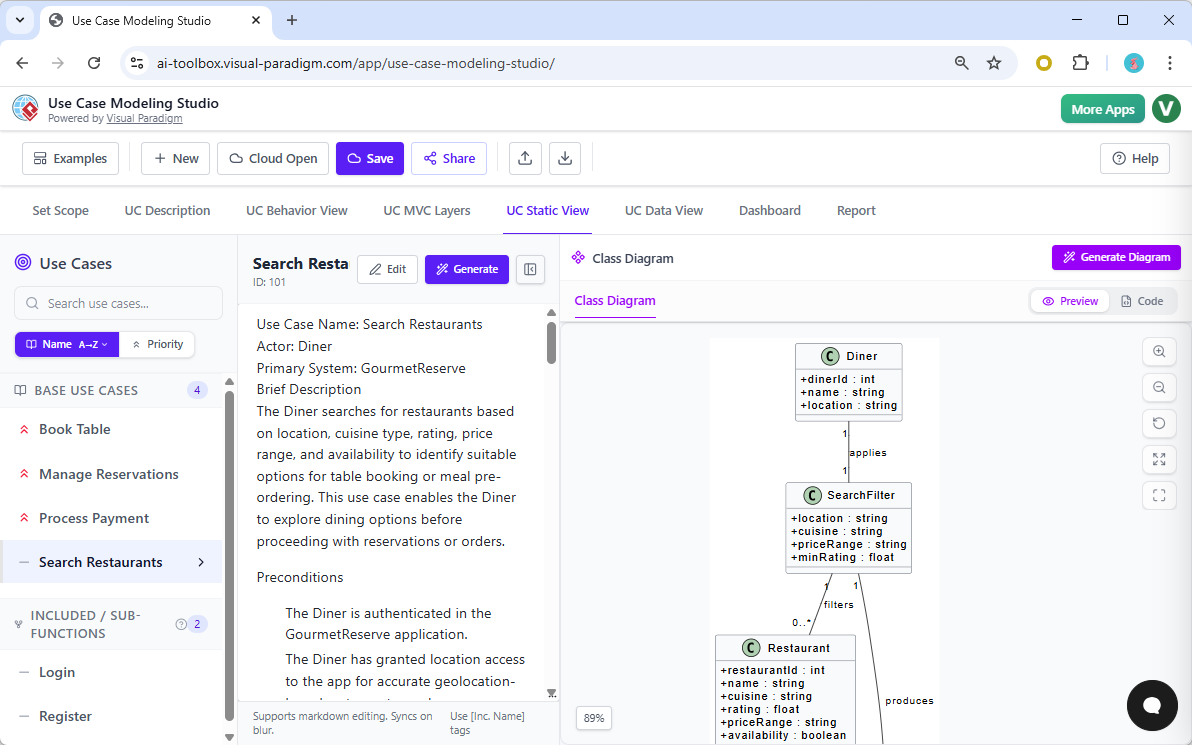
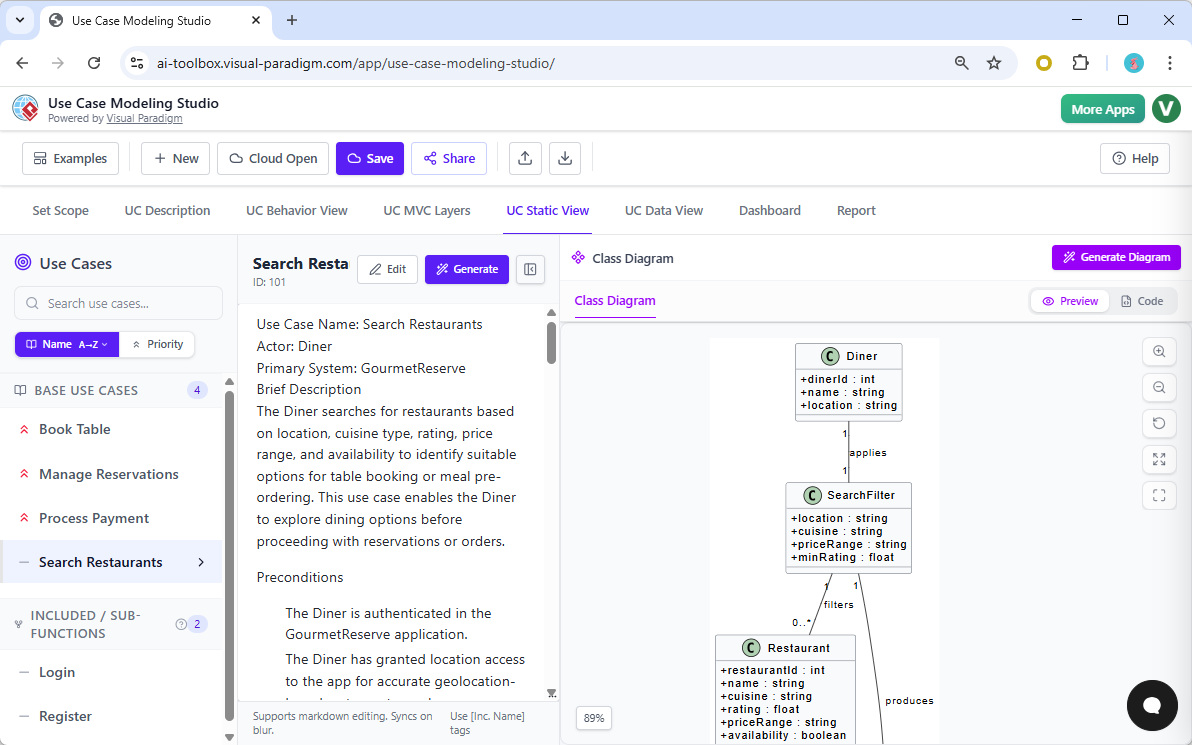
This interconnectedness fosters agile workflows, where users can start with conversational brainstorming in the chatbot, move to guided refinement in web apps, embed results in OpenDocs, and finalize in VP Desktop. The ecosystem’s focus on traceability means changes in one platform propagate appropriately, reducing silos and enhancing productivity.
Benefits of AI Chatbot Support
Incorporating the AI chatbot into diagramming processes offers numerous advantages:
- Speed and Efficiency: Instant generation accelerates workflows, making it suitable for fast-paced environments like agile development teams.
- Accessibility: By handling natural language inputs, it lowers the barrier for non-experts, allowing quick prototyping without deep software knowledge.
- Accuracy and Professionalism: Built-in traceability and refinement tools ensure outputs are error-free and interconnected, leading to high-quality, enterprise-level models.
- Collaboration and Scalability: Integration across platforms supports team collaboration, with offline capabilities in VP Desktop adding flexibility for large-scale projects.
Overall, the chatbot bridges the gap between idea and execution, turning exploratory work into polished deliverables.
Real-World Examples
To illustrate its practical value, consider these scenarios:
- Software Development: A developer describes a user authentication flow to the chatbot, generating a UML sequence diagram. They refine it via chat, then export to VP Desktop for code engineering.
- Business Strategy: A strategist prompts for a SWOT analysis diagram, embeds it in an OpenDocs report, and uses guided tools to align it with a Porter’s Five Forces model.
- Architecture Design: An architect generates a C4 container diagram through conversation, iterates on components, and integrates it into a cloud architecture workflow in web apps.
These examples highlight how the chatbot facilitates end-to-end diagramming, from ideation to implementation.
Conclusion
The Visual Paradigm AI Visual Modeling Chatbot is more than just a tool—it’s a transformative element within the VP AI ecosystem that democratizes advanced diagramming. By combining conversational AI with robust integration, it enables users to create, refine, and collaborate on diagrams with unprecedented ease and precision. Whether you’re tackling UML models, strategic frameworks, or data visualizations, the chatbot’s support features ensure efficient, traceable, and professional outcomes. For those looking to elevate their visual modeling game, exploring this ecosystem is a step toward smarter, AI-driven design.
-
AI Chatbot Feature – Intelligent Assistance for Visual Paradigm Users: This resource introduces chatbot functionality designed to provide instant guidance, automate repetitive tasks, and enhance productivity within the modeling platform.
-
Visual Paradigm Chat – AI-Powered Interactive Design Assistant: An interactive interface that enables users to generate diagrams, write code, and solve complex design challenges in real time through conversational AI.
-
AI Chatbot for Diagramming: How It Works with Visual Paradigm: This article explains how the chatbot acts as an AI-powered modeling assistant, turning natural language into diagrams without requiring the user to learn specific syntax.
-
Case Study: Enhancing System Modeling Efficiency with Visual Paradigm’s AI-Powered Chatbot: A real-world demonstration of how the assistant improves modeling accuracy and speed by facilitating conversational diagram creation.
-
Visual Paradigm AI Chatbot: The World’s First Purpose-Built AI Assistant for Visual Modeling: Highlights a groundbreaking AI assistant engineered specifically to understand and support complex visual modeling standards.
-
Mastering Sequence Diagrams with Visual Paradigm: AI Chatbot Tutorial: A beginner-friendly tutorial using an e-commerce chatbot case study to show how to build professional sequence diagrams via conversational prompts.
-
How to Turn Requirements into Diagrams with an AI Chatbot: This guide explores how to evolve raw project requirements into full system designs using a continuous conversational interface.
-
How AI Chatbot Can Help You Learn UML Faster: An article detailing how the chatbot provides an interactive environment to practice UML, offering instant visualization and feedback for learners.
-
The Future of Collaborative Modeling: AI as Your Team’s Co-Designer: This resource examines the role of the AI chatbot as a co-designer that helps teams create standards-compliant diagrams through natural language interaction.
-
How to Use Visual Paradigm AI Chatbot’s Multi-Language Features: A tutorial on leveraging enhanced multi-language support to generate, refine, and analyze diagrams in native languages such as Spanish, French, and Chinese.
Related posts:
 Exploring Visual Paradigm AI Desktop Support: A Detailed Overview
 Visual Paradigm AI OpenDocs Support: A Core Pillar of the VP AI Ecosystem
Visual Paradigm’s AI Ecosystem: A Deep Dive into 50+ AI Web Apps and Their Purposes
Visual Paradigm AI OpenDocs Support: A Core Pillar of the VP AI Ecosystem
Visual Paradigm’s AI Ecosystem: A Deep Dive into 50+ AI Web Apps and Their Purposes
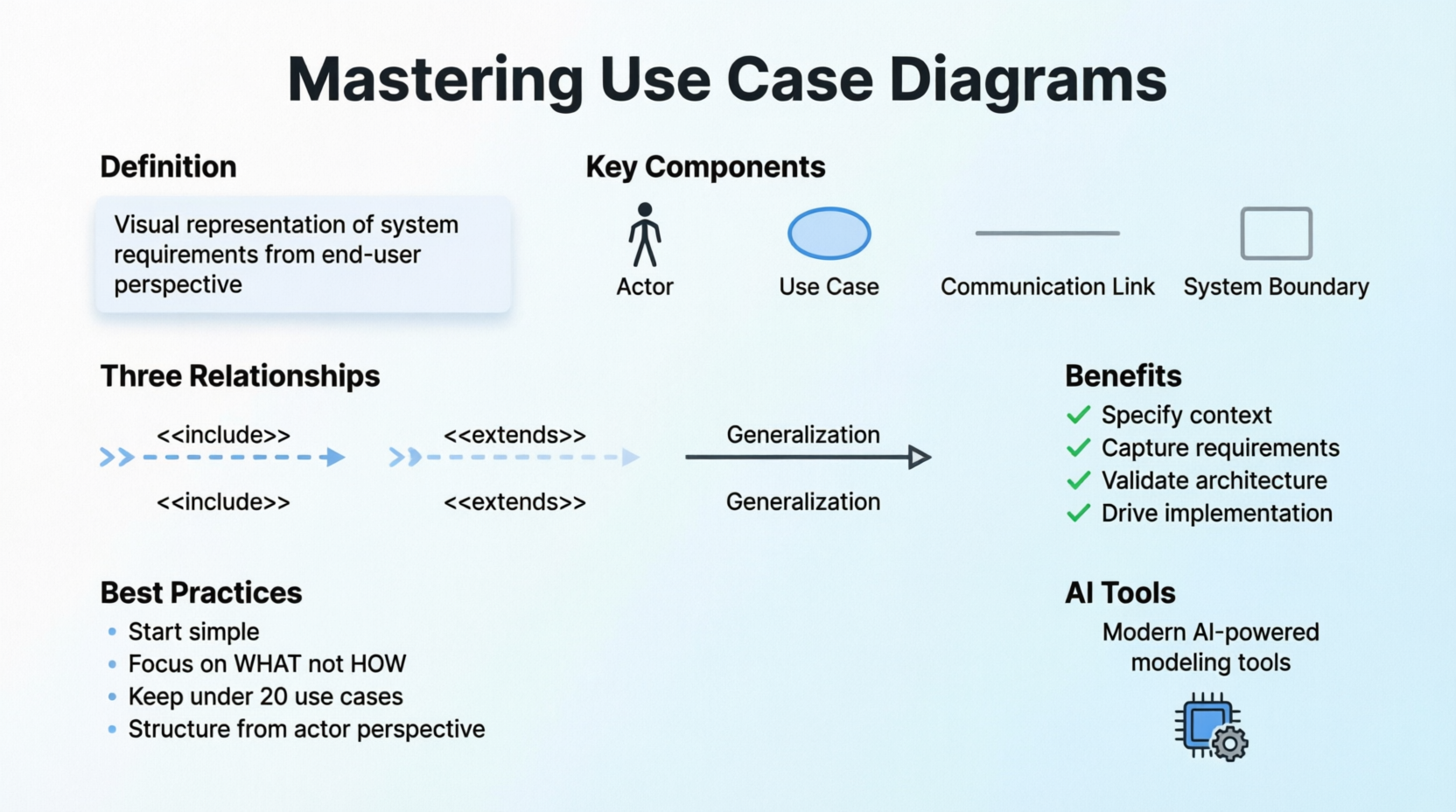 Mastering Use Case Diagrams: A Complete Guide to Requirements Modeling with Modern AI Tools