Imagine transforming a simple topic like “A journey through the milestones of space exploration, from early rockets to future Mars missions” into a dynamic, animated presentation in minutes. That’s the power of Visual Paradigm’s AI Markdown Presentation Maker, an innovative web application that turns plain text into professional visual stories. This tool leverages AI to generate your entire presentation from a single topic, using a simple Markdown workflow that keeps you focused on your message. The result? A captivating, animated slideshow that you can share instantly with a unique URL or export as a self-contained HTML file. Whether you’re a technical writer, an educator, or a product manager, this AI-powered tool streamlines the entire process of creating engaging presentations.
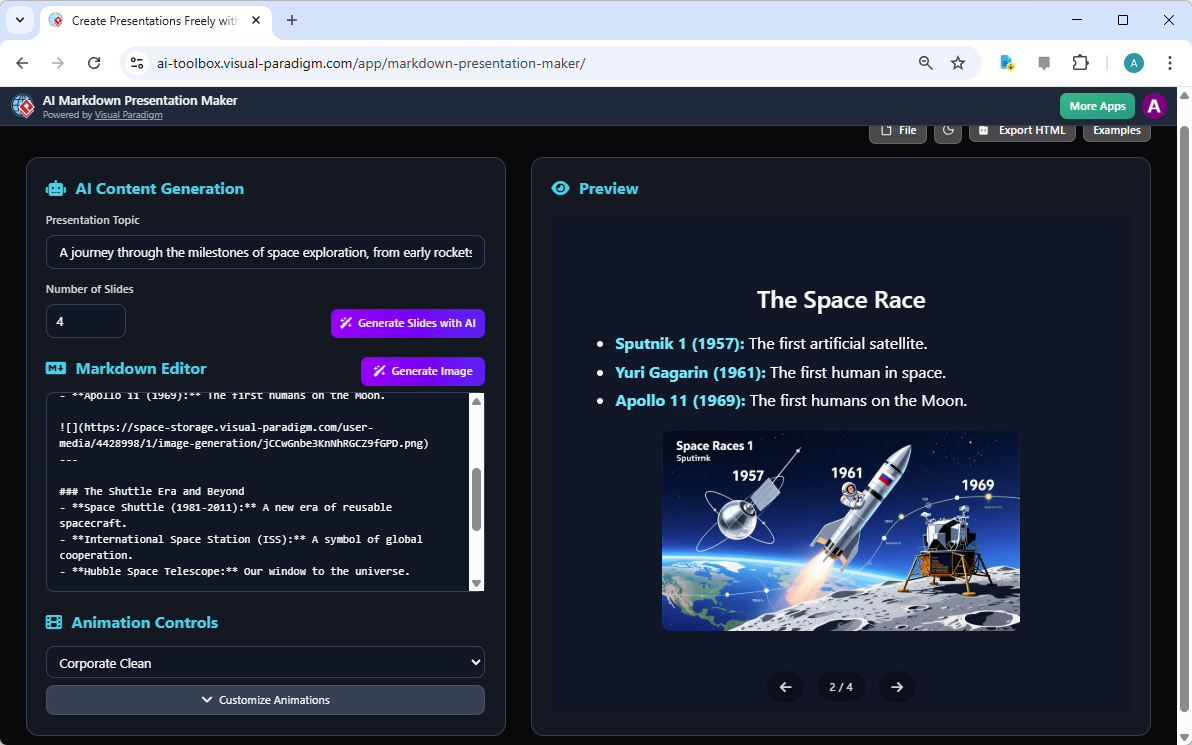
At the heart of this experience is a dual-view interface that makes creation effortless. On the left, the Markdown Editor allows you to write and edit your content using a distraction-free text-based format. On the right, the Preview Panel shows a live, rendered version of your presentation, complete with animations and transitions. This real-time feedback loop ensures you see exactly how your content will look and feel, allowing for quick refinements. The AI doesn’t just generate text; it creates a complete narrative structure, saving you hours of setup time.
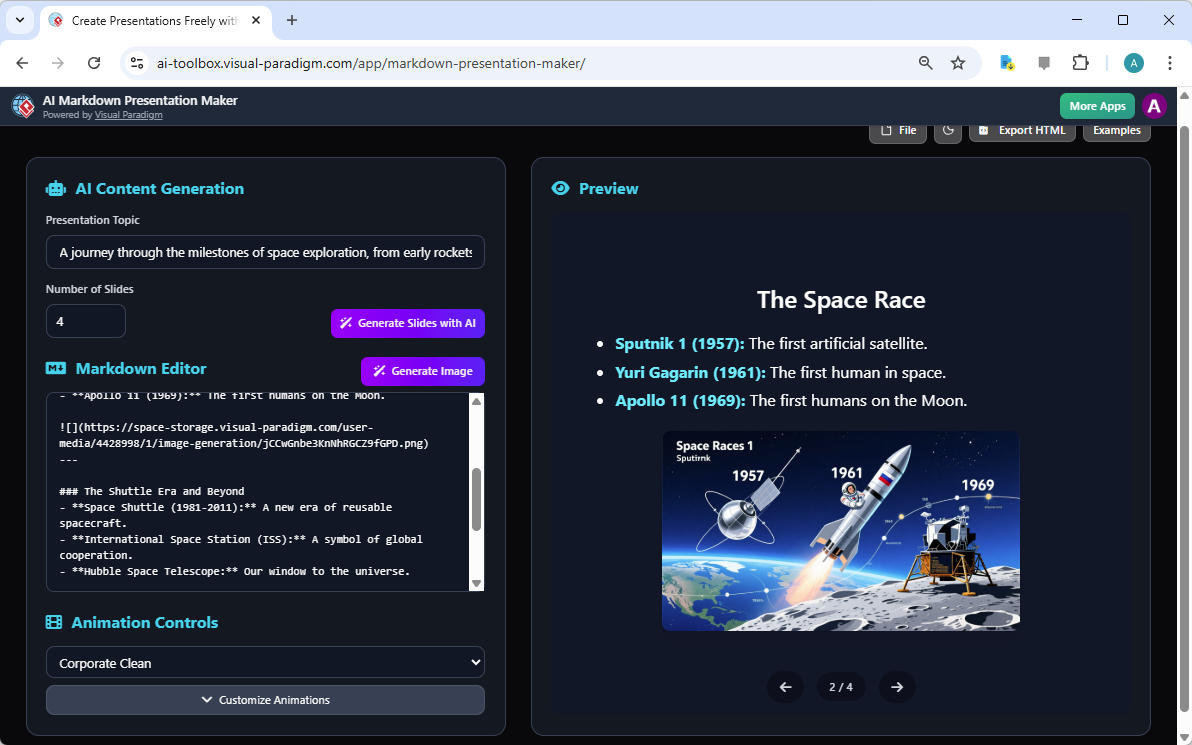
The AI Markdown Presentation Maker is designed for efficiency and professionalism. Its core feature, AI-Powered Full Presentation Generation, allows you to input a topic and the number of slides you want, and the AI will draft the entire presentation. In the example shown, the topic “A journey through the milestones of space exploration…” was used to generate a four-slide presentation. The AI created structured Markdown with clear headings for each slide, such as “The Space Race” and “The Shuttle Era and Beyond,” along with bullet points summarizing key events. This initial draft serves as a powerful foundation, letting you focus on refining the content rather than starting from scratch.
How the AI Markdown Presentation Maker Works
Using the AI Markdown Presentation Maker is a straightforward process, designed to be intuitive for anyone familiar with writing. The first step is to define your presentation’s core idea. In the Editor Panel, you simply type your topic into the designated field. For the space exploration example, the topic was entered, and the user set the number of slides to four. Then, by clicking the “Generate Slides with AI” button, the application instantly populated the Markdown Editor with a complete draft. This AI-generated content is not just a list of points; it’s a structured narrative with a logical flow, making it a strong starting point for any presentation.
Refining Your Content and Design
After the AI generates the initial content, the real work of crafting a compelling presentation begins. The Markdown Editor is where you can refine the text. You can edit the slide titles, rephrase bullet points, or add your own insights to ensure the message is clear and impactful. The tool’s strength lies in its flexibility; you can write in plain Markdown, which is a lightweight and easy-to-learn syntax. This is ideal for technical users who prefer the speed and simplicity of text over complex GUI tools.
Once your content is refined, you can enhance its visual appeal. The Animation Controls section allows you to select from various predefined animation profiles. In the example, the “Corporate Clean” profile was chosen, which applies a professional and modern style with smooth transitions. This single action changes the entire look and feel of your presentation, giving it a polished, professional finish without requiring any manual configuration. The Preview Panel updates in real-time, so you can see the effect of your choices immediately.
Sharing and Exporting Your Vision
One of the most powerful aspects of the AI Markdown Presentation Maker is its seamless workflow for sharing and distributing your work. After saving your project to the cloud, you can generate a unique URL. This link provides a read-only, interactive viewer mode, perfect for presenting to clients, colleagues, or stakeholders. They can view your presentation in a clean, distraction-free environment, ensuring your message is delivered clearly. This eliminates the need for complex file formats or software compatibility issues.
For offline use or broader distribution, the tool offers a robust export option. By clicking “Export HTML,” you create a self-contained web file. This HTML file is not just a static page; it embeds all your presentation data, including the original Markdown, topic, and animation profile. This means you can open it in any modern web browser and, if needed, re-import it back into the AI Markdown Presentation Maker to continue editing. This ensures your work is always accessible and secure.
Key Benefits of the AI Markdown Presentation Maker
Here are the primary benefits of using the AI Markdown Presentation Maker:
- Accelerate Presentation Creation: Generate a full presentation draft with AI in minutes, drastically reducing initial setup time.
- Maintain Focus with Markdown: Write your content in a distraction-free environment, allowing you to concentrate on your message.
- Professional, Animated Presentations: Easily add engaging animations and transitions to make your content more impactful and memorable.
- Versatile Export & Sharing: Share your work via a unique URL or export as a self-contained HTML file for easy access.
- No Complex Software: Create and animate presentations directly in your web browser, without needing to install specialized software.
The AI Markdown Presentation Maker is more than just a tool; it’s a paradigm shift in how we create presentations. It empowers users to turn ideas into compelling visual stories with unprecedented speed and ease. By combining the simplicity of Markdown with the power of AI, it democratizes the process of creating professional, animated content. Whether you’re presenting a product pitch, a technical documentation, or a dynamic lesson, this tool provides the perfect blend of efficiency and creativity.
Ready to transform your ideas into captivating presentations? Try the AI Markdown Presentation Maker today and see how it can revolutionize your workflow.
Related Links
- AI Markdown Presentation Maker – Visual Paradigm AI: November 28, 2025 – Markdown Presentation Maker leverages powerful AI to instantly turn your ideas into polished, animated presentations.
- Markdown Editor – Visual Paradigm AI: November 11, 2025 – Get instant visual feedback as you type. Our real-time rendering engine eliminates the guesswork, showing you the final, perfectly formatted HTML output alongside your Markdown source.
- Real-Time Markdown Editor with Live Preview: A powerful, real-time Markdown editor with a side-by-side preview. Write, format, and see your changes instantly.